Comparison Summary
Comparison SummaryStreak CRM is built into Gmail and is super convenient, but when we tried it we found it frustrating over time—it slows down Gmail, data can get unstructured and messy, which results in bad CRM habits. It's more like a glorified spreadsheet than a true CRM.
Copper CRM, on the other hand, is structured for scale, and builds a better foundation for businesses.
That said, after using Copper CRM for 10+ years, we recently stopped using it entirely and swapped to an AI-first CRM, Lightfield.
 Copper
Traditional CRM for Google Workspace
Traditional CRM for Google Workspace Streak
For individuals looking for Google Sheets but CRM
For individuals looking for Google Sheets but CRM
At a Glance
At a GlanceRecommended Alternatives
Recommended Alternatives LightfieldBest
Best AI CRM
Best AI CRM WonderlyRecommended
Best for home remodeling businesses
Best for home remodeling businesses
Editor's Verdict
Editor's VerdictWe often get the question "How does Copper compare to Streak?" With Copper's basic pricing starting at $25 per user per month, and Streak starting at $0 per user per month, it's a good question. We've answered this question in private more times than we can count, so last time we got asked we decided to post it here as a blog post. Keep reading for a candid comparison of Streak VS. Copper written by Efficient App's Founder, Alex Bass.
I'm actually intimately familiar with Streak CRM, that's actually the first CRM I cut my teeth on. I implemented it into my own business in 2014, and then my stepfather's business in 2015, and then recommended it to 43North as a CRM in 2016 (of which they used it for a year as per my recommendation). I really liked it, until I didn't.
Over time, I had a lot of frustrations with Streak, it was more of spreadsheet than a CRM, and the killer was how much it slowed down Gmail. Gmail would take 2-4 seconds to load normally, and then streak would take 20-30 seconds to load on top of that. So when I wanted to quickly do something even in Gmail, it was being bogged down by Streak.
I started realizing that while I thought I liked the idea of an all-in-one tool (baked right into Gmail), it was actually the thing that made me despise it.
Streak positions itself as a CRM, but it doesn't function in many ways as a normal CRM does. What Streak really is, is a glorified spreadsheet within Gmail.
And while many might be like "what's wrong with that?" it's that it will lead to bad data entry practices and duplicate information without a single source of truth.
Which is the core problem with spreadsheets: it's so easy to create a new column of a data-point that you want to "track" on a standalone pipeline, and the next thing you know, sales reps are building out their pipeline structure, storing information on the "Box" (equivalent to an Opportunity in a traditional CRM), that should be stored on the person/company record traditionally.
What I saw after these 2-3 years of using Streak, was that my clients and I all had tons of duplicate data across different pipelines, wondering which one is the most up-to-date data.
Duplicate records of "John Doe" with the same and different email addresses, because "John Doe" was in 6 different boxes (separate processes), some for cold outreach, some used by other divisions of the company, and complete separation of data.
Email delivery issues arose because they were doing cold outreach with their main email domain because it was convenient (when they shouldn't as it hurts domain deliverability) and because Streak made adding data easy - like a spreadsheet.
But a CRM shouldn't be that easy to add whatever data-points you'd like. Part of a good CRM is keeping it clean and treating it as your company's single-source-of-truth.
Clean data comes from having thoughtfulness around what data-points you're adding and to what entities (Leads/People/Opportunities/Companies). Not quickly creating columns in a spreadsheet to do a quick one-off mail-merge email blast.
Streak is convenient, it has some cool features, but they come at a cost. Streak is a CRM that you'll have to move off of with scale, and when you do, a CRM consultant like us will steer clear, because there's no consistency in data. There's not even consistency in entity naming schemes (they have their own proprietary "box" terminology).
So moving to a properly structured CRM like Copper/Salesforce/Hubspot/Pipedrive will result in either throwing away much of your data or hiring a data cleanser to take a ton of junk data and attempting to merge it all and fix it all.
With 43North, we spent at least 40 hours cleansing their data to move them over to Copper. Streak was a huge mistake and I had majorly regretted recommending it back in the day to them.
Their team also had slight frustration because things like mail merge weren't as "simple" with Copper, so they got used to some of the convenience, though at a major cost. John in ABC department could move so quickly doing things, but at the expense of having a complete mess of data disconnected from the rest of the team. Is it worth it? Well, you tell me — you're not building company IP when you do that, you're trying to do things quickly with duct tape.
All that being said, when you get to tens of thousands of records, your Gmail is going to be loading so slowly which leads to other frustrations. It's a good temporary solution for a small team that is okay with moving quick and breaking things, but you'll have to move off of it in the future with scale, and when you do, companies like us will recommend starting from scratch as that is easier than it will be to fix what already exists.
This question gets asked to us so often. Especially when it comes to pricing ("if I can get a free/discounted CRM, shouldn't I just go with that?") - and when you start looking into CRM's built for Google, you're going to stumble upon Streak.
I'd recommend using any traditional CRM (literally Pipedrive/Hubspot) over using Streak, because what Streak does is teaches your team bad habits and gets used to having convenient features, that won't scale.
So when you inevitably move to a proper CRM, because it's needed with scale, your team is going to be incredibly frustrated, but your company will need to do it. So it's a short-term solution that does cool things, but it's not what I would recommend if you're looking to invest in good software and build IP and a single-source-of-truth + processes for your company.
Copper is trying to build a more user-friendly and enjoyable CRM, one that can be used instead of Salesforce for the SMB market. Streak is trying to bridge the gap between spreadsheets and CRM. They aren't a great spreadsheet tool and they aren't a great CRM. Their competitor is Google Sheets/Excel. While Copper's is too, they are also trying to compete with proper CRMs, enabling you to build a better company foundation. Use this link to try Copper for free.
Hope you enjoyed this candid comparison of Streak VS. Copper CRM. We typically work with businesses that are going $1.5+ mil in revenue/are ready to invest in building their CRM infrastructure for scale. Get in touch to learn how we can help you implement your CRM the right way from the start.
Ease of Learning
Ease of LearningCopper actually gets whole teams up and running fast because it sits right inside Gmail and Google Calendar, so if your crew already uses Google Workspace, there's barely anything new to learn. You just see Copper's features pop up where you already work, and nobody stalls out in onboarding or gets lost switching between apps.
Streak feels super easy for solo founders or tiny teams who live in Gmail or love spreadsheets. But as soon as you add more people, the lack of structure turns onboarding into chaos, everyone does things differently, and your data gets messy fast. That means larger teams can't actually get started smoothly, and what seemed easy at first becomes a headache.
If you want your whole team using a CRM with no drama, Copper is the clear pick. Streak only works for very small groups before things fall apart.
Workflow Presence
Workflow PresenceCopper lets your sales team do almost everything from inside Gmail or Google Calendar, so you barely have to interact with the CRM itself. That means less context switching and admin, and you can even automate follow-ups that send directly from your own Gmail, keeping things personal and smooth.
Streak also lives right inside Gmail and is great for solo founders or tiny teams who never leave their inbox. It feels invisible at first, but once your team or workload grows, Gmail slows down and messy data starts piling up. The same design that feels seamless for one or two people quickly turns into a headache as things get busier.
If your whole workflow is just you in Gmail, Streak might feel fine early on. But for any sales team that plans to grow or wants to avoid future mess, Copper is the safer pick because it keeps things flowing without those scaling headaches.
Team Adoption
Team AdoptionCopper is built so your whole team can use it straight from Gmail or Google Calendar, without ever needing to switch tabs or learn a new tool. Even the people who hate new software end up actually using it because it's just part of their normal workflow. There's no friction or drop-off, everyone stays in sync because the CRM is integrated right where they already work.
Streak might feel easy for a solo founder or a tiny team at first, especially if you're used to spreadsheets. But as soon as you add more people, the lack of structure leads to messy, inconsistent data, and nobody trusts the system. The more your team grows, the worse it gets: slow Gmail, scattered info, and reporting headaches make people stop using it altogether.
If you care about your whole team actually adopting and sticking with the CRM, Copper is the clear pick. Streak just can't keep up once you're more than a couple people.
AI Assistance
AI AssistanceNeither Copper nor Streak offers strong AI assistance that actually saves you time. Both are weak here, but Copper edges ahead slightly because it at least lets you write AI emails and has a separate Copper GPT app where you can ask questions about your account, even if it feels disconnected from daily work.
Streak doesn't really bring anything to the table for AI help. Its only automation is basic workflow stuff, and you're still left doing most tasks yourself.
If you care about useful AI features, neither is a great pick, but Copper is the lesser disappointment since it gives you a bit more than nothing.
Integrations
IntegrationsCopper blows Streak out of the water on integrations. Copper syncs all your emails from the past year right away and plugs into Google Workspace at a level Streak can't touch. Plus, you get a flexible API that lets you connect to almost anything using Zapier or webhooks.
Streak only links tightly with Gmail. If you need to tie your CRM into other apps or automate anything beyond your inbox, Streak just leaves you stranded. You're stuck handling everything else by hand.
If you care about high-quality, seamless integrations and want your CRM to actually connect with the rest of your tools, Copper is the only real option here.
Screenshots
Screenshots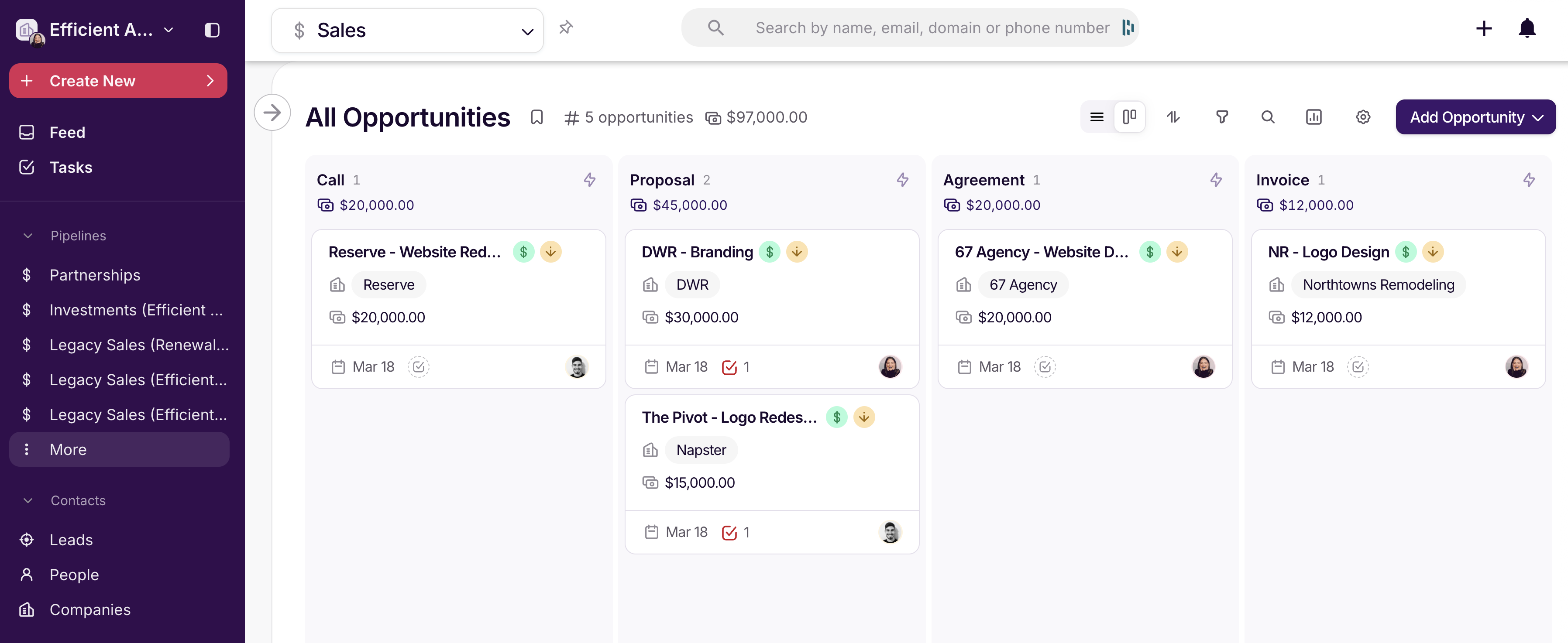
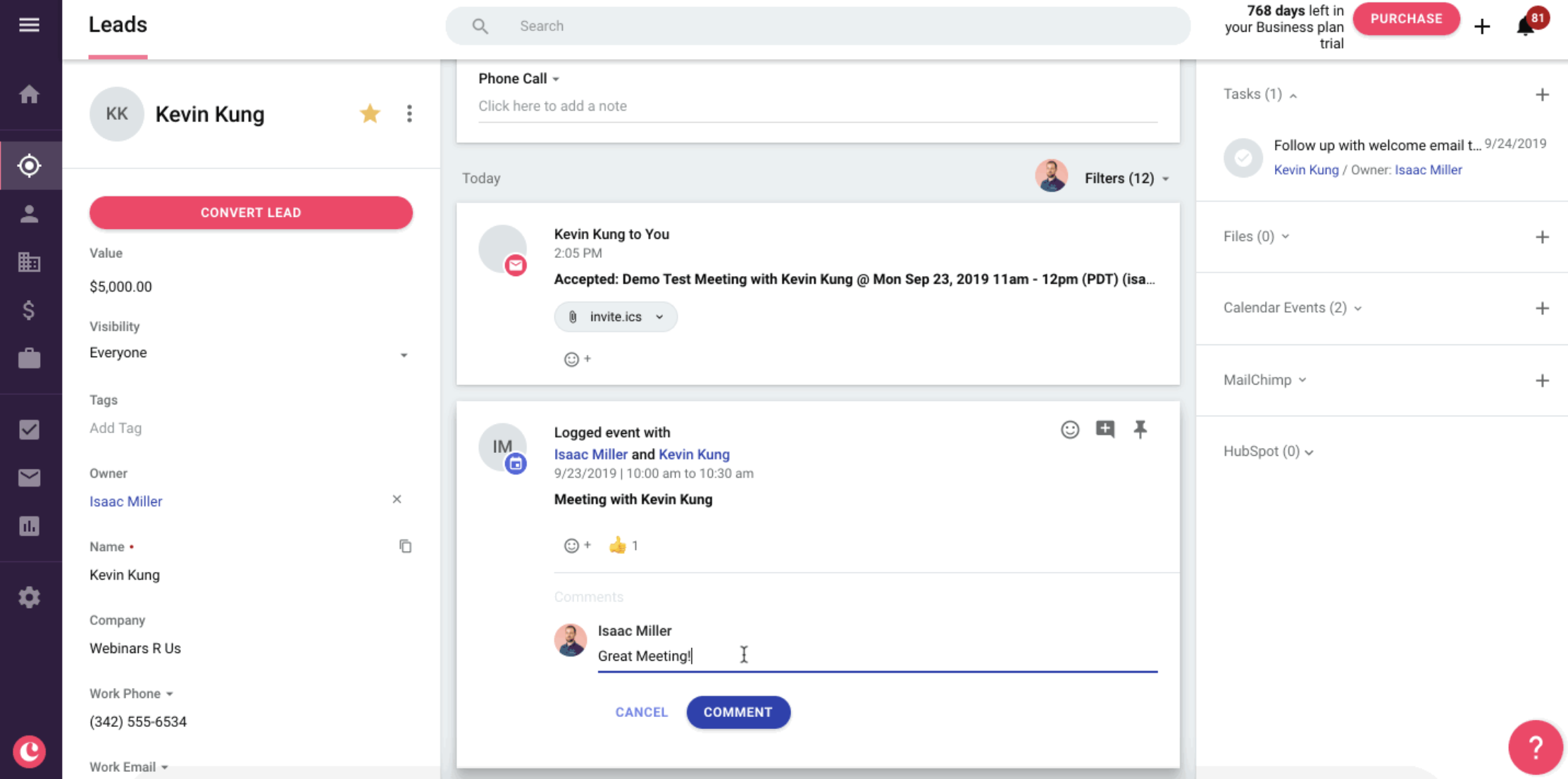
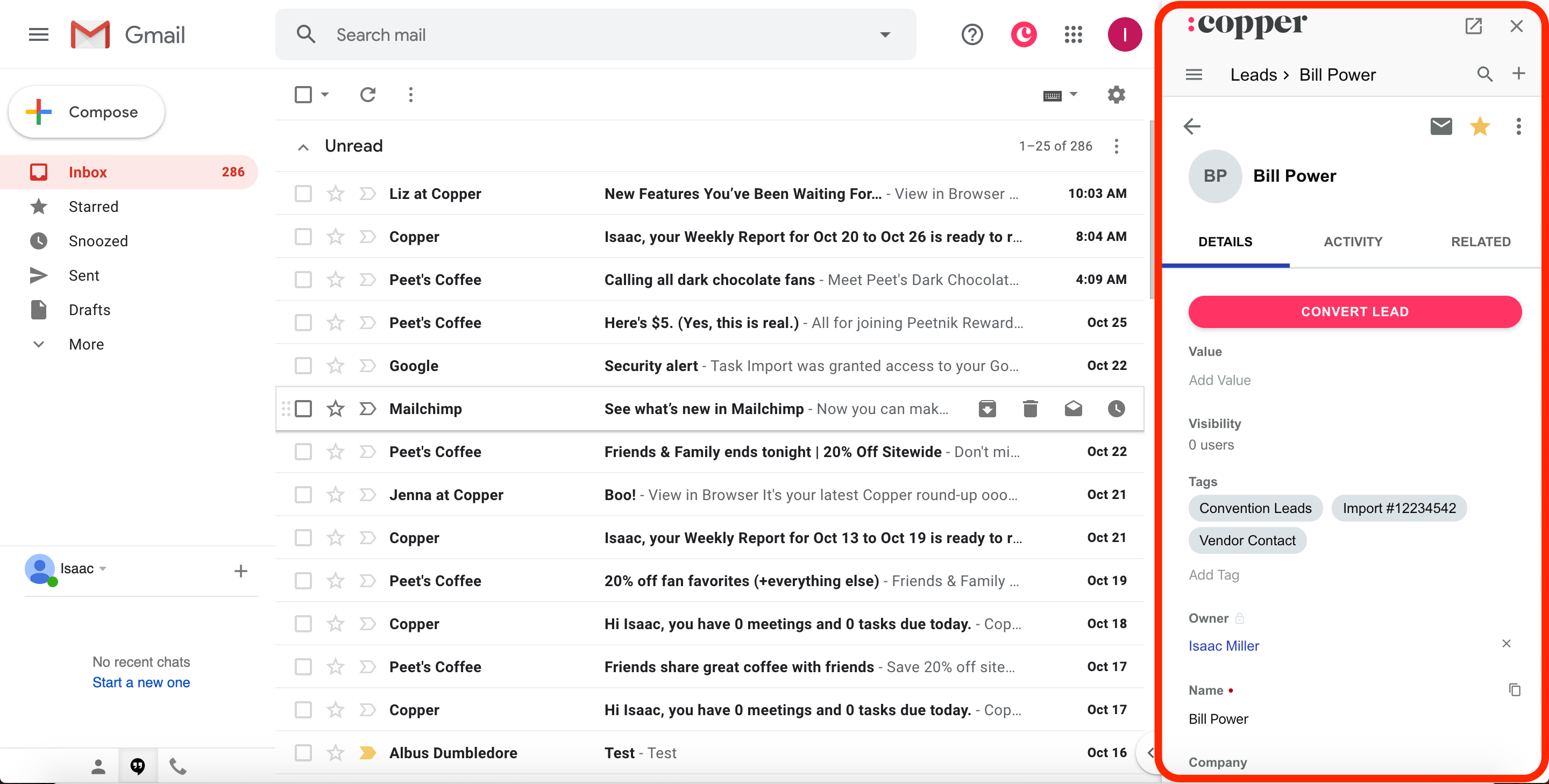
Copper