
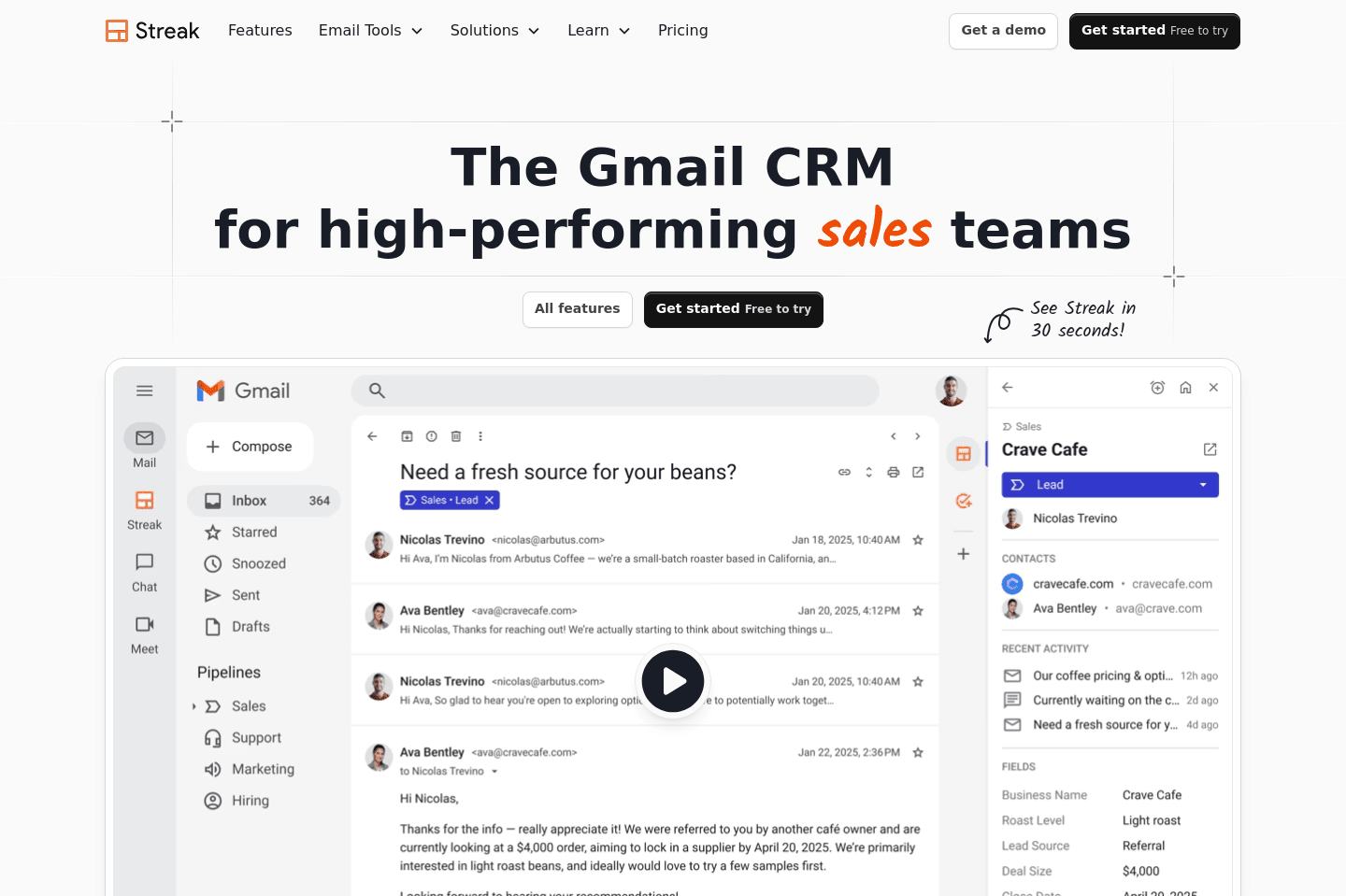
Review Summary
Review SummaryStreak acts like a CRM inside your Gmail but quickly bogs everything down and turns messy if you have any real volume, basically feeling like a clunky spreadsheet bolted onto your inbox. Unless you are dead set on running your CRM out of Google Sheets and refuse to use anything else, you should avoid Streak.
Streak Alternatives
Streak AlternativesNot sure if Streak is the right fit for you? Check out these alternatives:
 LightfieldBest
Best AI CRM
Best AI CRM WonderlyRecommended
Best for trade-services businesses with $250K+ revenue
Best for trade-services businesses with $250K+ revenue
What is Streak?
What is Streak?Streak CRM is trying to be a CRM accessible from the convenience of your Gmail inbox. Although what we find is that it heavily slows down Gmail with any level of scale.
Streak tries to meet the Google Sheets users in the CRM world, by using a non-standard implementation of a CRM (which feels more like a spreadsheet).
While this might sound good in theory if you're currently using Google Sheets as your CRM (also, if that's you, please read why we don't recommend Google Sheets CRM), it causes a pretty huge mess with scale.
I've worked with teams that were initially excited about the simplicity. When everything is inside Gmail, you avoid the friction of constantly switching tools.
But over time, the cracks start to show. Because Streak is essentially structured like a spreadsheet, it's very easy for teams to start creating inconsistent, fragmented work. Instead of one clean system of record, you end up with scattered data across different processes.
When comparing Streak vs Copper CRM, Streak tends to feel more like a temporary solution than a long-term system of record.
Another issue that tends to pop up as teams grow is performance. Since Streak loads on top of Gmail, it can boggs down your inbox, making loading speeds insufferable. For teams that spend all day in Gmail, that friction adds up quickly.
Who is Streak for?
Who is Streak for?Streak tends to attract soloprenuers and teams who want the simplicity of spreadsheet based workflows that Streak offers. But if that's you, we'd recommend checking out folk CRM instead as they are also very simple, but more refined.
Key Features
Key FeaturesGmail-Native CRM
Gmail-Native CRMSteak runs from directly inside Gmail, allowing you to track everything without leaving your inbox. But heads up, the integration slows Gmail down over time. So, if your inbox is already heavy with extensions and automations, adding a full CRM layer on top is going to make it noticeably slower.
Since Streak lives in Gmail, it naturally connects emails with deals and contacts. Email threads automatically link to the relevant pipeline item, which makes conversations easy to track.
For relationship-heavy businesses, this can be genuinely useful. Instead of jumping between inbox and CRM, everything lives in the same thread.
But again, this convenience can sometimes encourage shortcuts, like sending mass outreach from your primary email domain. Which can create deliverability problems if you're not careful.
Mail Merge
Mail MergeStreak includes a built-in mail merge feature that lets you send bulk emails from Gmail.
The tradeoff is that teams sometimes start relying on this a bit too heavily and end up running outreach from their primary domain instead of using the proper sales outreach tools or email infrastructure.
Custom Data Fields
Custom Data FieldsLike most CRMs, Streak allows you to create custom fields to track data about deals or contacts.
But because the system behaves so much like a spreadsheet, users will try to start adding random columns for one-off tracking needs. Which becomes a problem over time, leading to inconsistent data that makes reporting harder.
Good CRM systems force a little more structure, and that’s a good thing.
Additional Features
Additional FeaturesPipeline Management
Pipeline ManagementYou can build custom pipelines for things all kinds of avenues and have each step in the pipeline represents a stage in your process.
The interface is simple and flexible. If you've ever used Kanban boards or spreadsheets, you'll pick it up quick.
We will say the flexibility is a double-edged sword. Because pipelines can be customized so easily, teams often start tracking important information in inconsistent places. They might even start adding columns inside pipelines instead of using structured contact records, so your CRM data starts to get messy fast.
Workflow Automation
Workflow AutomationStreak includes automation features that can move deals between stages and trigger actions.
It's useful for basic workflows, but compared to more mature CRM automation systems, it's definitely limited. If your team relies heavily on automation, you'll probably outgrow it pretty quickly.
Pricing
Pricing- Pro: $59/mo per user. Best for small teams that want a CRM to collaborate on deals and pipelines.
- Pro+: $89/mo per user. Best for growing teams that need automation and reporting capabilities.
- Enterprise: $159/mo per user. Best for large teams that need more control over permissions and data management.
Final Verdict
Final VerdictIs Streak worth it? We'd skip it and check out of these Best CRM tools instead.
Categories
CategoriesStreak fits into multiple categories based on what it actually helps you do. Each category highlights a different strength and the efficiency points it earned, helping you compare tools not just by features, but by how well they actually perform.
Keep exploring the best software across categories, or explore Streak alternatives