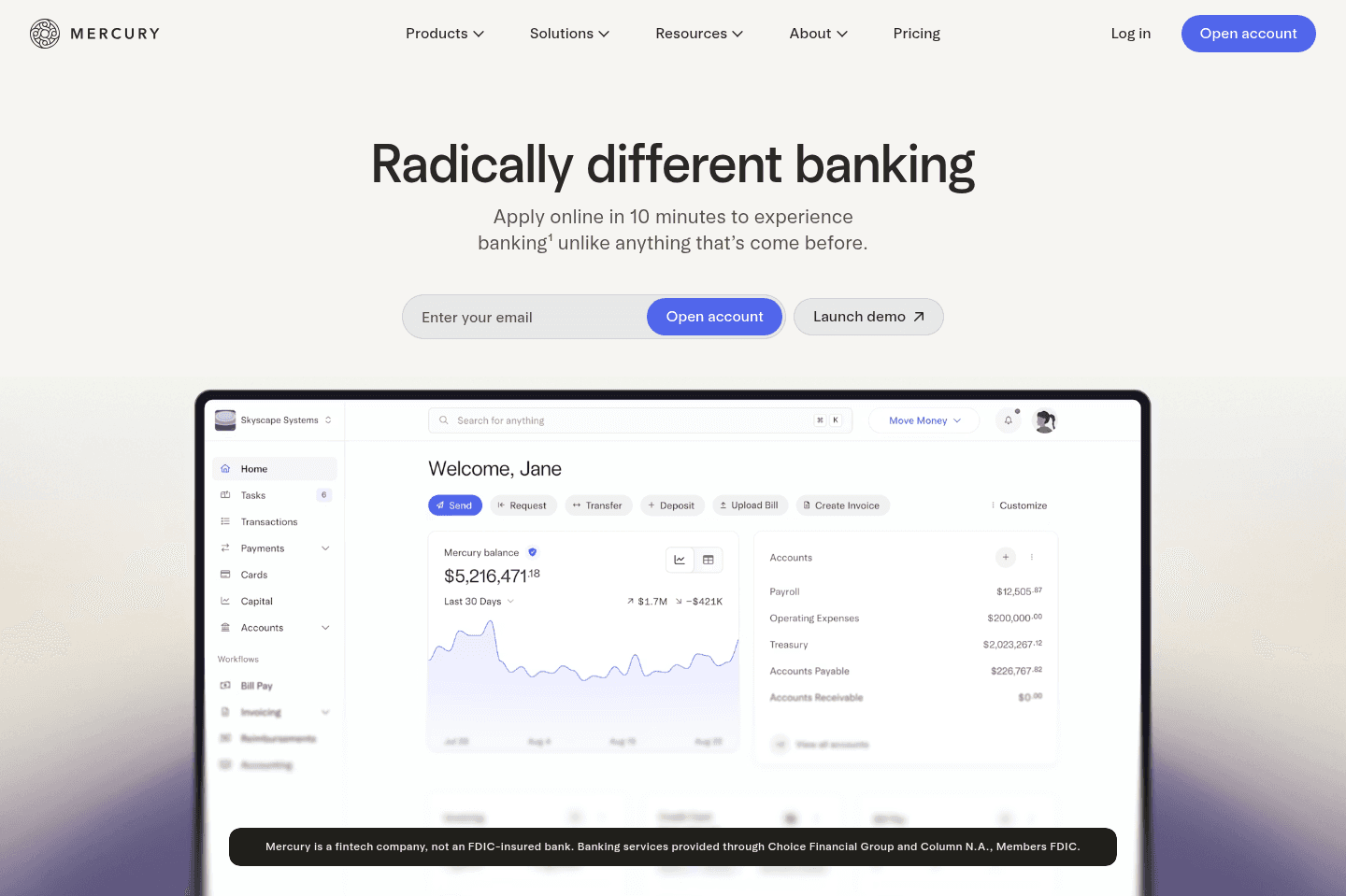
Review Summary
Review SummaryThe best business banking solution for startups and tech-forward small businesses. We've used so many business banks that got the job done, but Mercury is what business banking should feel like. It makes tedious tasks like invoicing and managing cashflow easy and, dare we say, enjoyable.
If you run a super traditional, check-heavy business and need branch access, keep a legacy bank as backup. But for most tech-forward SMBs, Mercury will give you everything you need. We've been using it for 6+ years, and you couldn't pay us to switch to another bank. Plus you can get a Mercury bank sign up bonus of $250.
Why We Switched to Mercury (After Testing Every Business Bank)
Why We Switched to Mercury (After Testing Every Business Bank)What is Mercury?
What is Mercury?Mercury is the most modern business bank on the market. If you run a US-based business and you've had enough of traditional banks with a horrible UI/UX and no perks, Mercury is definitely worth considering.
My credentials: I've tried almost every online business bank over the past decade. Seed. Azlo. Novo. Some were great… until they shut down. Others were "fine" but frustrating in weird ways.
Then I found Mercury.
At first it was pretty barebones with no mobile app and a basic interface. But the foundation was different, and it felt like a real product team was building it, not a bank duct-taping tech on top.
Fast forward a few years and it’s easily the best business banking experience I’ve used. The UI/UX is top-tier. Treasury accounts are built in. You can spin up additional checking accounts in seconds. Invoicing and bill pay actually feel smooth. It just works.
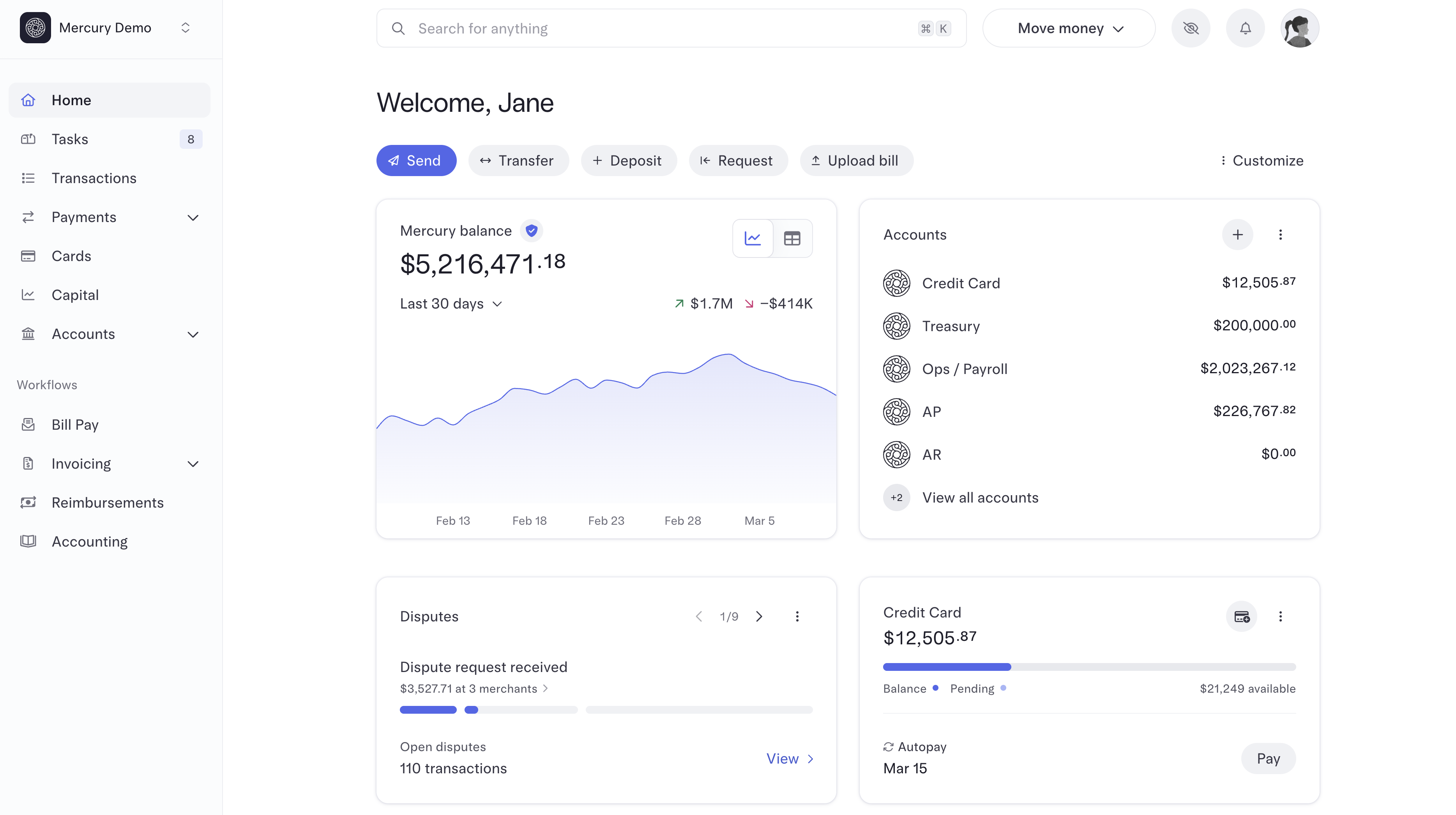
You might still be thinking, "It's just a bank… how different can it be?" 🤔
That's what I thought too, until I used it.
Traditional banks feel like paperwork and friction, whereas Mercury feels like software. If you want business banking that feels modern, thoughtful, and built for operators, Mercury is it. We've been using it for years and can't imagine switching away.
Who is Mercury For?
Who is Mercury For?If you're a business owner who wants a modern bank, Mercury is for you.
US-Based Small to Mid-Sized Business
US-Based Small to Mid-Sized BusinessSmall & mid-sized business owners, you'll rejoice in the joy of using Mercury as your banking solution.
You get as many accounts as you want (ok, up to 100 saving and checking), automated transfers (you can even allocate a % of income to different accounts), built-in treasury accounts so you can earn interest on your cash, and an incredible invoicing and bill pay system (the best I've ever used).
But heads up, Mercury is an online-only bank so, if your company still writes physical checks daily or depends heavily on in-person branch support, you may want to keep a secondary traditional bank for those edge cases. But for most modern SMBs, Mercury works extremely well as a primary operating account.
Startups
StartupsMercury was built for startups first. That's who their initial ICP was for many years, so much so that if you just completed a new stage of fundraising and deposited that money into your account, Mercury would send you a "Congrats" letter, not a compliance form. They just assume their users are founders raising money, and they've gotten rid of the hoops traditional banks love to make you jump through.
Once your funds are in Mercury, you can park the majority of your money in a Treasury account and earn super competitive yields on it.
And because we know you're going to ask: Yes, your money is safe with Mercury. It maintains all the security and safety benefits of traditional banks, including FDIC insurance of $5M.
Key Features
Key FeaturesAccount Setup and Fees
Account Setup and FeesIf traditional business banking is an endless, annoying headache, Mercury is a nice, relaxing day at the spa...seriously.
Opening an account with Mercury takes minutes, and you don't even have to get in your car or spend the day in a branch to make it happen. Once you have your account, there are no monthly fees (not even sneaky hidden ones), no minimum balances, and no unnecessary hassles. You'll also save money on free ACH transfers and free domestic wires.
After using traditional banks, the difference is obvious. It feels just fast, intentional, and built by a product team, because it is.
Dashboard and User Interface
Dashboard and User InterfaceMercury's UI/UX is genuinely best‑in‑class for a banking solution. It feels like a beautiful, modern product that's been designed with real passion, care, and thought. Find me someone who would use those words to describe their bank! You can't. And if you do, I'm betting they are a Mercury user.

The interface is intuitive and easy to navigate (think drag-and-drop bill pay), so even traditionally painful tasks don't feel terrible...and can even be somewhat fun. I know. Fun and banking don't usually go together, but like I said: Mercury has changed that. Once you experience Mercury, it'll be hard to imagine going back to any bank.
Unlimited Accounts + Powerful Auto Transfer Rules
Unlimited Accounts + Powerful Auto Transfer RulesAnother thing we love about Mercury is that you can create as many checking and savings accounts as you want (100 of each) and set up auto transfer rules to manage how money flows between them. It gives you the option to keep things simple and pick from pre-built rule templates, or get really granular and create your own custom rules.
For example, you can set up so that 20% of your earnings each month so transfer to a tax account, 30% to payroll, 20% to marketing expenses and so on.
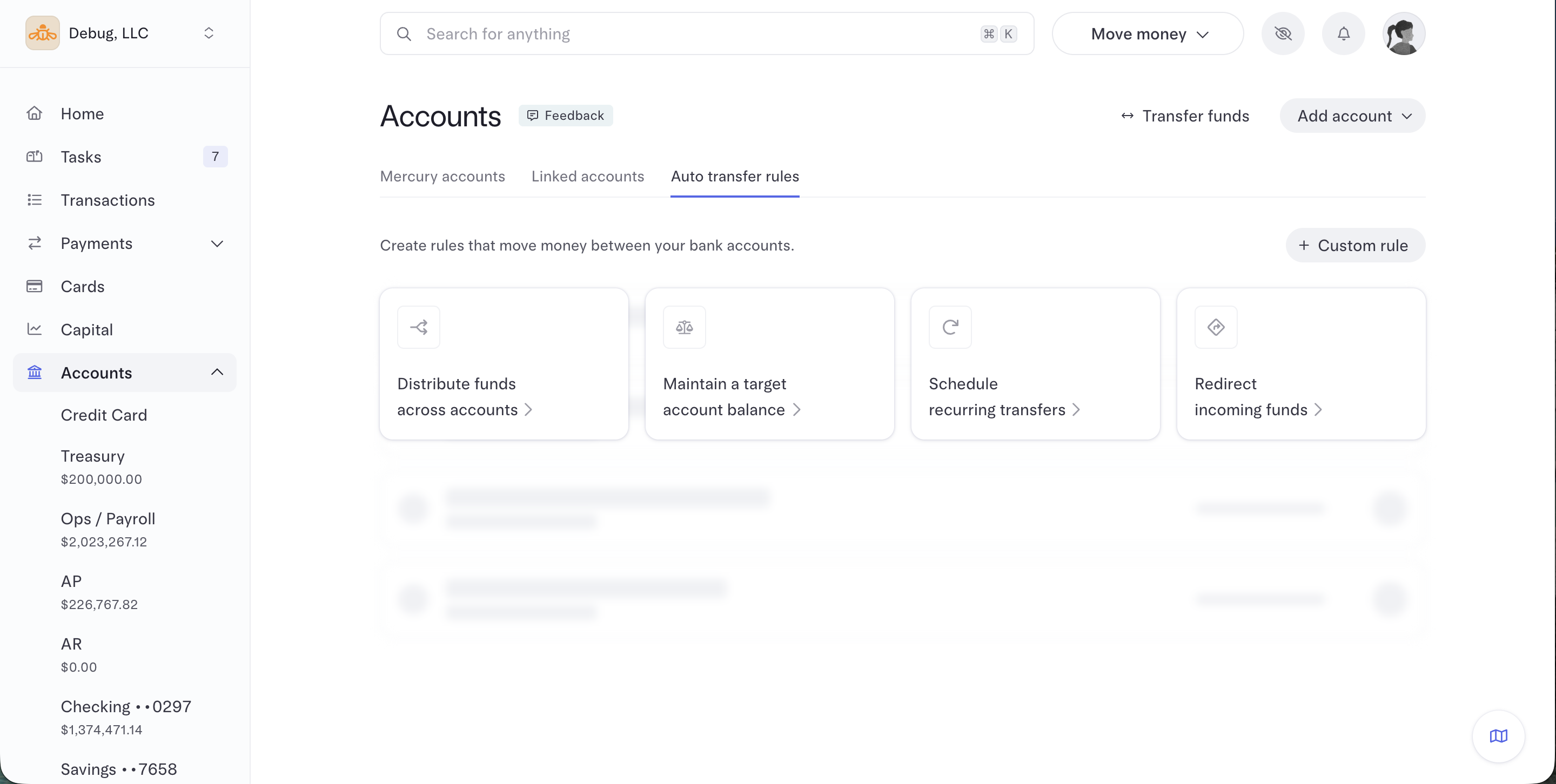
It's a great set it and forget it feature that keeps tedious, recurring tasks off of your to-do list. If you've ever struggled with manually moving money around when it comes time to pay taxes or employees, you know how help this is.

Invoicing & Bill Pay
Invoicing & Bill PayMercury's invoicing and bill pay tools are the best I've ever used, and I don't say that lightly. On the 1st of every month, I do admin which includes sending and paying invoices. It was a chore I absolutely dreaded each month, and now dare I say I don't mind it, and even enjoy it, with Mercury.
This is purely because it's so simple and fast. You know how painful it is if you have on tool for invoicing, another for banking, and another for accounting where you need to manually match deposits and chase paperwork 😅
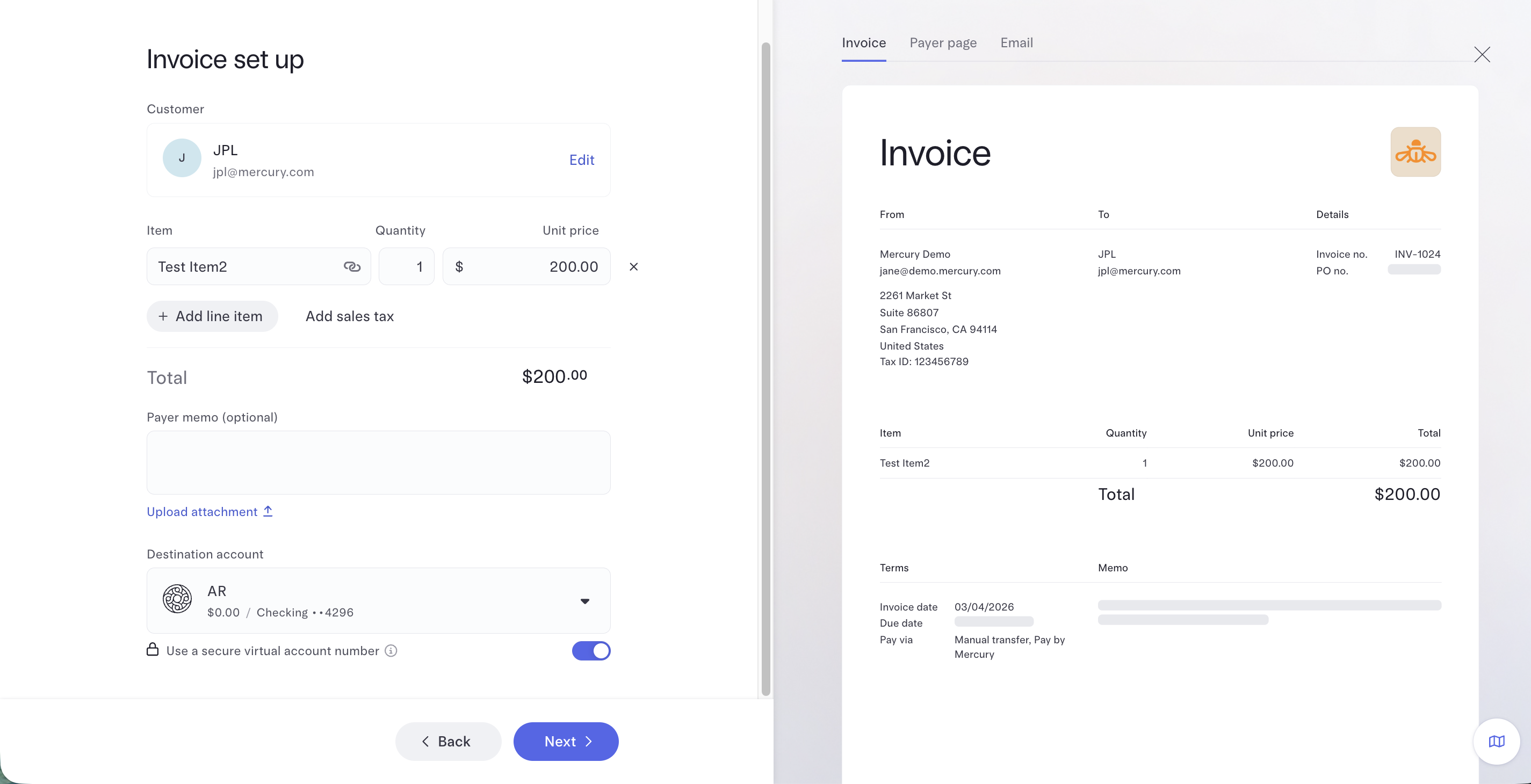
So say you want to invoice someone, just create a one-time invoice within Mercury, choose how you want to get paid (ACH, card, wire), and send it.
Then you really see the magic after you send it. Normally, if someone sends you an ACH, your bank just shows "money received," and you have to match it to the invoice manually. Mercury generates a virtual account number tied to each customer's invoices, so when a payment comes in, it can automatically match that payment to the right invoice and mark it as paid.
On the payables side, vendors can send invoices to a dedicated email (like ap@yourcompany.mercury.com). Mercury scrapes the invoice, auto-fills what it can, and lets you review and pay via ACH.
It can even request W-9s and banking details for you, which if you work with a bunch of contractors is a huge time-saver. If you're left to do this on you own during tax season, it just becomes a huge admin burden.
Corporate Cards & Spend Controls
Corporate Cards & Spend ControlsMercury offers unlimited virtual and physical debit & credit cards (with cash back on all credit spend) and quick, easy spend controls.
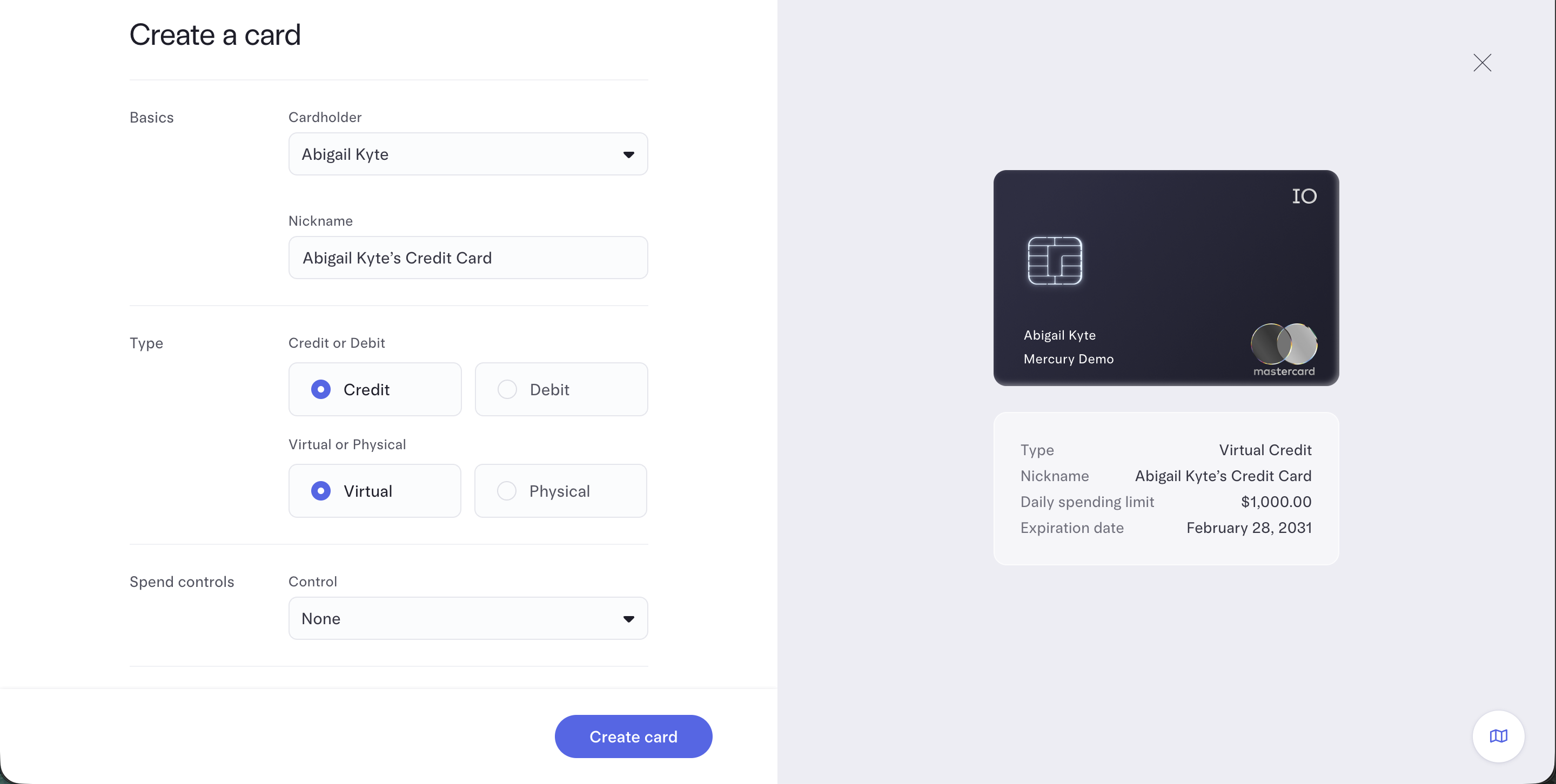
In your dashboard, you can easily add an employee, choose between a virtual or physical card, and set spend controls and limits. Need John, your contractor, to have a card that only works for gas and transportation and has a monthly limit of $300? It's easily done.
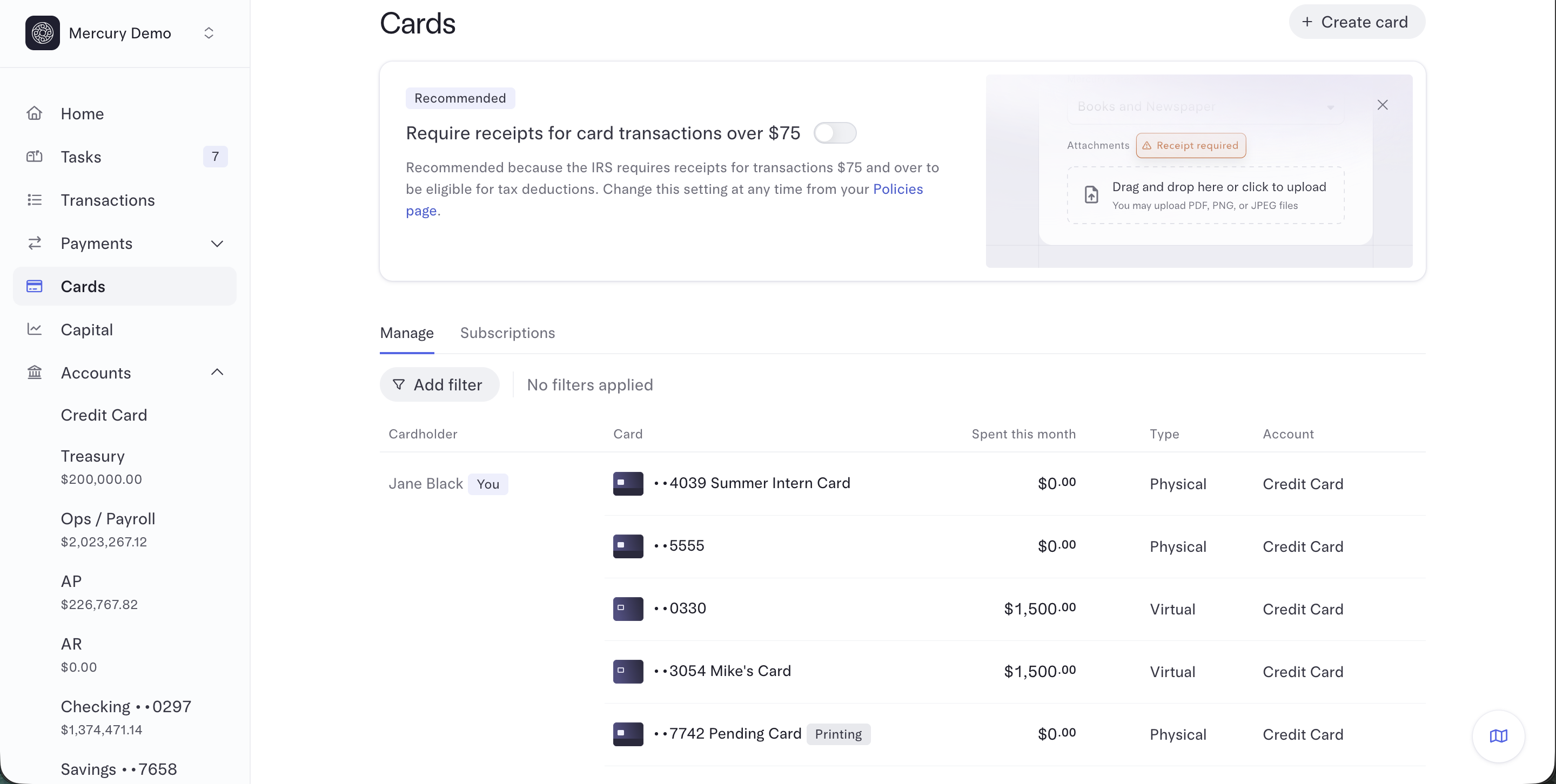
If you're just getting started with virtual cards, their tools are a great entry point. Mercury even gives you in-app recommendations on how to use these tools to streamline spending or set you up for success when tax season rolls around.
With that, Mercury's expense management is more of an entry level solution at the moment. We personally use Ramp (one of the best expense management software) along with Mercury. It integrates with Mercury and it just gives us more control over our spending.
User Roles and Approval Workflows
User Roles and Approval WorkflowsIf you're scaling, you're going to want to enable user permissions.
Mercury lets you assign different roles to team members depending on what they actually need access to. You can assign different roles like Admin, Bookkeeper, or Viewer, each with their own permissions. For example, a finance lead might be able to send payments and manage cards, while an accountant might only need transaction visibility and export access.
You can also set up approval workflows so certain payments or transfers require sign-off before they go through (e.g. anything over $10k requires the Founders sign off). This is especially helpful as teams grow and expand, because it adds financial controls without slowing down day-to-day operations.
Treasury Accounts & Yield
Treasury Accounts & YieldEach account includes access to Mercury Treasury accounts so your idle cash can earn interest instead of sitting at near-zero interest in a traditional bank.
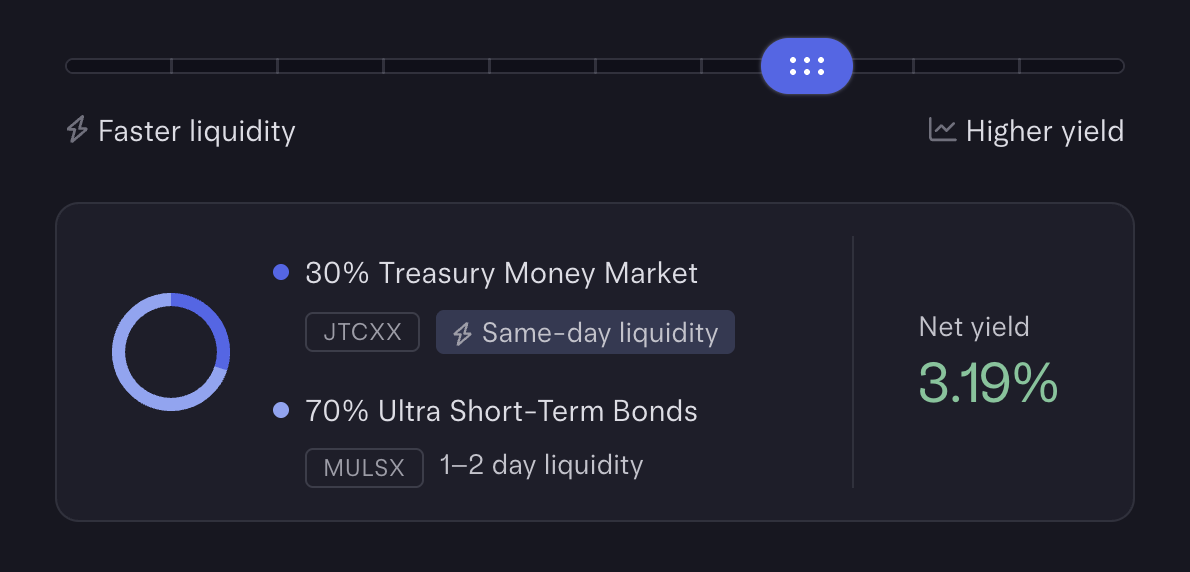
You can even automate transfers between your operating account and Treasury, so excess cash moves over without you thinking about it.
Access is flexible too, we're talking same-day withdrawals.
Up to $5 Million FDIC Insurance
Up to $5 Million FDIC InsuranceLet's answer the obvious question: "Is Mercury safe?"
Mercury is a fintech layer on top of traditional banks, meaning it is not an officially chartered bank—yet. They did recently apply for a federal charter, and we're keeping an eye on what comes next. That said, Mercury offers up to $5 million in FDIC insurance (20x the typical $250k coverage) through partner and sweep network program banks, each of which is FDIC-insured and subject to bank regulator oversight.
What that actually means: The funds in your checking and savings accounts are held at those Mercury partner banks, not Mercury itself, and you actually have a direct contractual agreement with those FDIC-insured banks as part of onboarding. So no matter what happens to Mercury as a company, you still have access to your money. For anyone nervous about "fintechs" versus traditional banks, this is the part that should put you at ease.
To top it off, Mercury also includes modern security controls like two-factor authentication, detailed activity logs, and team permission settings so you can track exactly who moved money and when.
ACH Payment Authorizations
ACH Payment AuthorizationsYou know how in the US it's for some reason normal to give your ACH routing and account number out to other businesses? And yet all someone also needs is your account number to actually pull funds from your bank account?
That's where Mercury stops this and actually puts the control in your hands, somewhat like that of how Ramp allows you to spin up virtual cards, set limits, and lock them. The same can now be done for ACH pulls.
This can best be shown in a couple screenshots:
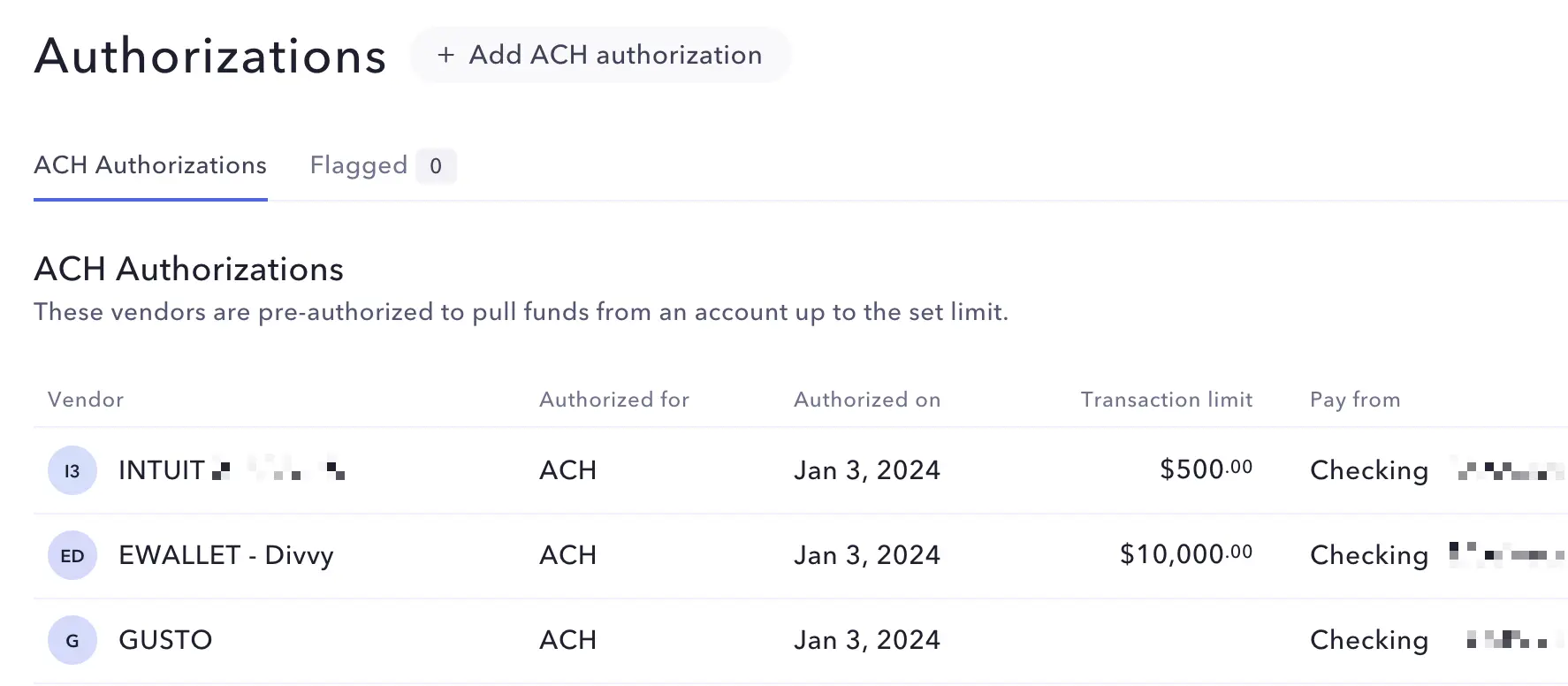
Set up your ACH Authorizations, Transaction Limits, and Account to pull from
And if you get an unusual request come in, it'll show under the "Flagged" area.
You have 3 business days to approve an authorization, and if you don't it'll get blocked and not transfer the funds over:
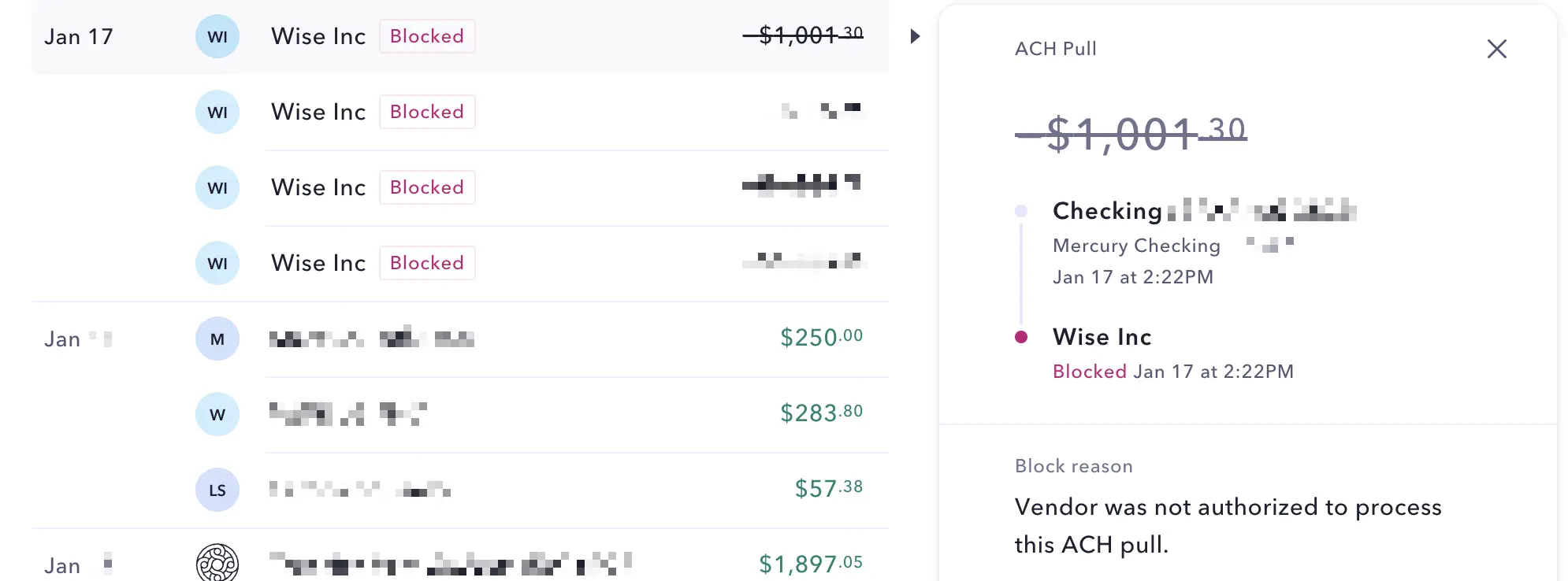
ACH Pull Blocked and Declined
This is pretty amazing to have at the bank level—this is an area that we genuinely believe Mercury to be pulling the industry forward, giving back control to the businesses using them.
API & MCP Access
API & MCP AccessTell me this, have you ever heard someone talk about their business bank and "API, MCP, or CLI" in the same sentence? Probably not.
Mercury allows you to actually connect directly into all of your banking data via their API, allowing your engineering team to wire it directly into your internal systems, and build dashboards that actually reflect how your business moves money.

AI-native Development (MCP & CLI)
But what genuinely fired us up is the MCP and CLI they dropped. Mercury's MCP (read-only, OAuth-based) is a hosted server that gives AI tools secure access to your account, designed to work with assistants like ChatGPT and Claude. We've already got a bunch of agents running across all kinds of projects here, so the second we saw this, we started mapping out how to loop Mercury directly into those workflows. Then, adding CLI into the mix means your engineers who like to run, manage, or manipulate via terminal don't have to context-switch. Instead, they can query balances or move money without ever having to leave the command line.
The builder community isn't waiting around either, I was waiting for my flight when I saw Theo's already spinning up agents to handle invoices and hoping to be able to send W-9s in the near future. That's huge and it makes me excited to dig in! With the MCPs, It'll be nice to take some mental load off my plate by being able to ask questions like "What's my balance today?" or "Graph my last six months of transactions" and then get an answer without any context switching.

Additional Features
Additional FeaturesFree Personal Banking
Free Personal BankingMercury personal accounts have a $240/year subscription fee. That's not cheap, but we gladly paid for it because it felt worth it. But now, if you use Mercury for business, personal banking is free. AND you can give the same perk to all of your employees.
You get the same beautiful, modern experience and thoughtful tools we talked about with business accounts. Plus you get instant business to personal transfers since they're not moving between banking entities. When we pay out distributions, the money lands immediately.
Another big one: the process of making large transfers is dramatically smoother than it is with traditional banks. Most personal accounts start throwing flags if you try to wire more than $5,000 or $10,000. With Mercury, we can wire significant amounts without needing to talk to anyone or deal with those "for your protection" bottlenecks.
It actually feels like you own your money and can call the shots you want to. If you're a founder who invests or moves capital often, this feature just saves you a ton of headaches.
Community + Founder Support
Community + Founder SupportMercury does something unusual for a bank: They offer real support to founders using their product. They host events to spotlight customer businesses, and even have programs designed to help startups get exposure to investors. When new features are rolled out, the CEO is on X responding to user questions (and offering refunds!) in real time.
Digital Checks
Digital ChecksYou won't be getting a Mercury checkbook when you open an account. We need checks so infrequently that it's not a big deal for us.
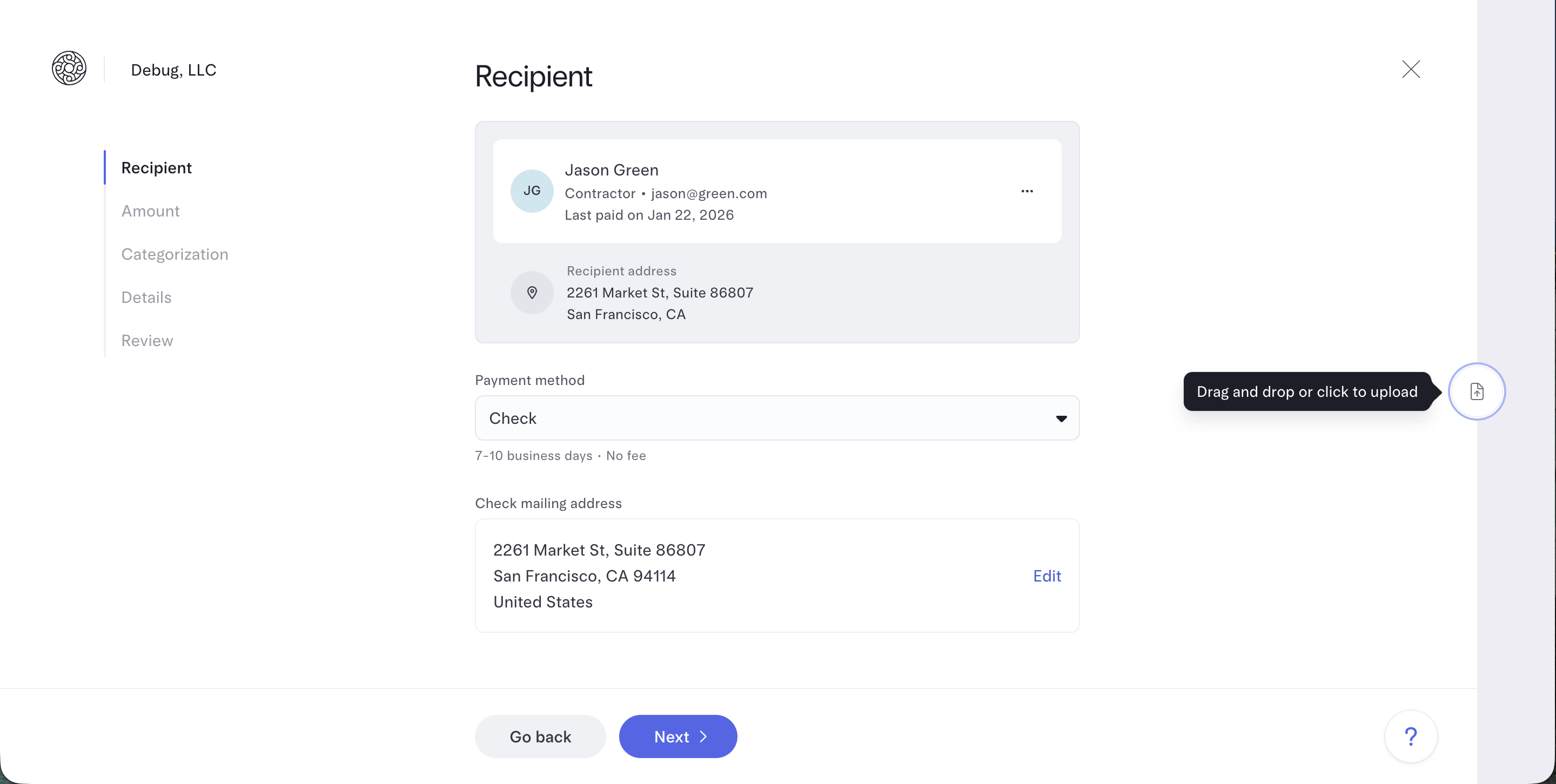
But when the need has come up, the process was surprisingly delightful.
Take a recent example: The government required a physical mailed check alongside printed forms (old habits die hard, right?). All we had to do was upload a PDF of the form and tell Mercury which account to pull money from.
They then printed it all out and mailed the PDF and the check on our behalf 🚀 So really, it then turned into feeling like we had an assistant helping us out.
Pricing
Pricing- Free: $0/mo. Best for startups and small businesses that need a powerful free business bank account (We're on this tier).
- Plus: $35/mo (or $29.90/mo billed annually). Best for growing businesses that want advanced invoicing, ACH debit collection, expense reimbursements for larger teams, and enhanced accounting automations.
- Pro: $350/mo (or $299/mo billed annually). Best for businesses with complex operations that need a relationship manager, unlimited invoicing via API, ACH debit with $0 transaction fees, and support for large teams.
Final Verdict
Final VerdictIs Mercury worth it? I think it's pretty clear by now, for most US-based SMBs and startups, there isn't any other bank we'd consider.
It removes friction and modernizes how you manage money, both for business and personal accounts.
Make sure you grab the Mercury bank sign up bonus of $250.
Disclaimer: Mercury is a fintech company, not an FDIC-insured bank. Banking services provided through Choice Financial Group and Column N.A., Members FDIC. Deposit insurance covers the failure of an insured bank.
Screenshots
Screenshots
Mercury
Categories
CategoriesMercury fits into multiple categories based on what it actually helps you do. Each category highlights a different strength and the efficiency points it earned, helping you compare tools not just by features, but by how well they actually perform.
Keep exploring the best software across categories, or explore Mercury alternatives