
Comparison Summary
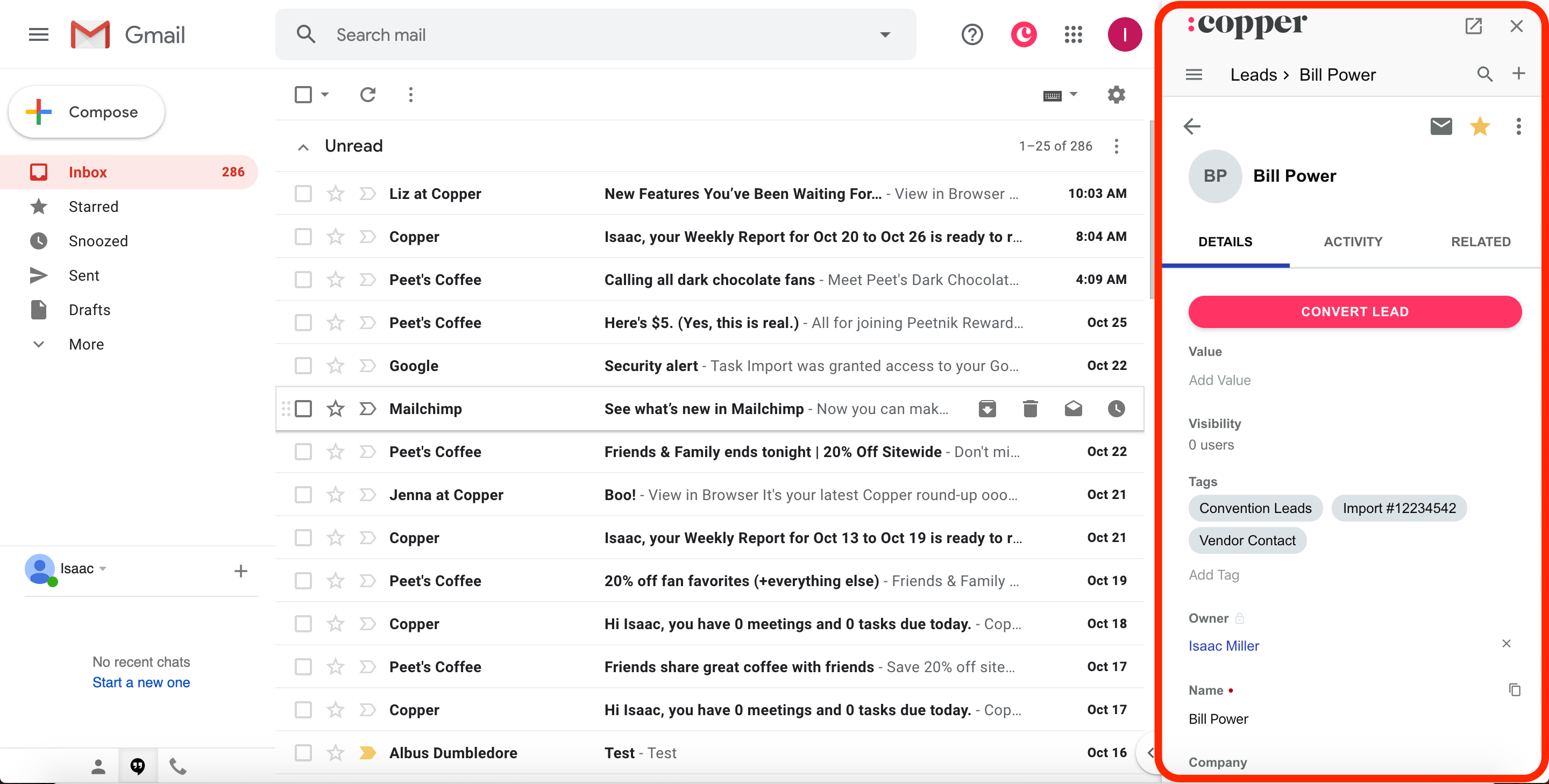
Comparison SummaryCopper gives you deep Google Workspace integration so you can manage Gmail right inside the CRM, which GoHighLevel does not match.
Avoid GoHighLevel and use Copper if you want a CRM that actually works well with Google tools.
 Copper
Traditional CRM for Google Workspace
Traditional CRM for Google Workspace GoHighLevel
Best for agency reselling
Best for agency reselling
At a Glance
At a GlanceRecommended Alternatives
Recommended Alternatives LightfieldBest
Best AI CRM
Best AI CRM WonderlyRecommended
Best for home remodeling businesses
Best for home remodeling businesses
Editor's Verdict
Editor's VerdictEase of Learning
Ease of Learning
Copper is a no-brainer if you want your team up and running fast. Since it lives inside Gmail and Google Calendar, anyone already using Google Workspace can just start working without having to learn a new system or spend time on training. You add contacts or manage tasks right where you already work, so onboarding is basically instant.
GoHighLevel is the total opposite. You have to spend hours just setting it up before your team can even touch it, and then there's a steep learning curve on top. If your team isn't technical, they'll keep running into issues and need constant help just to keep things moving.
If getting started quickly matters, Copper is way ahead. GoHighLevel will slow you down and frustrate everyone who isn't already an expert.
Workflow Presence
Workflow PresenceCopper makes it easy for your sales team to work where they already spend their time, letting you handle CRM tasks right inside Gmail or Google Calendar. This means way less context switching and almost no need to dig through a separate CRM interface.
GoHighLevel does the opposite. You're forced to use its slow, clunky dashboard for everything, which just adds friction and admin headaches. Expect to waste time troubleshooting and answering team questions instead of actually working in your usual tools.
If you care about reducing context switching and want your CRM to fit seamlessly into your team's daily workflow, Copper is the clear pick. GoHighLevel just gets in the way.
Team Adoption
Team AdoptionCopper is way ahead when it comes to team adoption. It plugs right into Gmail and Google Calendar, so everyone just uses it naturally without having to learn anything new or bounce between tabs. Even people who usually avoid new tools end up actually sticking with Copper because it lives where they already work.
GoHighLevel, on the other hand, is a headache from day one. The interface is clunky, things break all the time, and you'll spend your time fixing problems instead of getting your team to use it. Most people will resist using it, and you'll constantly be dragged into tech support mode just to keep it afloat.
If you care about your team actually using the CRM without endless frustration, Copper is the obvious pick. GoHighLevel just makes everything harder and your team will hate it.
AI Assistance
AI AssistanceNeither GoHighLevel nor Copper nails AI Assistance, but Copper edges ahead if you actually want to save time with AI in your CRM. GoHighLevel's AI feels slapped on just for show and won't make a dent in your workflow. It talks a big game but doesn't deliver anything truly helpful.
Copper sticks to the basics with lighter AI features, like writing AI emails. Its new Copper GPT is separate from the main app, so you won't get a true in-app assistant, but at least the AI features it does have work as described.
If you care about genuinely useful AI that helps with real tasks, Copper is the less disappointing pick. GoHighLevel's AI just isn't worth your attention.
Integrations
IntegrationsCopper blows GoHighLevel out of the water when it comes to integrations. Copper's sync with Google Workspace isn't just deep, it's immediate and retroactive, so everything's up to date from the start. Plus, with a flexible API and easy Zapier or webhook connections, you can hook it into basically any tool you need.
GoHighLevel, on the other hand, piles on features but leaves you with clunky, unreliable integrations that barely work. Expect frustration, not seamless workflows. If you care about integrations that actually add value and don't break your flow, Copper is the only real choice here.
Screenshots
Screenshots
Copper