Small Business CRM
Small Business CRMOver the past decade, ever since we started working in the CRM space, we've answered the question "Which CRM software should I use?" endlessly. So as if you had just sent us a text message and had asked us this very question yourself, this article will cover what we'd tell you.
When you're in the position to be making the decision to choose a CRM tool, it can seem like there is an overwhelming number of options. But the truth of the matter is the CRM space has changed significantly in the AI-era.
Our Credentials
Our Credentials- We used Copper CRM in our business for 10 years (and set it up for 50+ customers during that time too). It used to be our favorite CRM but we recently just switched away to Lightfield CRM because we wanted an AI-first CRM.
- We used Pipedrive for 2 years across 2 companies. While it worked decently at the time, it's certainly an old-school CRM at this stage and certainly not AI-first.
- We used HubSpot for 6 years with a consulting client. We found it had the worst user experience, so much so we dreaded even logging in. Team adoption will be hard with HubSpot, especially in the AI-era.
- We moved away from all of the above tools and now use Lightfield CRM.
AI-CRM: Why it matters
AI-CRM: Why it mattersWith the rise of AI, we started feeling quite limited using Copper as our CRM (and switching to any of the other incumbents wouldn't be much better).
While HubSpot and Pipedrive claim to be AI CRMs now, the reality is they are far from that. They were still built a long time ago, so what you're going to get is a CRM that feels like it has bolted on features.
So as you're choosing a new CRM in this day and age, I want you to think hard about what you're signing up for.
An AI-first CRM will be able to:
- Set itself up (you describe your business processes, it suggests custom fields and all you do is click approve and it configures itself for you in minutes)
- Keep itself up to date (e.g. an email comes in with a new contact at a company, it will suggest this is updated in the CRM)
- Summarize the entire opportunity for you using AI, rather than make you dig through an activity log
With that in mind, HubSpot, Pipedrive, Copper are all going to be limited in that sense.
For us, our Copper became a graveyard. Our team started feeling like it was just "busy work" to keep it updated, and we felt like in the AI-era we could expect our CRM to be more proactive and helpful.
After waiting and waiting, we finally saw an ad for Lightfield CRM (which is indeed built in this AI-era).
When deciding if we should switch, our team re-iterated that they were unhappy and "slowed down" using Copper. It just didn't make sense to continue using it anymore.
So we decided to make the jump and setup Lightfield (which btw, only took a few hours thanks to its AI chat, read our full Lightfield Review).
And yeah 😅 The team is more productive, the AI keeps itself up to date, the interface is beautiful and modern. Overall, we genuinely feel like this the what a CRM should be in the era that we're living in.
Lightfield CRM
Lightfield CRM#1 AI CRM
We started using Lightfield in 2026 and it's the first true AI-CRM that we've come across. If you're a modern team looking for a CRM that is fast to set up, this it it.
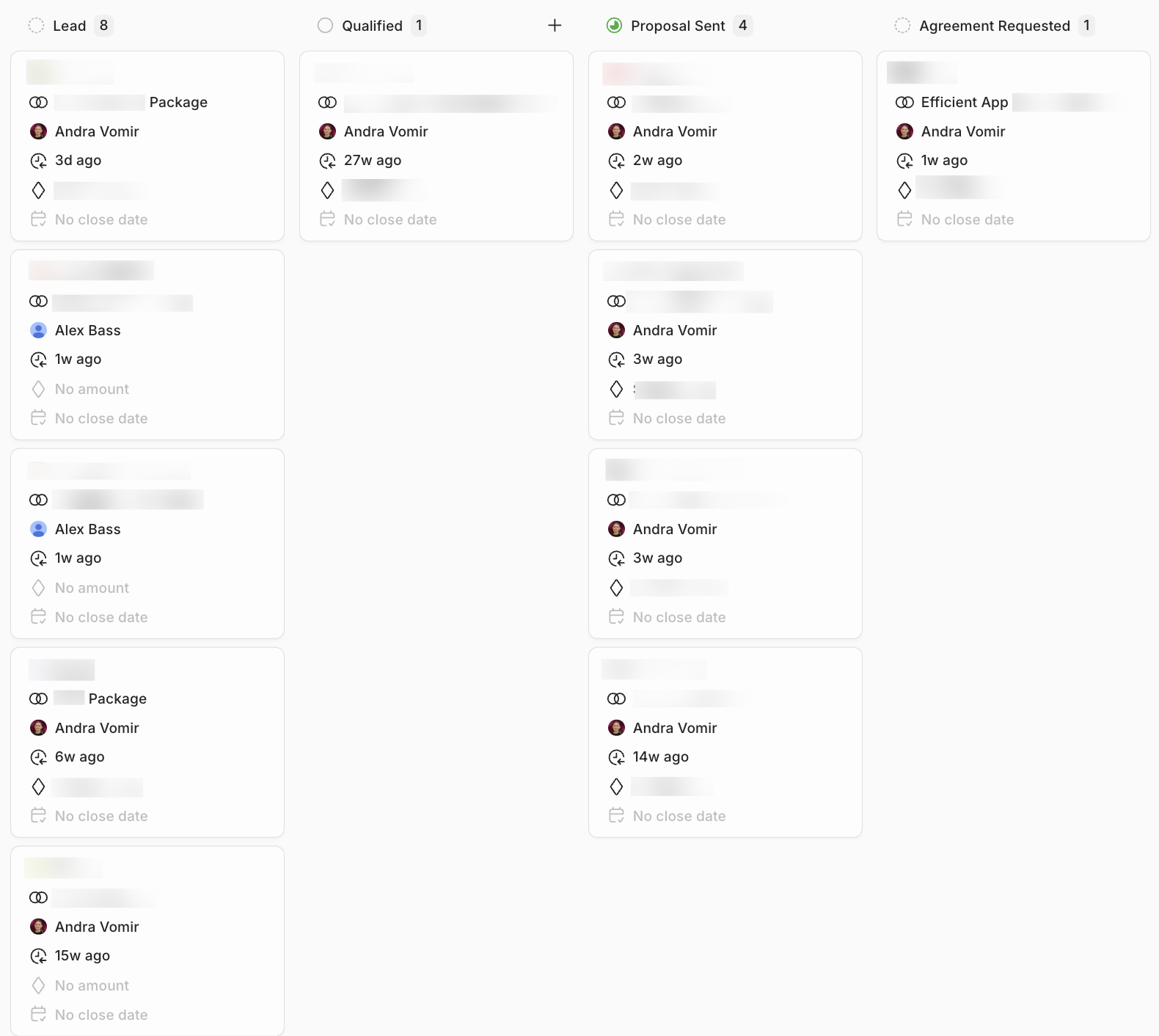
AI Custom Set Up
With Lightfield, you don't need to hire a consultant to help you set it up. You can just tell it about your business processes and it will suggest the best way to set it up, and then once you approve it, it will actually configure CRM fields and do the entire set up for you. No other CRM does this.
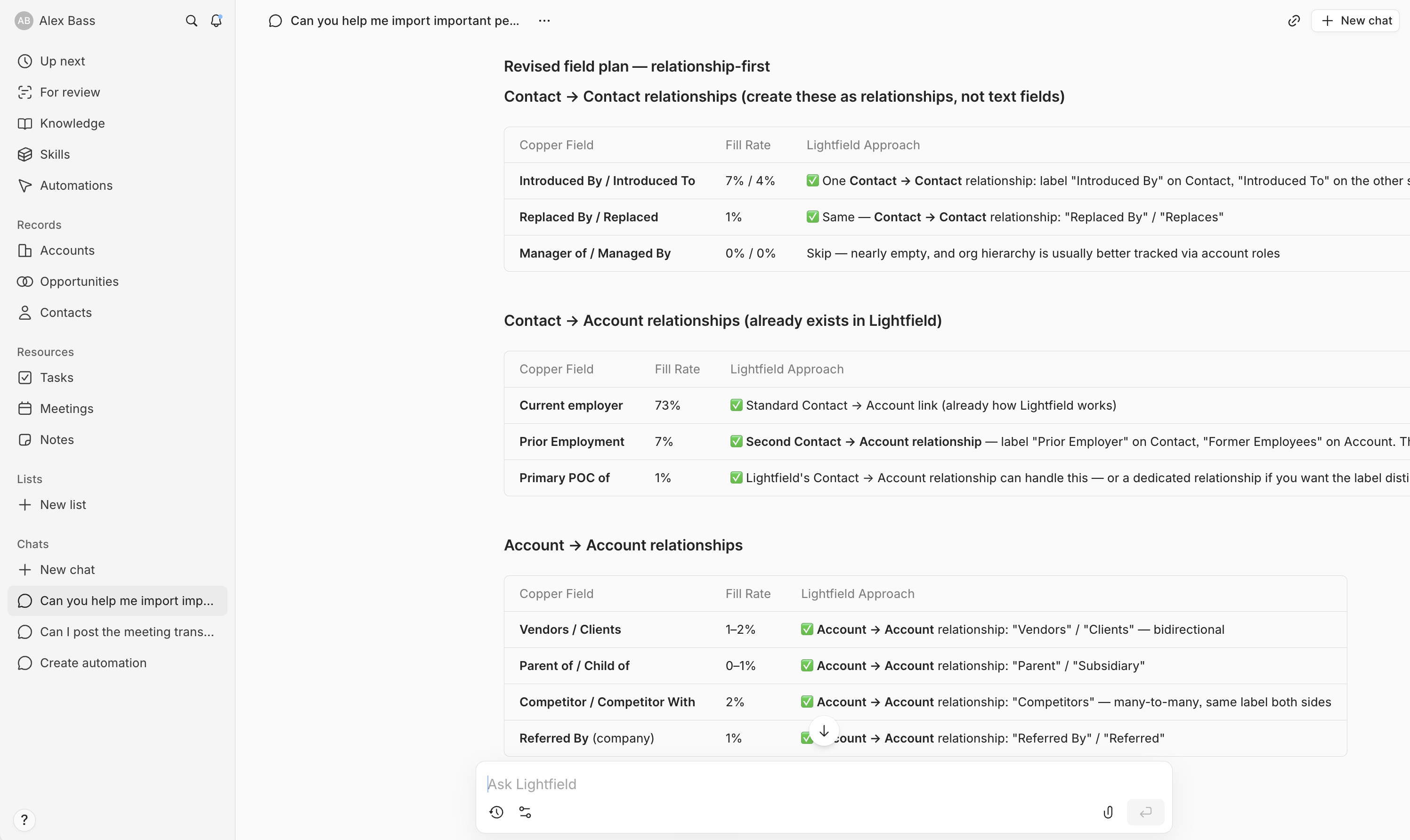
For us, this looked like exporting our data from our previous CRM into a .CSV file and dropping it into Lightfield's AI chat. Lightfield starting recommending fields, and set up our CRM within an hour. It was truly remarkable.
Finds Missing Data
Finds Missing DataLightfield keeps itself up to date using AI. When you have a call, Lightfield automatically records it and updates the next step in your CRM. Has a contact changed? Lightfield will find their new role and title and suggest an update. All you need to do is hit approve.
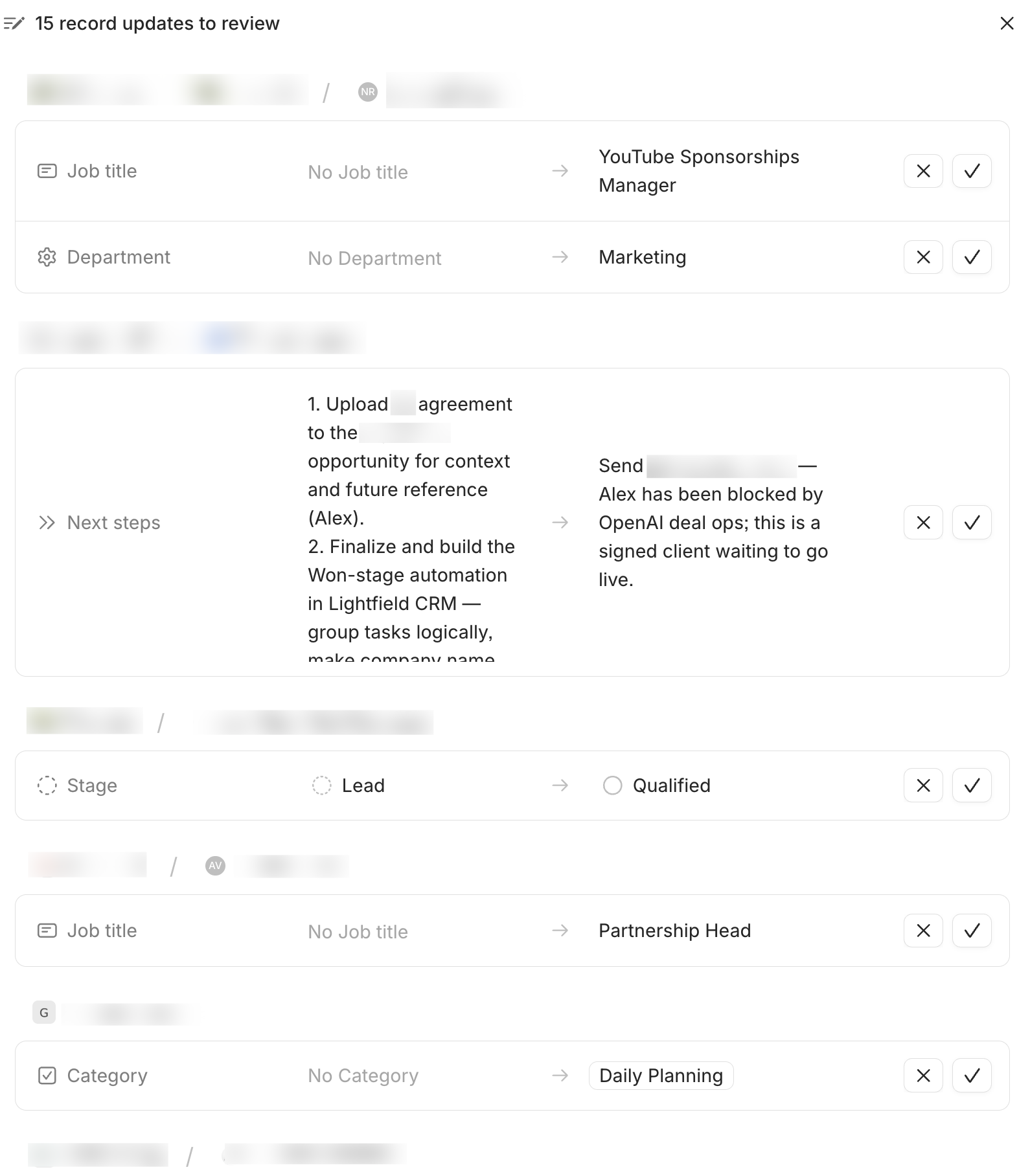
Honestly, the reason why we love Lightfield so much is that it totally removes that "urgh I need to update my CRM" feeling. And if you manage a sales team, you don't need to constantly chase your team for updates because Lightfield does it automatically.
Copper CRM
Copper CRMWe've used Copper for almost a decade and implemented it into companies for just about that long as well. In 2026, we switched off of Copper to Lightfield, but we know Copper inside and out. While it was once the leader in our eyes, it came time to say goodbye as our team started feeling limited by not having an AI-first CRM.
Copper Chrome Extension
Copper has a friendly Chrome Extension that pops up on the right hand-side of your Gmail inbox. The extension allows team members to have quick access to the CRM and easily add people/leads to the CRM, or reference previous communication, straight from their inbox.
Personally, even though we used Copper for 10 years, we didn't use this extension because we used Superhuman Mail and they don't work together.
Workflow Automation
While Copper has workflow automation's, their editor interface is quite complicated to use and requires a bit of technical experience to setup and configure. One area that we think Copper can improve is making their workflow automation editor a bit more friendly and intuitive to use for it's small business owners.
Pipedrive CRM
Pipedrive CRMIf you're using Google Workspace, you're going to get a much deeper integration with Copper, so we don't think it's truly worth considering Pipedrive unless you are using Microsoft 365 (we sometimes recommend Hubspot, but it has issues and also gets wildly expensive quite quickly, more on that below).
We've implemented both Pipedrive and Copper for our customers and they have very similar features. You can easily add leads, create sales pipelines and track activities and notes to help your sales team close deals. Pipedrive has a fairly robust API so integrating with other tools is also possible and will allow you to scale. What you won't get with Pipedrive that we covered above is the automatic aggregating of email attachments/files and of course, doesn't have the Gmail extension.
Set Up Email Syncing
If compared to Copper, Pipedrive doesn't have that "syncing forward" methodology for emails which means if you exchanged emails with a lead and added them to the CRM after the correspondence started, those emails won't be tracked. This means you'll possibly lose some important data unless you strictly try to add each lead to the CRM before you even reach out.
Setting up Pipedrive to ingest your emails is also a bit of a manual process initially, it won't automatically happen like with Copper. So if you're using Pipedrive, just make sure to do that first because if you forget, you might be wondering why your teams emails aren't showing up in the CRM.
Workflow Automation
What we like about Pipedrive's workflow automation is that they have a visual editor that allows you to easily create workflows. It's quite intuitive to use which is great for small business owners that are eager to get some automations running to help their team members save time.
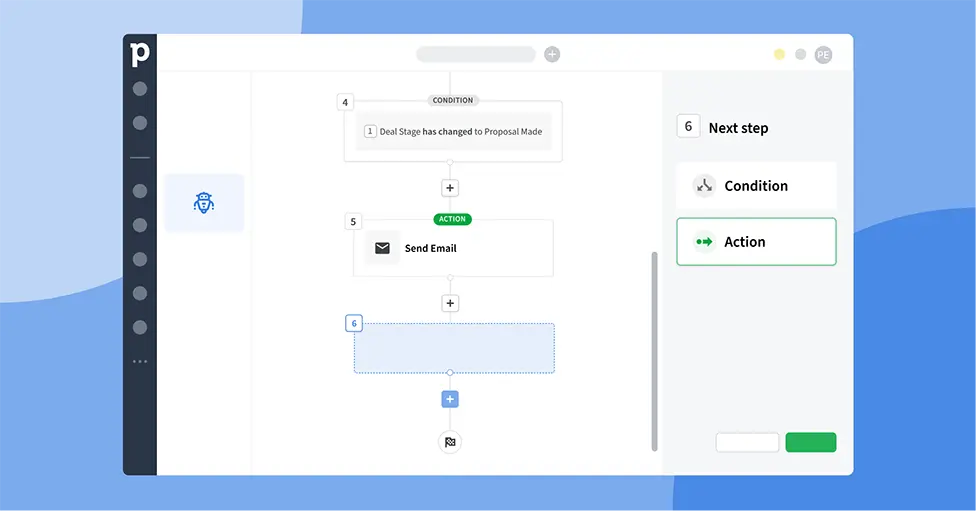
Source: Pipedrive
Unlike Copper, Pipedrive's workflow automation will allow you to trigger automated emails to prospects and customers. So for example, want to send an email when a deal enters a new stage in your pipeline? You can set that up with Pipedrive's workflow automations.
One thing to keep in mind is that the automations feature is available on Pipedrive's Advanced pricing tier and beyond.
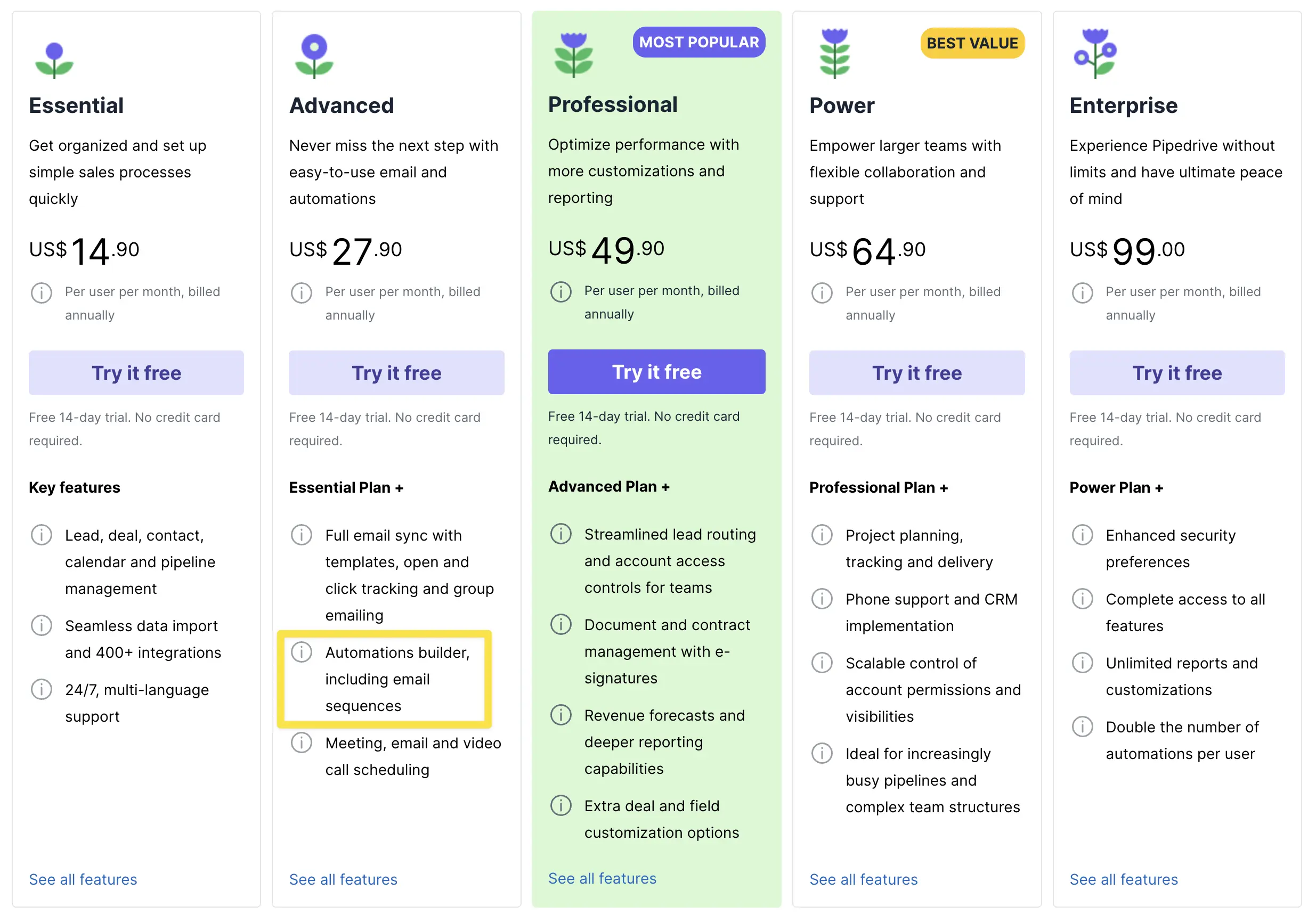
Pipedrive only offers workflow automations starting on their "Advanced" tier
Pipedrive's Add-Ons
While Pipedrive started as a CRM for sales teams and have gained quite a big market share in the small business CRM space, they have continued to add on features in order to continue to scale. While this might seem tempting, the problem when tools do this is they become an "all-in-one" tool that is trying to do everything, and therefore doing many things mediocrely.
Choose Specialized Tools
For example, on Pipedrive's "Most Popular" tier they offer document and contract management—we would never recommend anyone use this feature. There are tools like PandaDoc, who specialize document and contract management and believe us, the experience is going to be much better than anything you'll get with Pipedrive. We believe in using the right tool for the job, and once you get outside of the core CRM features, with Pipedrive you're going to get a bunch of half baked features that are kludgy to use.
Looking further at Pipedrive's Add-Ons they offer "Campaigns", which we'd say avoid and use something like MailChimp that will offer a much more user friendly experience. Instead of using Pipedrive's Projects add-on, use a proper project management tool. Forget their Smart Docs add-on, use PandaDoc or Airtable instead.
If you're deciding between Pipedrive or Copper because of the "many additional features" Pipedrive offers, we're here to tell you that you're going to have a much more stable, less buggy experience with using tools that were built for the job and integrating them with your CRM. Even if you are using Pipedrive, we wouldn't recommend adding on any of these features. In other words, don't let Pipedrive's "Add-Ons" be a determining reason between Copper and Pipedrive, the only time we'd recommend Pipedrive is if you are using Microsoft 365 (not Google Workspace).
HubSpot CRM
HubSpot CRMWe rarely recommend HubSpot CRM for small businesses (under 300 employees). The reason is because it can get insanely experience very fast, making it more than a small business will ever need.
HubSpot Free CRM
The main reason teams sign up to HubSpot is because they see it's a free CRM or got a very low intro price. But this is just HubSpot's main tactic for getting new customers and hopefully locking them into their suite for years to come.
HubSpot's CRM was built solely as a gateway product, and because of that, they want to make it as easy as possible to get started with their software. Talking: "Free starter plan" and "no credit card down necessary", clever right? Better yet, you can also negotiate a no-brainer of a plan if you want to pull in the full marketing suite as well (for the first year that is...).
We've had customers switch from Pipedrive to Hubspot because "it's a free CRM" and they are now spending $40-60k/yr on Hubspot alone. They have a good way of sucking you in for "free" and then paying for contacts, so you're paying an insane amount for having 20-40k contacts in your CRM (you will have that easily over time).
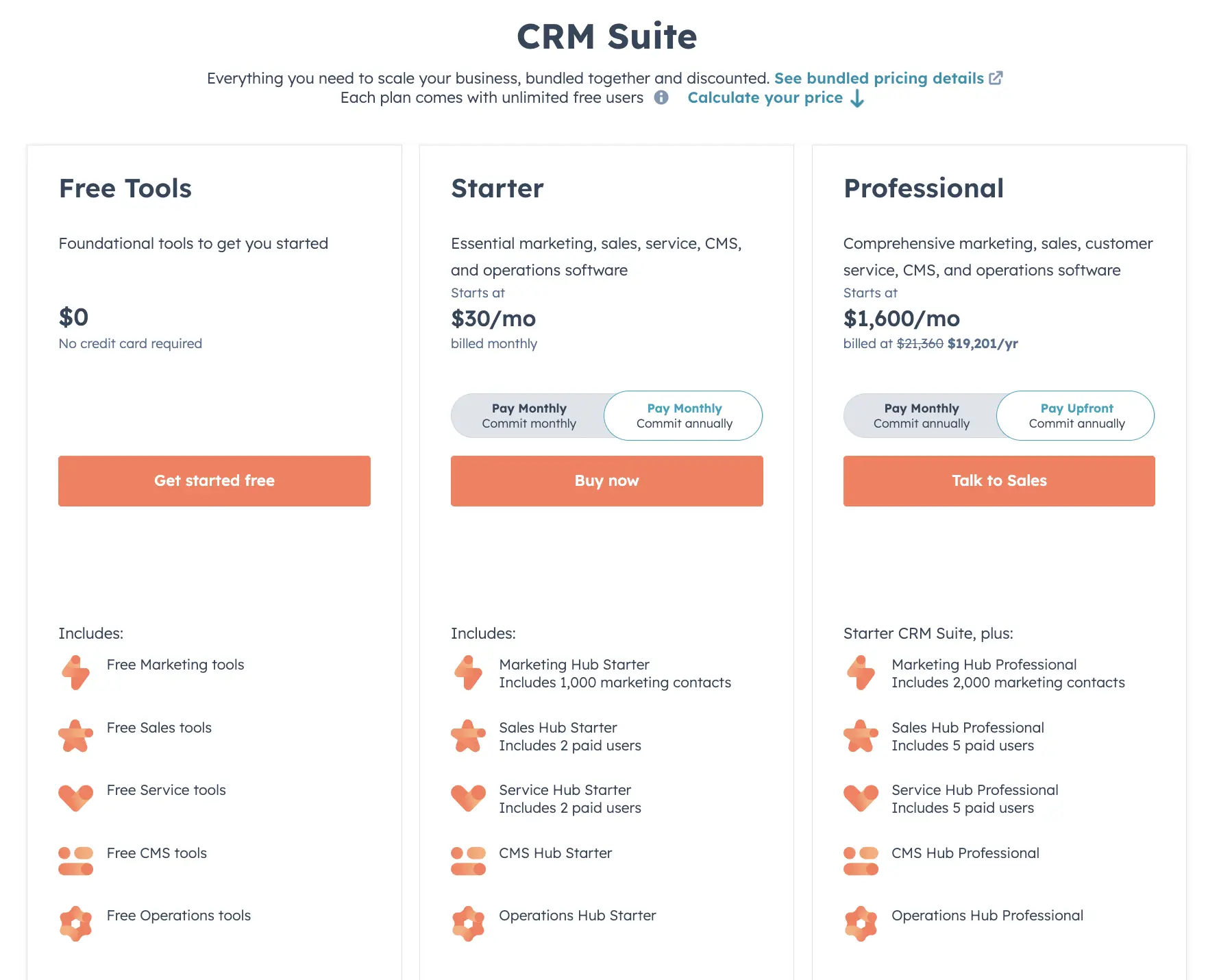
HubSpot pricing - starts "free" and gets unbelievably expensive once you unlock needed features
HubSpot is often what people end up landing on when they are thinking about getting Salesforce. HubSpot is a better fit than Salesforce for most, but you're going to spend a LOT more on Hubspot than you think you are when first signing up.
If you are considering between using HubSpot or Copper though, you might be surprised by how much can be done with Copper integrations to get it to actually do most everything that HubSpot can do (and more), with a far superior user-interface, and significantly cheaper pricing.
Small Business CRM Solutions To Avoid
Small Business CRM Solutions To AvoidSalesforce CRM
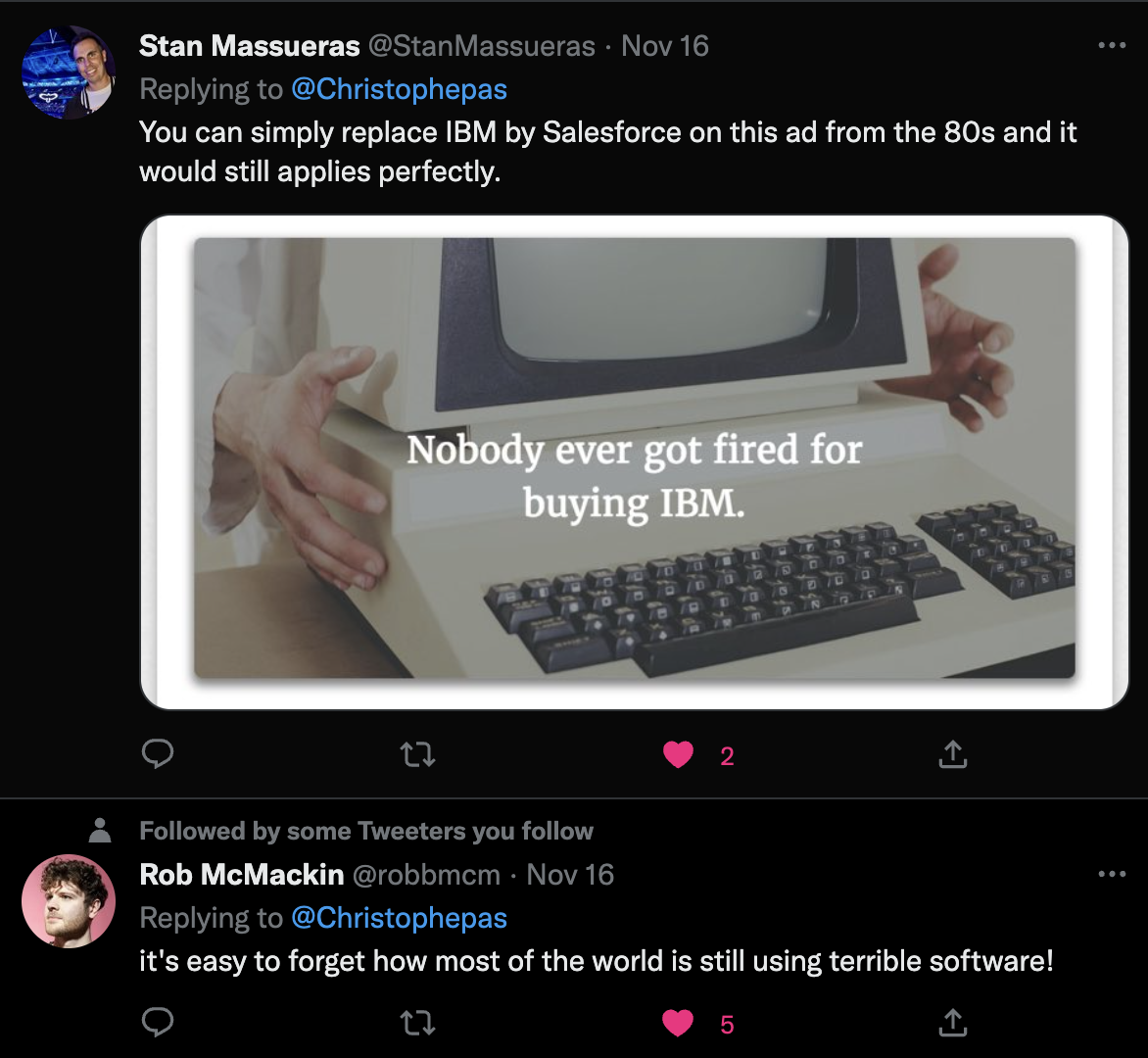
Salesforce CRMSalesforce is good if you have 500+ employees, but as a startup or small business, stay away! You're going to either burn way too much money configuring it to be the way you had envisioned, or it's going to be a mess.
Employees and salespeople don't enjoy using Salesforce. They might be used to it at their prior job, but their prior job probably also spent $300k getting it set up to how they remember it as.
Why Businesses Are Moving Away From Salesforce (which goes into Salesforce vs Copper, and how a "seemingly" SMB-focused CRM could actually do much of what you might want to do with Salesforce for a fraction of the cost—oh, and with significantly easier team adoption).
Scaling Teams
If you're a young B2B startup, use a more flexible smaller CRM like Copper or Pipedrive, it'll allow you to easily build out your company processes, iterate, and your team will actually enjoy using it. Yes, the hope and goal is to grow quickly but often the answer to "should we use Salesforce?" is 99.9% of the time no. Unless you already have 500+ people already using the CRM daily, don't go there. If you get it too early, it'll slow your team down from growing.
Don't believe us? Just take it from our friend Christophe Pasquier (CEO & Founder at Slite— a software we use daily!)

Airtable CRM
Airtable CRMBecause this comes up often—we don't recommend using Airtable as a CRM, it's an amazing tool but not a good CRM system for your company. We have an entire article about this too:
If you're considering between Copper or Airtable, the answer is quite obvious when it actually comes to the CRM side of things 😅
Streak CRM
Streak CRMStreak positions itself as a CRM, but it doesn't function in many ways as a normal CRM does. What Streak really is, is a glorified spreadsheet within Gmail. And while many might be like "what's wrong with that?" it's that it will lead to bad data entry practices and duplicate information without a single source of truth.
Which is the core problem with spreadsheets: it's so easy to create a new column of a data-point that you want to "track" on a standalone pipeline, and the next thing you know, sales reps are building out their pipeline structure, storing information on the "Box" (equivalent to an Opportunity in a traditional CRM), that should be stored on the person/company record traditionally.
Zoho CRM, Freshworks CRM, Monday CRM, Zendesk Sell, Capsule CRM, and Agile CRM
Zoho CRM, Freshworks CRM, Monday CRM, Zendesk Sell, Capsule CRM, and Agile CRMYou'll notice we didn't even include these CRM's on our site anywhere. That's because they are so far away from tools we'd recommend to any small business. They didn't make the cut because of poor UI/UX, trying to do too much and we think teams that try to use any of these CRM's will end up unhappy and wanting to switch.
Here is a rapid fire round of reasons why we don't recommend these CRM solutions:
- Zoho is way too big, tries to do everything. From HR management to accounting to contracts. Sales teams will end up confused and hating Zoho (we promise you).
- Freshworks CRM is also trying to be an all in one tool, more focused on customer service. We'd say, just use a proper Help Desk like Help Scout along with a CRM and you'll be further ahead. Also, the Freshworks UI is outdated, sales teams don't enjoy using it (making it harder to adopt) and is reportedly slow and clunky.
- Monday CRM. Sheesh, where do we even start? Monday was built as a Project Manager and recently expanded in the CRM space in an effort to scale. Saying this, their primary focus was being a project manager and a CRM second, meaning most of their resources through the company life span haven't even been focused on CRM building efforts. This is why we recommend the CRM's above that were built, first and foremost, to be CRM solutions.
- Zendesk Sell was also an afterthought as the company started as a help desk first in 2007. Zendesk Sell was added on in 2018 in an effort to capture more market share.
- Capsule CRM recently redesigned their website, which gives the impression that they are a modern CRM. But when you sign up for a demo or account, you'll quickly see that it's a quite outdated basic CRM. They offer a very small free tier for up to 250 contacts so might appeal to solo business owners just looking for a way to manage contacts, but for a small business that wants a proper CRM solution, you'd be much better off using Copper or Pipedrive mentioned above for a similar price point.
- Agile CRM point blank has a super dated UI/UX and is not built for small businesses who want to use modern software.
Final Thoughts: Best Small Business CRM?
Final Thoughts: Best Small Business CRM?The CRM Software Market Is Crowded
That said, there are a few clear leaders. If you're a small business but serious about implementing a modern CRM that will scale with you, hands down, Lightfield is the best AI-CRM. Read our full Lightfield review.
If you're using Google Workspace and are looking for a traditional CRM solution that is easy to use, has a good UI/UX, and will allow you to scale, look no further than Copper.
If you're using Microsoft 365, then Pipedrive CRM is your next best bet.
With other CRM solutions that you see out there, we'd say stay away, especially as a small business. There is a running joke in the software space, that every software eventually turns into a CRM. Stay clear of the companies that are just trying to add features to their software and focus on solutions that are built as being a CRM first and foremost.