
Review Summary
Review SummaryIf you're using MacOS, Raycast is hands-down the best spotlight search replacement available. It's one of those apps that you won't "get" until you use it, but once you use it, you won't be able to live without it.
It's usually the first app we install on a new computer, if that tells you anything.
Raycast Alternatives
Raycast AlternativesNot sure if Raycast is the right fit for you? Check out these alternatives:
 LittlebirdBest
Best for perfect memory and time tracking
Best for perfect memory and time tracking Wispr FlowBest
Best for faster writing
Best for faster writing Superhuman MailRecommended
Best productivity email client
Best productivity email client SunsamaRecommended
Best for mindful planning
Best for mindful planning MotionRecommended
Best for those who want an AI personal assistant
Best for those who want an AI personal assistant
What is Raycast?
What is Raycast?Most people use the native Spotlight search within MacOS, and most are totally happy with it. If that's you, you probably don't care much about this space, but I'm here to tell you that you should.
Search is the main way to navigate the OS, and imagine this search box with superpowers. Do you open up the calculator? Raycast has that built in. Have a separate window resizing/manager tool like Rectangles? Yeah, Raycast does that too.
Just about anything you can think of, Raycast can do, or they have an app/integration for it. I'm not kidding—I literally compressed the image to the Arc + Raycast integration using a Raycast plugin:
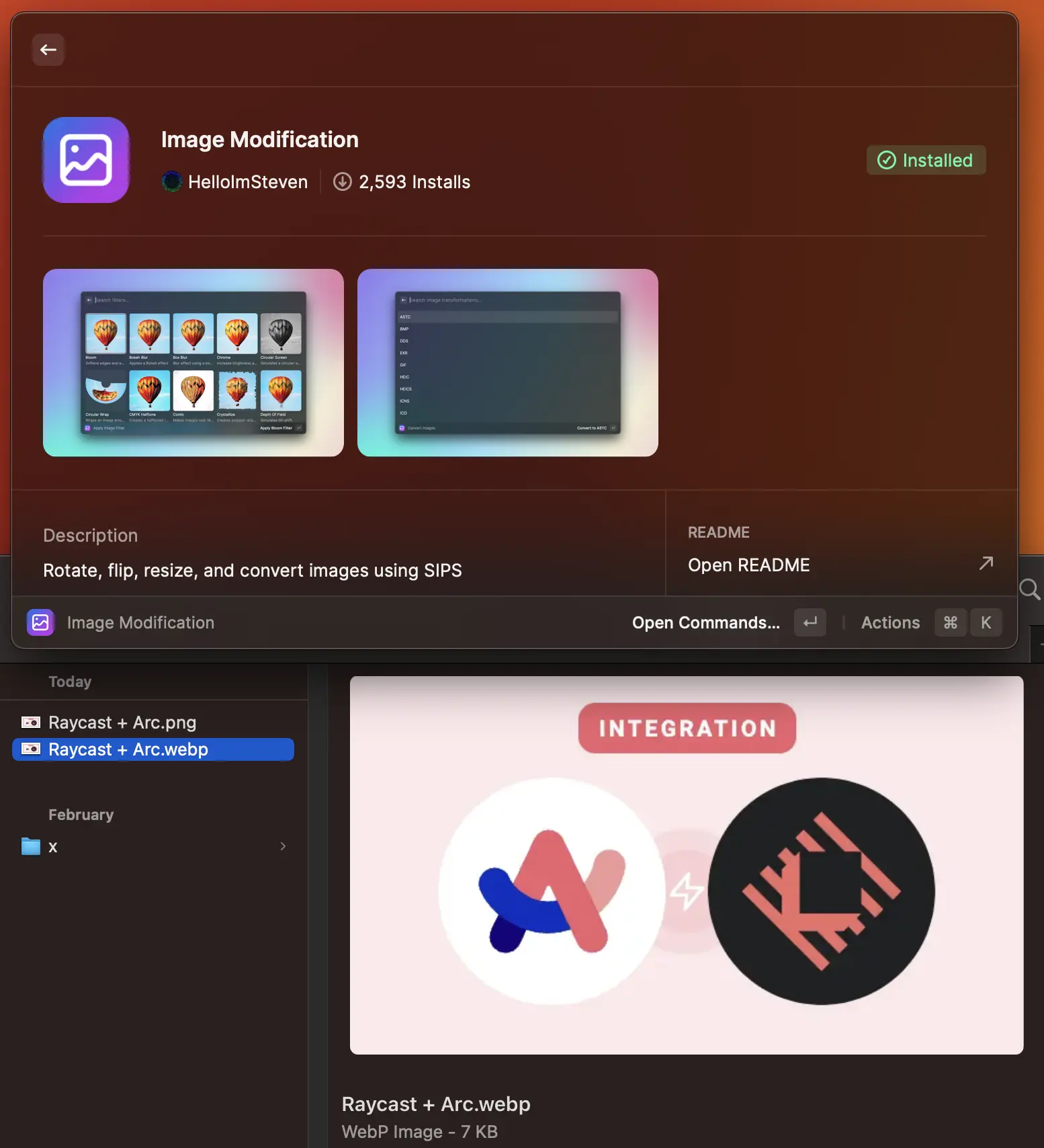
Never again do you need to navigate to a sketchy "image conversion" website again—you can now do it all through your favorite ⌘ + Space shortcut via Raycast.
Now for the more technical crowd... I'm here to tell you that it's better than Alfred in every way. It's beautiful, free, has deeper native integrations, and the developer community is next-level.
Skeptical? I hear you—so much in-fact that I've debated (for hours) with just about every single one of my power-user friends about why Raycast is far-and-above better than Alfred. They didn't believe me, fought me tooth-and-nail on it.
And guess what? Every single one of them are now using Raycast (and Arc 😉). They just needed to download it and give it a genuine shot. It does everything better, and looks 10x as good (UI/UX).
It's free, just give it a shot yourself. If you're skeptical, come debate me on Twitter—happy to convince you as well 🦾
Who is Raycast For?
Who is Raycast For?If you’re constantly jumping between apps, copying links, pasting snippets, grabbing emojis, and doing tiny repetitive Mac tasks throughout the day, Raycast has been helping our workflow for long enough that we can honestly say it's so useful. It replaces the clunky "open app, find thing, copy thing, paste thing" dance with one shortcut. Just press Command + Space, and you're off to the races.
Sometimes I'll be copying three links and need to paste them into a new page without going back and forth. Other times, we're sending the same NDA message, UTM links, or business address, and it's annoying to keep hunting that down.
And in cases like screen recording, where I need my Mac to stay awake or need to grab a color quickly, it becomes so apparent just how much friction Raycast removes in my day-to-day.
When we're working across Efficient App, we use Raycast for fast access to the things we repeat constantly. Team snippets are huge because they let us share commonly used text across our computers, which is one of the reasons we now pay for Raycast after using it for free for such a long time.
If you've used Spotlight and felt like it's fine but kinda basic, Raycast is going to feel like a huge upgrade and turn your Mac into a faster, more keyboard-driven workspace. It's such a nice layer that sits on top of your computer and makes the small stuff a whole lot less annoying.
Key Features
Key FeaturesClipboard History
Clipboard HistoryI truthfully cannot live without this feature. Clipboard history is the feature that made Raycast stick for us, and I get that it sounds so unimportant, but it solves a tiny workflow problem that affects me all day, every day.
Say you copy a link, then copy another link, then copy a piece of text. Normally, your Mac only remembers the last thing. With Raycast, you can pull up your clipboard history and paste any of them, which saves you from bouncing back through tabs just to re-copy something you already had.
Snippets and Team Snippets
Snippets and Team SnippetsSnippets are saved pieces of text you can reuse without rewriting them every time. For us, that means things like UTMs, our business mailing address, NDA language, and other small repeatable bits that would otherwise live in a random doc or Slack message.
For SMBs, this feature is super powerful. For our business, that means Alex and I can share snippets across each of our computers, so the same links, messages, and business details are available to both of us. This feature alone was the one that sold us on the upgrade, since it focused more on a shared workflow versus just personal utility.
Obviously, every team has different needs. So, if your team doesn't have repeatable language or links worth saving, then it's not going to be of much value to you. But, for businesses with recurring sales, ops, hiring, or partnership messages, it's worth it.
Raycast AI
Raycast AIOur experience may not be the same as everyone else's, but with our specific stack, Raycast AI feels underwhelming. I see how it could be useful to certain people, but it's definitely not the reason we'd recommend it. You can use it to ask questions, summarize text, transform information, and bring AI into your Mac workflow without opening another app. It's basically a way to have AI available from your launcher.
The problem for me is the lack of context. ChatGPT, Claude, and any other tool have so much more context about me, so I just wouldn't default to using Raycast AI. I suppose it can help with quick, contained tasks, but it doesn't feel like the place we'd go for serious writing, research, strategy, or work that depends on knowing our business.
Additional Features
Additional FeaturesCaffeinate
CaffeinateThis keeps your Mac awake when you don't want the screensaver or sleep mode kicking in. I use this a lot when I need to do a screen recording and need my computer to stay active without having to worry about babysitting it.
Color Picker
Color PickerRaycast can grab a color from your screen and copy the value instantly. When you're working on visuals, screenshots, landing pages, or design feedback, this is much better than opening a separate app just to get a hex code.
App and Extension Ecosystem
App and Extension EcosystemA strong developer community and a growing library of extensions is something I wish more tools had, because I would much rather compress an image through a Raycast plugin than go to some sketchy image conversion site... which I totally haven't done before. 😅
Window Management
Window ManagementRaycast can also handle window resizing and management, which means some people can save on storage space and skip downloading separate tools like Rectangle.
Pricing
Pricing- Free: $0/mo. Best for most individual Mac users who want...
- Pro: $10/mo, or $8/mo billed annually at $96/yr. Best for power users who care about sync or want Raycast AI built into your launcher.
- Pro + Advanced AI: $20/mo, or $16/mo billed annually at $192/yr. Best for users who specifically want access to more advanced AI models.
- Teams Pro: $15/user/mo, or $12/user/mo billed annually at $144/user/yr. Best for small businesses if shared snippets and commands become part of daily operations.
- Teams + Advanced AI: $25/user/mo, or $20/user/mo billed annually at $240/user/yr. Best for teams that want access to the most advanced AI models.
- Enterprise: Custom pricing, billed annually. Best for larger organizations that need advanced security and admin controls.
Final Verdict
Final VerdictIs Raycast worth it? For sure, especially if you're on macOS and do most of your work from a laptop all day. Raycast is one of those rare tools where the free version is already useful enough that there's not really a downside to trying it.
IMO, the AI features are not the main reason to use it. Especially, if you want deep AI context, but if you want your Mac to feel faster, cleaner, and less annoying to navigate, Raycast is one of the easiest recommendations we can make.
Categories
CategoriesRaycast fits into multiple categories based on what it actually helps you do. Each category highlights a different strength and the efficiency points it earned, helping you compare tools not just by features, but by how well they actually perform.
Keep exploring the best software across categories
FAQ
FAQDoes Raycast have an iOS App?
Does Raycast have an iOS App?Yes, Raycast has an iOS app available, which is more of a companion app, but has the core features that you'd want on mobile like AI chat, Notes, Quick Links, and Snippets.