
Review Summary
Review SummaryWorkona lets you organize your browser tabs into workspaces without switching browsers, making it perfect if you juggle lots of tabs and want to keep using Chrome or Safari. If you want the smoothest tab management possible and are willing to change browsers, there are better options, but for anyone set on sticking with their current browser and needing easy workspace switching, Workona is a solid pick.
Best Web Browser? Arc vs Chrome vs Safari vs Brave
Best Web Browser? Arc vs Chrome vs Safari vs BraveWhat is Workona?
What is Workona?Workona is somewhere between a browser, tab manager, and team workspace, tying in all of your cloud apps together. It tries to solve the open tabs problem by essentially leveraging the existing tab management functionality of your browser (along with tab groups), but upgrading the functionality massively.
What if you were to click on a workspace, and magically all of your open tabs archived themselves, and only the relevant tabs of the workspace opened themselves up. That's Workona in a nutshell:
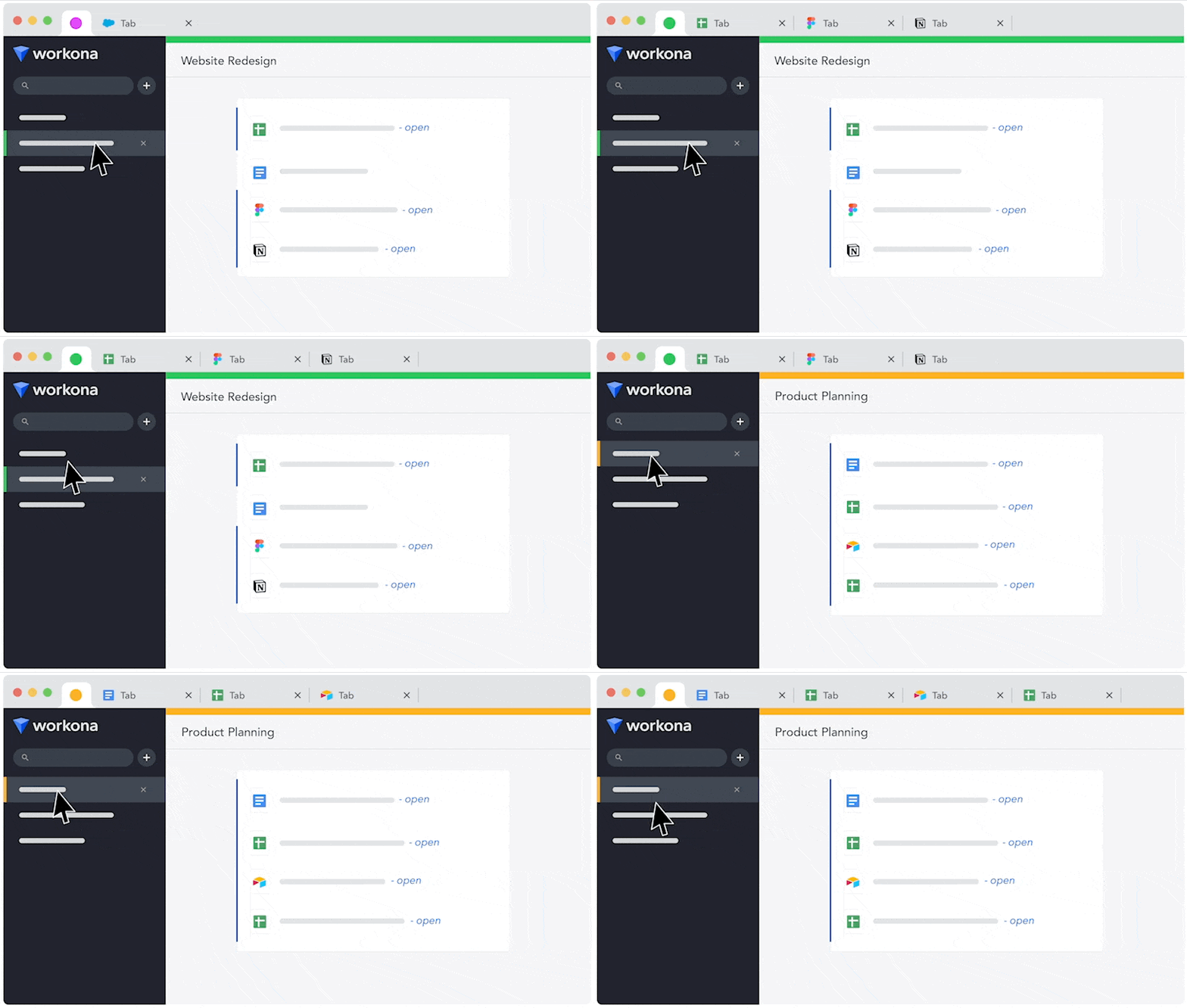
(As you can see, each workspace has unique tabs that you can easily jump between to keep your work segmented)
With that, you've probably seen (especially within the past couple years), a myriad of "productivity browsers" popping up (here you can see a list of the best productivity browser that I'm referencing). Well Workona tried solving this space not with a new browser, but a browser extension instead, super creative.
Who is Workona For?
Who is Workona For?If you're someone that is wearing multiple hats at a company and jumping in and out of many open tabs, Workona is aiming to solve that exact pain-point.
If you're like most people who are using Chrome or Safari and have no interest whatsoever to change browsers, then Workona is for you as all that's involved is installing a Chromium extension.
Who shouldn't use Workona?
Who shouldn't use Workona?Now while Workona is great for those who are set in their browser ways, we do feel like some other tools do handle actual tab management better (e.g. Dia and Arc Browser), that said, you'd need to be open to installing an entirely new browser.
If that sounds like you (oh, and alternative browsers like Arc do still allow for extensions), then we might recommend giving on of our best browser recommendations a shot first.
Oddly enough, you could in theory install Workona on Arc (because Arc is Chromium-based), just not sure exactly what would happen, might be a bit odd is all 😅
The Workona Vision
The Workona VisionHere's an excerpt from a larger write-up here that goes more into the over-encompassing browser & tab management evolution, posting a snippet as it gets some of this across:
In my never-ending search to find my “portal to the internet Chrome experience”, I stumbled upon a totally re-imagined Chrome extension and tab management experience called Workona.
It was ChromeOS + Workona that enabled me to finally experience a glimpse into what I had always hoped for the “portal” vision to be, it mostly checked the boxes:
- A better way to build out workspaces and processes for personal and business usage
- Deeper integration with the existing web apps we love and use today
- Sharable workspaces, build out your sales process and share the created workspace with your sales team
- Accessible from any system (if you logged into a Chromebook, it would auto-install the extension and just like that, you’re where you left off)
Read the rest of the article to see how this early obsession in Workona turned into a job offer to move to Silicon Valley and help them build out the over-encompassing vision.
Key Features
Key FeaturesWorkona does a lot, though their main bread and butter is tab management and shared team workspaces to share important links. The beautiful thing about links are that most things are links now-a-days, from assets (Google Drive and Figma) to projects and tasks in tools like Asana or Monday.
There's a layer where them getting into task management and note taking build right within, I started feeling a bit conflicted with whether I should be using those native features, or our actual project management tool (Motion) and knowledge base software (Slite).
Final Verdict
Final VerdictThere's no hiding that we're quite fans of the best tool for the job, so that's where we start running into some conflict when apps start going the all-in-one software path, building out sometimes basic functionality to check some boxes. Don't get me wrong, Workona definitely isn't an all-in-one tool, they aren't trying to be that, I think it's just a result of what comes with building more of a shared workspace management tool.
Categories
CategoriesWorkona fits into multiple categories based on what it actually helps you do. Each category highlights a different strength and the efficiency points it earned, helping you compare tools not just by features, but by how well they actually perform.
Keep exploring the best software across categories, or explore Workona alternatives