Review Summary
Review SummaryWe used Copper for over 10 years in our business, but recently migrated away and switched to Lightfield CRM. Why? We ultimately wanted an AI-first CRM, one that could keep up with the demands of the fast-paced AI world.
Best Small Business CRM?
Best Small Business CRM?Copper Alternatives
Copper AlternativesNot sure if Copper is the right fit for you? Check out these alternatives:
 LightfieldBest
Best AI CRM
Best AI CRM WonderlyRecommended
Best for home remodeling businesses
Best for home remodeling businesses
What is Copper?
What is Copper?Copper CRM first launched in 2013 as a CRM for Google Workspace. At the time, the bigger players were HubSpot, Salesforce, and Pipedrive so Copper was a refreshingly simple CRM.
I got my step-father to use it for his construction business and saw how it changed his sales and customer onboarding process. We integrated Copper with other tools like PandaDoc (for proposals) and Help Scout (for his help-desk) and it ultimately changed his business at the time.
Seeing the difference in his business, I started consulting and helping other businesses set up their CRM. Over the past decade, I've worked with something like 50+ businesses to help them configure Copper and integrate third party tools with it. To say I was a huge Copper fan is an understatement... but that was in the old, pre-AI world.
Why I Left Copper After 10 Years
Why I Left Copper After 10 YearsFast forward to the AI-era, I started noticing that what I expect out of my CRM has changed significantly. I started craving an AI-first CRM, not one that required dozens of hours to manually set up (we used to even teach a course on how to setup Copper) and update every day.
Overtime, as our team used Copper in the AI-era, we found that it became a graveyard. Old data, old custom fields, it really starting feeling archaic in terms of updating it. No one was doing it.
On top of that, we had recently changed our business processes, so the idea of re-configuring Copper felt like too much of a chore. With that, I started looking for alternative options and that's when Lightfield CRM popped up.
While the idea of migrating off a CRM with 10 years of data felt dreadful, Lightfield's website claimed that their AI can act as a consultant and set up your entire CRM for you. I was skeptical, but emailed Copper to export all our data.
I took the .csv file, imported it into Lightfield and to my surprise, it started recommending exactly how we should set up our CRM.
It even flagged "hey, you haven't used this field in Copper more than 5% of the time, I think you should let it go." It suggested the fields we should have based on our business processes, and just asked me to "approve"...and then it went and actually configured the CRM 🤯
Within a few hours on a Sunday evening, I had migrated our entire company off of Copper.
Since then, our entire team has been using the CRM on a daily basis and we're excited about the CRM space again. You can read our full Lightfield Review.
Oh and as for my step-fathers construction business? Wonderly is a new CRM on the market that is specifically designed for construction businesses, and they even help you get leads 👀
Who is Copper for?
Who is Copper for?Copper is for teams using Google Workspace that prefer a traditional CRM over an AI-first CRM. Expect manual setup and upkeep with Copper.
Key Features
Key FeaturesGoogle Workspace
Google WorkspaceCopper first launched on the premise that it would be the best integrated CRM with Google Workspace. That has always been it's core differentiator.
Chrome Extension
Chrome Extension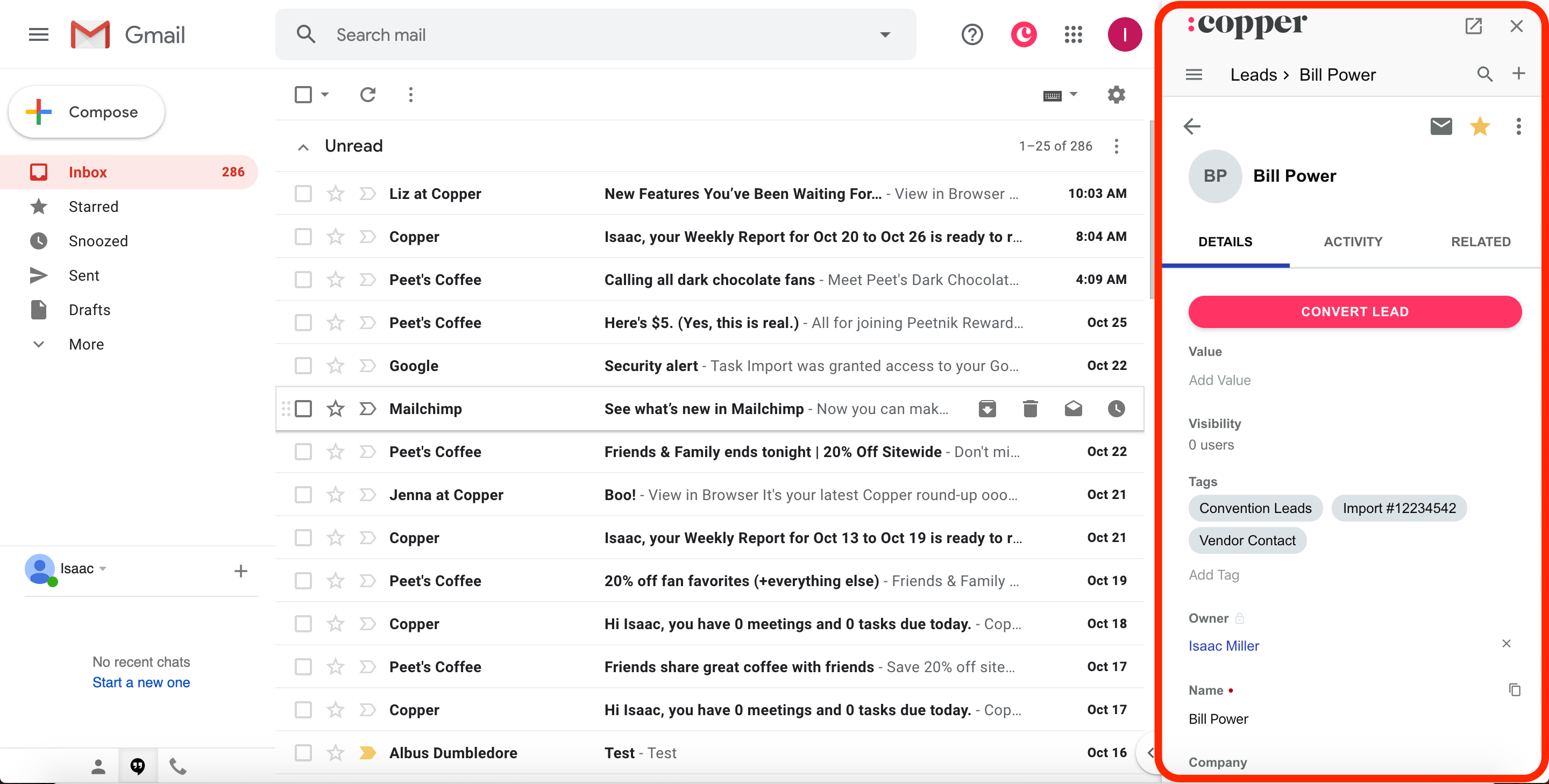
Copper has a chrome extension that makes it easier for teams to adopt because they can just update Copper from within Gmail rather than opening up the CRM itself. That said, in the AI-era, our expectation is more than the CRM should update itself.
Even though we used Copper for 10 years, we never used the Copper Chrome extension because it was not compatible with Superhuman Mail, which we preferred using over Gmail.
Automatic Email Syncing
Automatic Email SyncingWhen you add contacts into Copper, it will go back an entire year into all of your team's emails and log them all into the CRM as activities for that contact (along with any upcoming Google Calendar events).
This used to be more interesting but over the years, CRMs like folk and Lightfield offer this as tablestakes (Lightfield retroactively synced our data for 10 years when we migrated 🙌).
Activity Logging
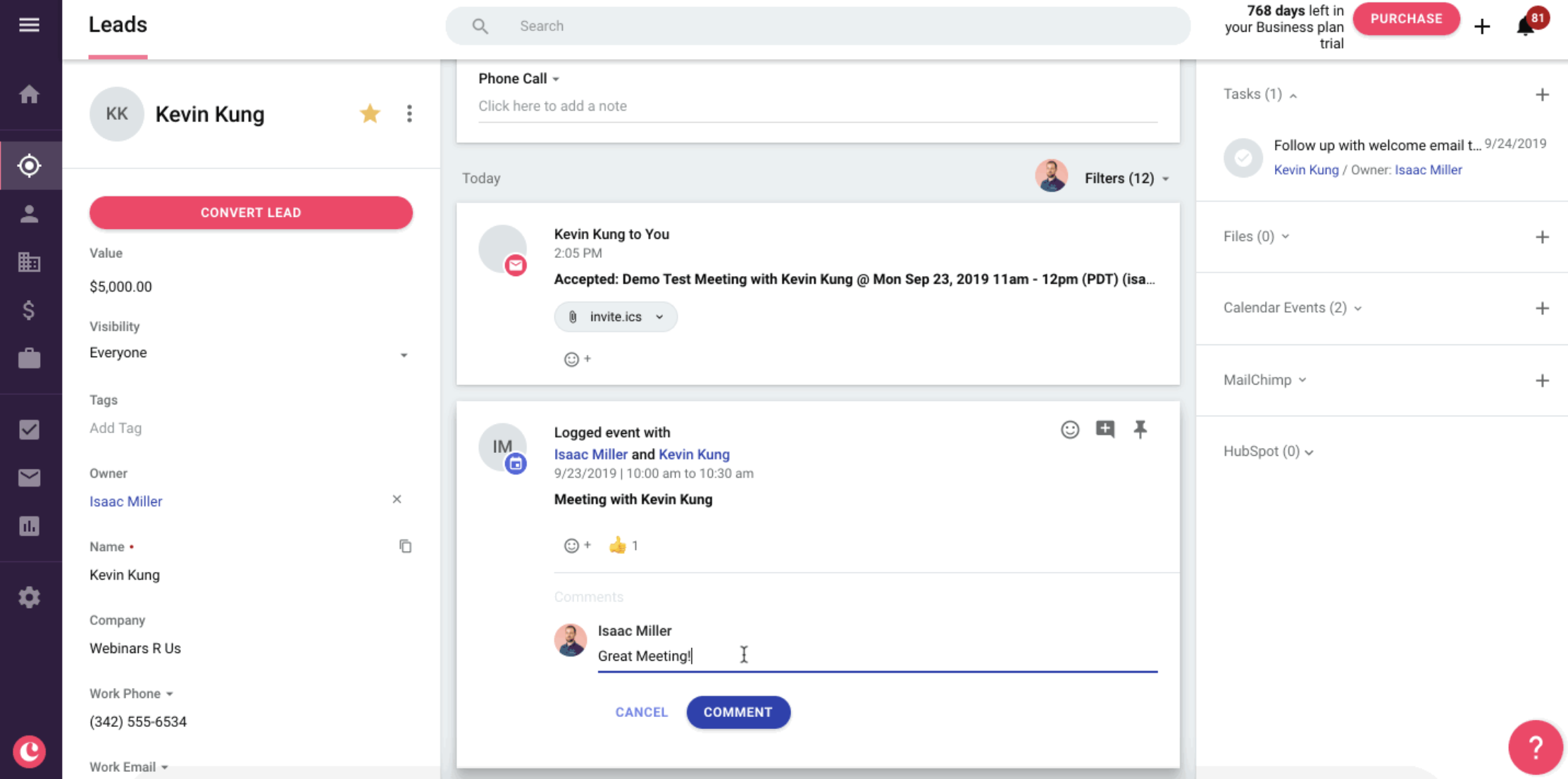
Activity LoggingYou can manually log calls and notes in Copper. If you integrate it with third party tools it can logs call recordings, meeting recordings, signed proposals, and even text messages.
But over the 10 years of using Copper, we found that this activity feed was rarely used. It became too cluttered, and we wished there was just an AI summary updating the gist of the deal based on everything that happened.
Many of our Copper consulting customers complained to us about this over the years.
More than that, we do a lot of business through Slack, and Copper has never supported activity logging from Slack (which Lightfield does).
Opportunities & Pipelines
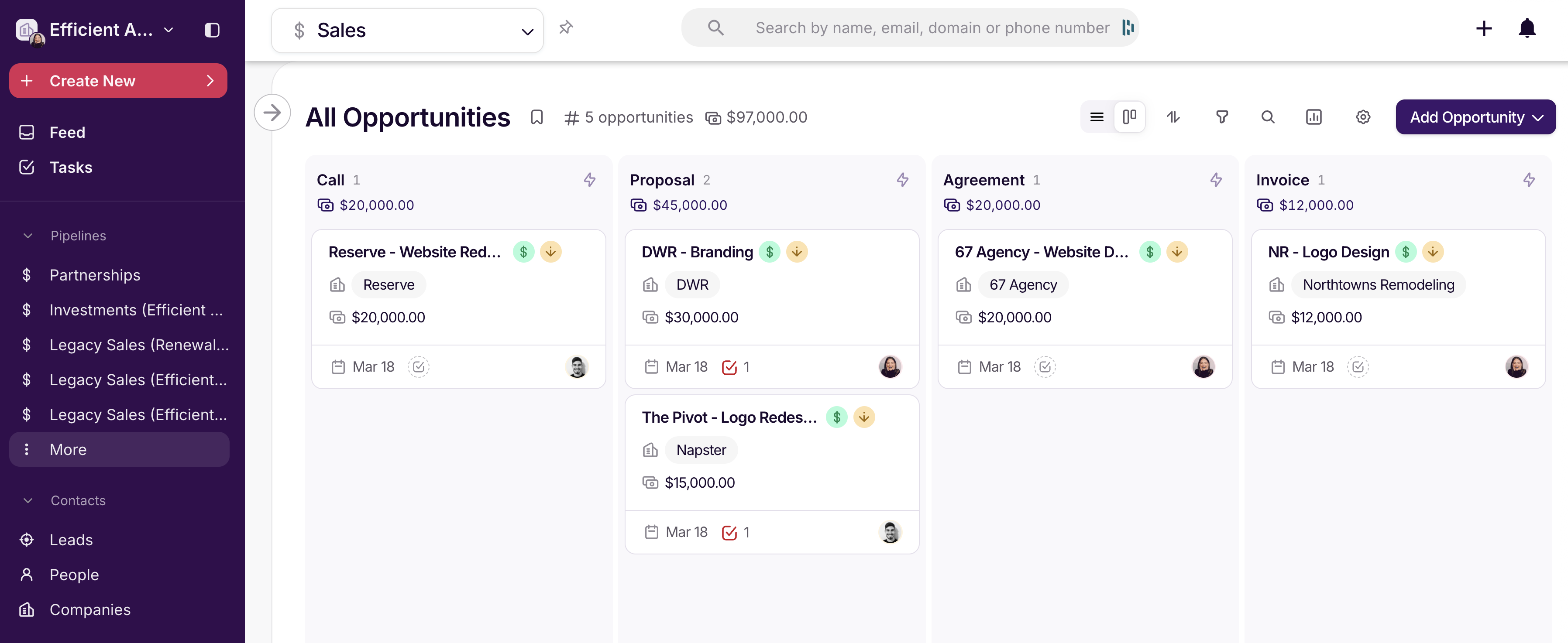
Opportunities & PipelinesYou can visualize all your deals within a pipeline view that is incredible simple to understand.
Form Integrations
Form IntegrationsCopper supports form-based lead capture that sends submissions straight into your CRM. Leads can submit a form and they will be assigned to a sales rep, and you can automatically send out an email.
Email Automation
Email AutomationCopper natively supports automated emails on both a one-off instance, as well as an email sequence (though the latter is restricted to the Business tier for now).
You can use this to automatically send an email (or sequence of emails if there's no reply) to either a lead or person. So say you have a site form that adds a new lead to Copper upon submission, you can simply have it set that lead to a specific status, and then trigger the email to send out based on that filter. Allowing you to send from either the lead owner, or the team member that actually created the automation:
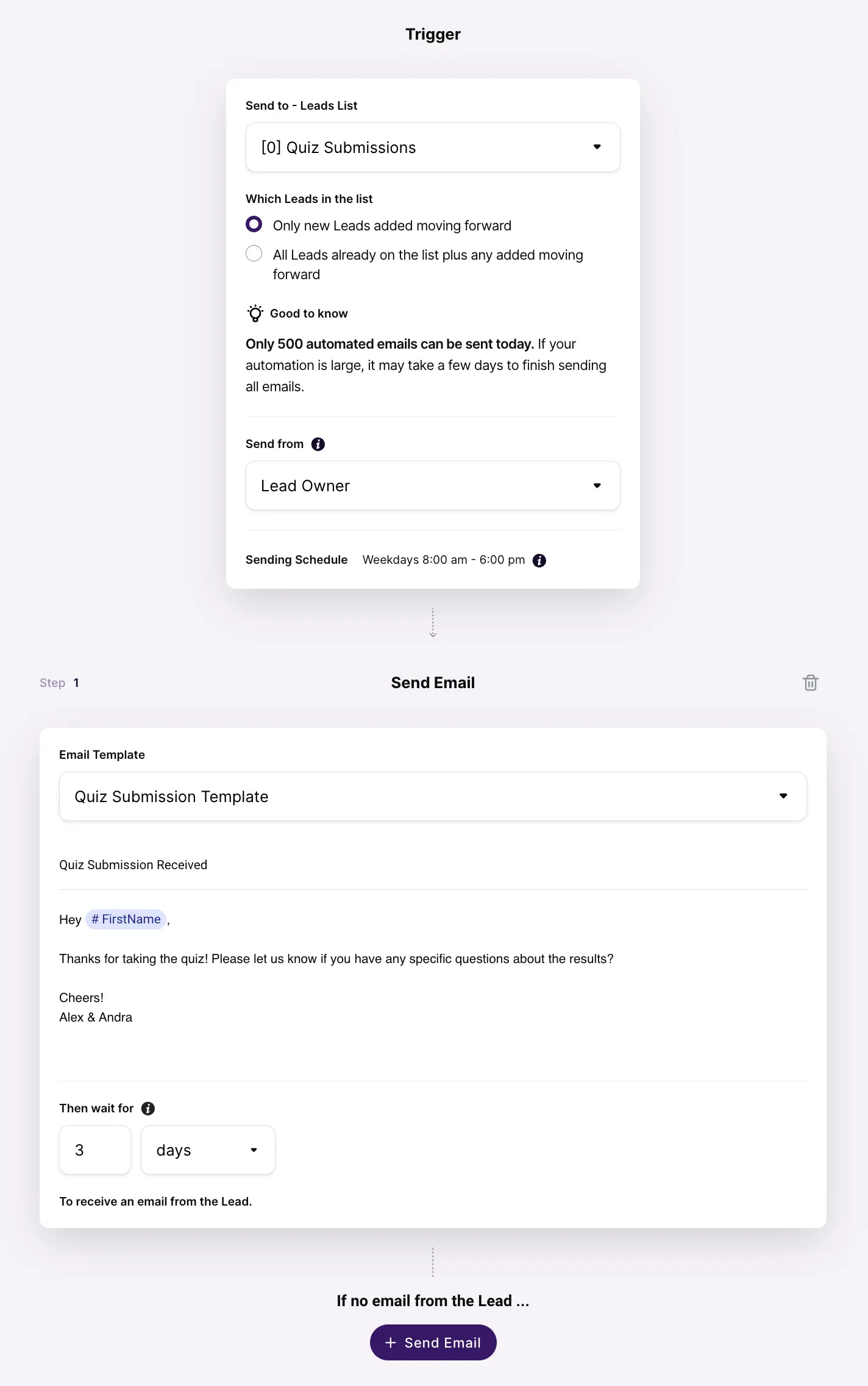
Email automation for leads within Copper CRM
The main thing to note here is that Copper's email automation actually sends the email directly from your Google Workspace/Gmail account, so note that it is a transactional email, meaning that there is no "unsubscribe" option, and if someone marks you as "spam", that can substantially hurt your domain.
Email Automation Limitations
Currently, only People and Leads support the email automation functionality within Copper, with automated email upon Opportunity stage change coming later this year.
You're also currently restricted to the native system merge fields like Name/Company/Title for use within the email templates that you use with email automation, with hopefully full custom field support coming in the future.
Additional Features
Additional FeaturesAPI
APIWe've excessively used the API of all the major CRMs on the market and Copper's API is fantastic. Their API is one of the most powerful and user-friendly to build on, especially as compared to that of HubSpot for which has some incredibly odd API design decisions.
While this might not sound like a big deal, if you ever plan on integrating your CRM, I'm here to tell you that building the same integration in HubSpot takes 2–3x as long and is more of a pain to maintain.
That said, this mattered a lot more before AI. Integrations have never been easier to build with AI 😅 Right now, my basic expectation is that I'd be able to connect my CRM with any tool, let any agent interact with it, and that I can configure all of it through a chatbot. Copper does not allow for this.
AI Features
AI FeaturesCopper has started introducing AI into the platform, including something they call Copper GPT, which is basically a GPT-style assistant that interacts with your CRM data. In theory, this should let you query your CRM or generate insights more easily.
But Copper still has some room to grow here and at the time of writing still does not have an MCP.
With how our team is moving, having an AI-first CRM became incredibly important to our business.
Pricing
Pricing- Starter: $29/mo per seat. Best for small teams that need flexible pipelines, task automation, and basic project management without advanced reporting or automation.
- Professional: $69/mo per seat. Best for growing teams that need workflow automation, reporting, bulk email, and integrations to scale operations.
- Business: $134/mo per seat. Best for teams that need unlimited contacts, advanced reporting, email sequences, multi-currency support, and premium support.
Final Verdict
Final VerdictFinal thoughts, is Copper CRM worth it? The truth is, after 10 years of using it, recommending it, and loving it, it came time to say goodbye. We migrated our business away from Copper to Lightfield and are happier for it.
And for my step-dad? We introduced him to Wonderly, which is a better fit for his construction business.
Screenshots
Screenshots
Copper
Categories
CategoriesCopper fits into multiple categories based on what it actually helps you do. Each category highlights a different strength and the efficiency points it earned, helping you compare tools not just by features, but by how well they actually perform.
Keep exploring the best software across categories, or explore Copper alternatives
FAQ
FAQDoes Copper Have Email Automation?
Does Copper Have Email Automation?Copper has native email automation functionality on their Professional and Business tiers. Here's our full breakdown of their new email automation and lead form functionality.
Just note that the email will send from your email account, so if you're doing bulk cold emails, you'll want to avoid it in-case of being marked as spam which can destroy your domain and deliverability.