
Review Summary
Review SummaryRelay is a business bank built for owners who want more structure around cash flow. It's designed around the Profit First method popularized by Mike Michalowicz, which suggests splitting your incoming revenue into separate buckets (or "envelopes").
Why We Switched to Mercury (After Testing Every Business Bank)
Why We Switched to Mercury (After Testing Every Business Bank)Relay Alternatives
Relay AlternativesNot sure if Relay is the right fit for you? Check out these alternatives:
 MercuryBest
Best modern bank for SMB's and startup founders
Best modern bank for SMB's and startup founders Ramp
RampBest if you've limited banking needs and already using Ramp
Best if you've limited banking needs and already using Ramp
What is Relay?
What is Relay?Relay is an online business banking platform created to give small business owners more visibility and structure around their cash flow using the "Profit First" methodology.
If you are not familiar with Profit First, it is a financial system designed for small business owners who struggle with cash flow. Instead of running everything through one main bank account, the idea is that every dollar that comes into your business immediately gets allocated to different buckets so you always know what money is actually available to spend.
For example, when $1000 comes into your account, you might automatically allocate:
- 30% to payroll
- 25% to taxes
- 15% to marketing
- 10% to profit
- The rest to operating expenses
For a lot of small business owners (especially those running service businesses) this system is super helpful. If all your money sits in one account, it can be easy to accidentally overspend and suddenly you realize you are short when payroll comes around.
The Profit First system solves that by forcing discipline. Relay has leaned heavily into this philosophy, and to their credit, they have done a very good job of building their product around it.
That said, when evaluating banks, we chose to go with Mercury bank instead (and we're so happy with our choice). It allows you to do all of the above, but has a better user experience, and even deeper features that allow you to manage your money.
Who is Relay for?
Who is Relay for?Business Owners Who Struggle With Finances
Relay tends to appeal to small business owners who want structure and guidance around managing their money.
Relay works best for businesses with roughly 1–20 employees generating somewhere between $100K and $3M in revenue.
A lot of the businesses that gravitate toward Relay are service-based operators like agencies, consultants, freelancers, HVAC or plumbing, and other local businesses where cash flow management is a daily concern. They started their businesses because they're good at their craft, but not the best at manages finances.
If you're already comfortable managing your finances or you're planning to scale, you may start to find Relay limiting compared to Mercury.
Key Features
Key FeaturesMultiple Checking Accounts
Multiple Checking AccountsRelay's core feature is the ability to create multiple checking accounts (they allow up to 20) within a single business account. Going back to Profit First, those multiple accounts make it easy to separate funds for things like payroll, taxes, operating expenses, and profit.
For small business owners who have relied on a single bank account in the past, this feature can be super helpful. Seeing money separated into specific categories makes it so much easier to understand what is actually available to spend.
That said, this concept is not unique to Relay. Other banking platforms (including our Top Pick, Mercury) also support multiple accounts and similar cash organization strategies, so it’s not a reason to choose Relay on its own.
Automatic Transfers
Automatic TransfersAnother core feature is their automatic transfer rules. We're huge fans of using automation to save time on tedious tasks, and this is definitely one of them.
For example, a business owner might configure Relay so that every time $10,000 comes in, 15% automatically moves to a tax account, 30% goes to payroll, and another portion goes to profit.
For business owners who struggle with cash management, this kind of automation can make a big difference. It essentially builds financial discipline directly into the banking system.
One HVAC business owner on Reddit described how they used to reach tax season and realize the money simply wasn’t there because everything had been sitting in one account and slowly getting spent. After switching to Relay, a portion of every payment immediately moved into a tax account, another to operating expenses, and another to profit.
This isn't unique to Relay, but this is the feature they lead most of their marketing with.
Accounts Payable and Vendor Payments
Accounts Payable and Vendor PaymentsRelay has tools for paying vendors and managing bills. Businesses can forward invoices into a dedicated bill pay inbox, where Relay scans the invoice and generates a draft bill. This saves time compared to manually entering payment details and helps keep vendor payments organized.
You can also save vendor contacts and payment details, which makes recurring payments easier to manage. That said, their accounts payable and vendor payments workflows are much more manual and limited that other banks.
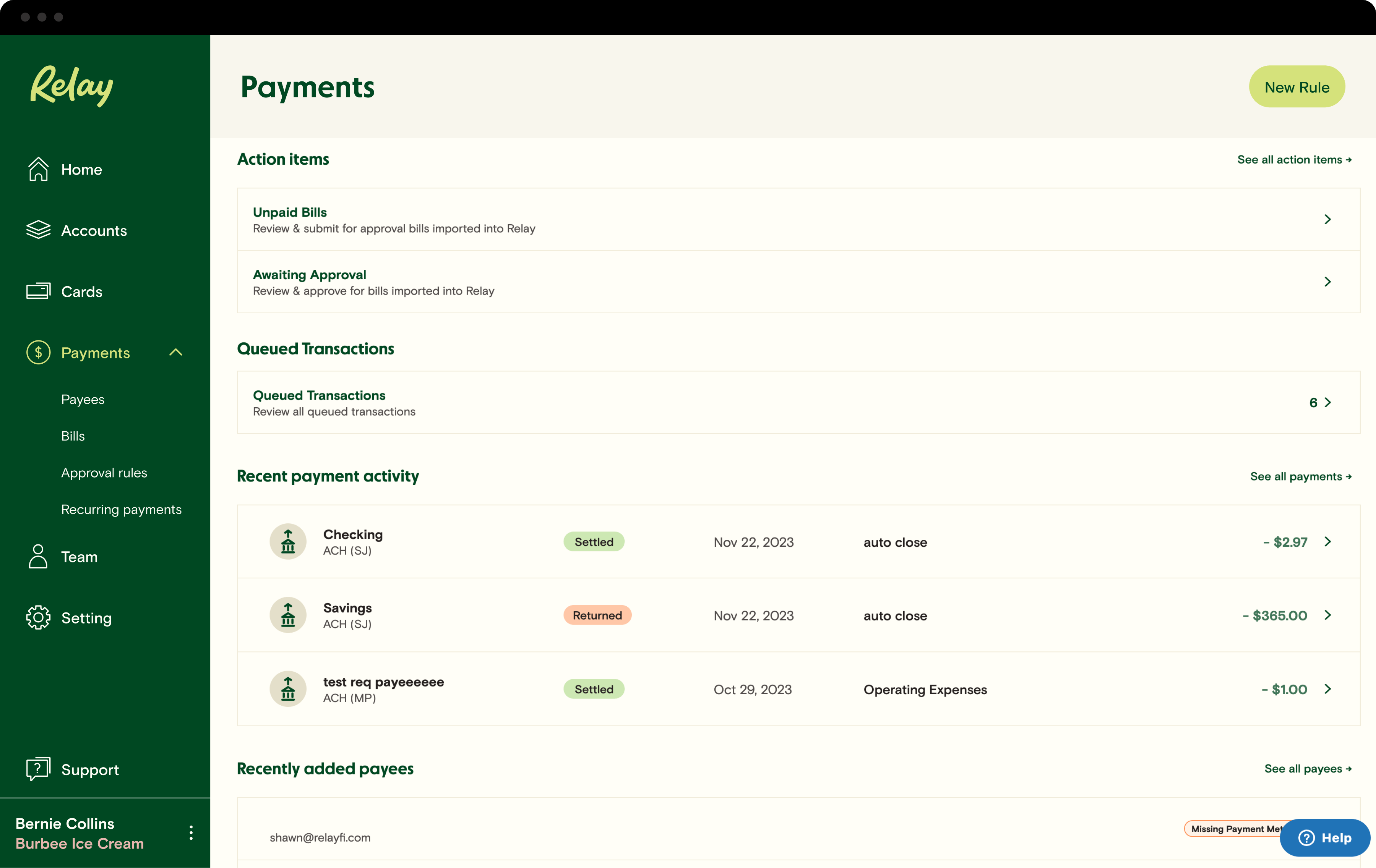
The main limitation here is that Relay does not include vendor onboarding tools. This means business owners still need to manually collect tax forms like W-9s from contractors and vendors.
If you work with many freelancers or contractors, the administrative work will become frustrating quickly (trust us, we've been there before we switched to Mercury). You pay a freelancer, and then during tax time, you'll realize you need their W-9. Whoops, now you need to email them to get it. Mercury does all of this automatically which is why we say it's built for actual scale.
Additional Features
Additional FeaturesBasic Expense Management
Basic Expense ManagementRelay has a basic built-in expense management feature to help you track spending without needing a separate tool.
Team members can upload receipts directly from their phone or forward them by email, and Relay attaches them to the matching transaction automatically. You can also set receipt policies for debit card purchases, which means employees get reminders if they forget to upload proof of a purchase. This helps prevent the "end-of-month receipt hunt" that many small businesses deal with.
Relay also lets you categorize expenses and sync everything to accounting tools like QuickBooks Online, Xero, or Kick (our favorite AI accounting software).
That said, Relay's expense management is lightweight. It works well for small teams that just want basic spending visibility and receipt tracking, but it's not as robust as dedicated platforms like Ramp or BILL Spend & Expense, which offer deeper card controls, budgeting, and approval workflows.
Invoicing
InvoicingYou can send invoices and collect payments directly through Relay. Of course this is convenient for small service businesses that want basic invoicing without relying on separate accounting software.
Integrations
IntegrationsYou get the integrations you'd expect with Relaty. It integrates with QuickBooks Online, Xero, Kick, Gusto, Plaid, and Yodlee.
Connecting Relay with QuickBooks, Xero, or Kick means new transactions can flow directly into your accounting software as they occur so you're not left doing it manually.
Pricing
Pricing- Starter (Free): Best for small business owners who want simple business banking and the ability to organize cash across multiple accounts. Includes up to 20 checking accounts, debit cards, automated transfers, and basic bill payments.
- Grow ($30/month): Best for growing small businesses that want higher interest rates and more advanced financial tools. This tier unlocks stronger yield on savings, faster ACH transfers, and additional bill payment capabilities.
- Scale ($50/month): Best for businesses with larger payment volumes that want deeper financial workflows and automation. This tier includes everything in Grow along with higher payment limits and more advanced accounts payable features.
Quick note: higher interest rates for your savings account are locked behind paid plans, which is a bit of a bummer since other banking platforms like Mercury offer better yields without requiring a subscription.
Final Verdict
Final VerdictIs Relay worth it? Sorta. On one hand, if you are absolutely awful at managing your finances and need some hand holding, Relay probably makes sense as a place to start.
On the other hand, in terms of comparing Relay to the best business banks, Mercury is much better (and you can still manage your money via the difference bank accounts). You can read our Mercury Review to hear more about why we chose it.
Screenshots
Screenshots
Relay
Categories
CategoriesRelay fits into multiple categories based on what it actually helps you do. Each category highlights a different strength and the efficiency points it earned, helping you compare tools not just by features, but by how well they actually perform.
Keep exploring the best software across categories, or explore Relay alternatives