Review Summary
Review SummaryMotion is the most innovative AI-powered project management tool for individuals and teams who want to fully embrace AI to get work done.
It uses AI to take all of your team's projects, tasks, priorities, deadlines, and dependencies to build the perfect day for you and your team, time blocking tasks right on your calendar. They also have AI Docs, & an AI Note Taker, helping you get work done faster.
We've been using it for 5 years and is core to how we manage our time and projects!
How to Use Motion for Project Management
How to Use Motion for Project ManagementWhat is Motion App?
What is Motion App?Motion isn't just a calendar app, scheduler, task manager, project management app. It's really an AI Assistant at the core, that takes all of this unique information, and uses it to build your perfect day, making it one of the best productivity tools on the market!
Before Motion, I used Asana for seven years. But back then, there was no AI to automatically update your deadlines so it always felt like I was spending at least an hour or two each week "cleaning up Asana" just so it wouldn't explode.
When Motion launched, we were immediately interested because the whole idea is that Motion automatically time-blocks tasks on your calendar and will warn you if a project is over due (and it does this for your entire team too). It's just a lot more proactive than any other project management tool on the market. We've been using it for 5 years now and haven't looked back. It was actually the first AI tool we used in our business.
How we use Motion
How we use MotionWe use Motion for managing our entire YouTube content production process.
I use their docs to store content ideas, and once we decide we're making a new video for Efficient App, I create a project from a template inside Motion.
The moment I do that, Motion automatically assigns every task across the whole production process, time blocks it on my editor's calendar, and notifies everyone on the team about what they're responsible for. My editor has his own checklist inside Motion for every video, and the moment he finishes a cut, it automatically assigns me a review task. I don't have to chase anyone or check in. I just open Motion, see what I need to do, and click!
What surprised me early on was the deadline visibility. Motion will actually flag when someone on the team is overloaded and tell you that you're not going to hit your deadline, before you've missed it (it was a reality check for me as a founder).
So when people ask me if Motion is a calendar app, I usually say it's more like an assistant that helps to manage my time and work.
Who is Motion For?
Who is Motion For?If you've ever told your team or yourself "this should only take one week" and then watched it turn into two months, Motion is probably for you.
That was us. Before we mapped out our YouTube production process in Motion, I genuinely thought a video took two weeks to make. Script it in a day, film, edit, done!
What Motion showed me was that it actually takes closer to two months, because I don't script in one sitting. I write a draft, step away, come back, revise, go over it with my co-founder, and then editing alone takes one to two weeks.
I wasn't disorganized, I just had no real visibility into how long things actually took. And as a result I felt constant pressure that we were "BEHIND!"
It was an expectations problem. And my editor and co-founder felt it most because they were on the receiving end of timelines that were never realistic to begin with.
Motion is a great fit if:
- You consistently underestimate how long projects take and you're tired of the pressure that creates
- You're a founder or team lead who wants to stop managing work and start actually doing it
- Your team is small enough that everyone wears multiple hats, and you need something that accounts for that reality automatically
- You've tried Asana, ClickUp, or Monday and found yourself spending more time updating the tool than using it
Team members that use Motion app report getting more done and worrying less about "figuring out what to do next".
Who should skip Motion?
Who should skip Motion?If you don't like the idea of AI arranging your schedule, Motion is not going to be for you. Motion is after all, a tool, and it can't get your schedule absolutely perfect as if you were to manually arrange it.
You can always drag and drop to correct it, and I do occasionally, but if you're someone who needs to manually control every block of your day, you'll find yourself fighting it more than using it (consider one of these daily planner apps instead).
The other scenario where I'd say skip it is if you're a larger team where managers are managing managers and reporting actually matters to you. Motion's reporting is genuinely underwhelming. I've barely touched it because there's just not much there. If you need visibility into how work is moving across departments or you have stakeholders expecting dashboards, you're going to hit a wall.
Key Features
Key FeaturesHere are some of the key features that make Motion stand out:
AI Calendar
AI Calendar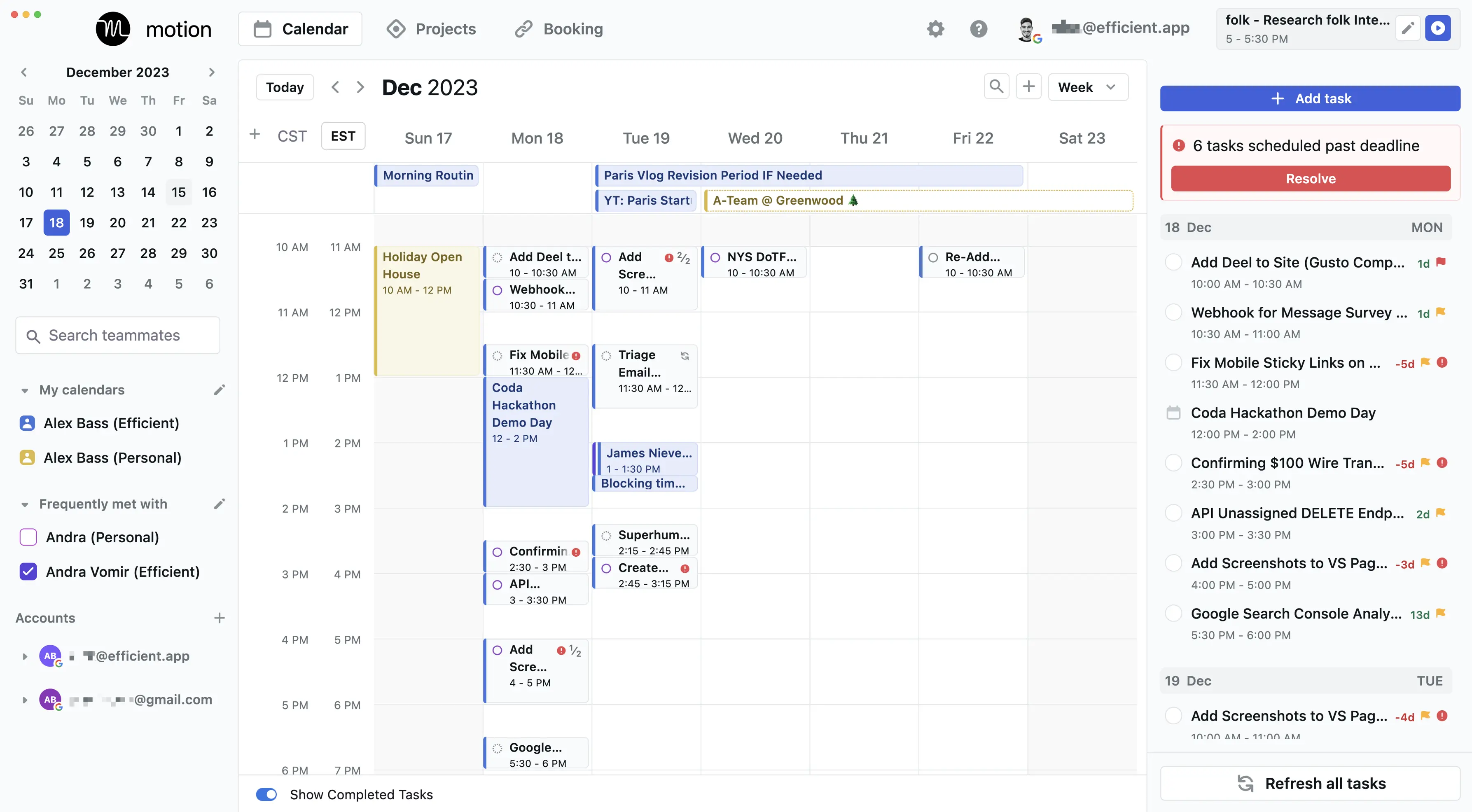
Motion calendar app view with tasks auto-scheduled for the week (with time off)
AI Task & Project Management
AI Task & Project ManagementOther project planning software requires you to spend chunks of your day re-evaluating deadlines and shifting back work. Not to mention, they have no actual reference of your calendar, so actual deep work and focus time available isn't even taken into account when you're in meetings... 😅
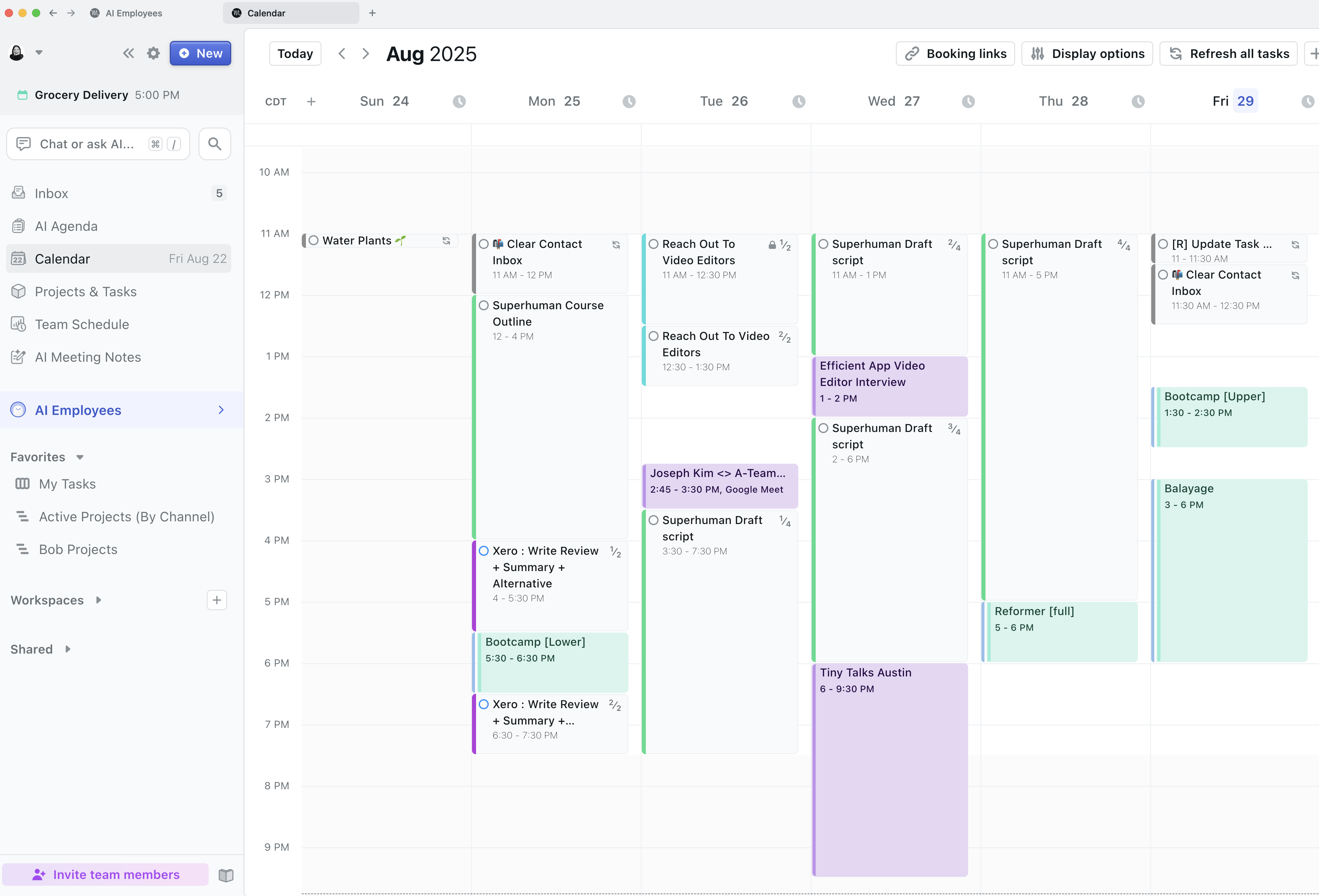
Motion automatically re-prioritizes everyone’s tasks and calendar so that everything gets done, on time
That's where Motion is different, and in some ways, in a category of its own. What they are doing is unmatched in the project management software space, and when you compare Motion alternatives like Motion vs Asana amongst others in the category, you see how outdated traditional task management tools and truly are.
They've leveled up your project management software with a baked in calendar scheduler that takes into account your task list and hard deadlines, along with time blocking to only recommend the best times for you to meet with others, ensuring that you can still get your work done on time. Something that no other project management software can do.
Oh, and whenever things don’t go according to plan (which they never do), Motion automatically re-prioritizes everyone’s tasks and calendar so that everything gets done, on time. Helping de-stress teammates by offloading all of the cognitive processing surrounding what should be done next.
AI Project Creation
AI Project CreationMotion also lets you use AI to create projects. When you have a new project or workflow, instead of mapping out every single step, you can just write one prompt and Motion will generate a full project template for you. From there, you can edit and customize it to fit your needs.
We've found this is a great way to kick things off quickly. And once you're happy with the process, you can save it as a template to reuse again and again.
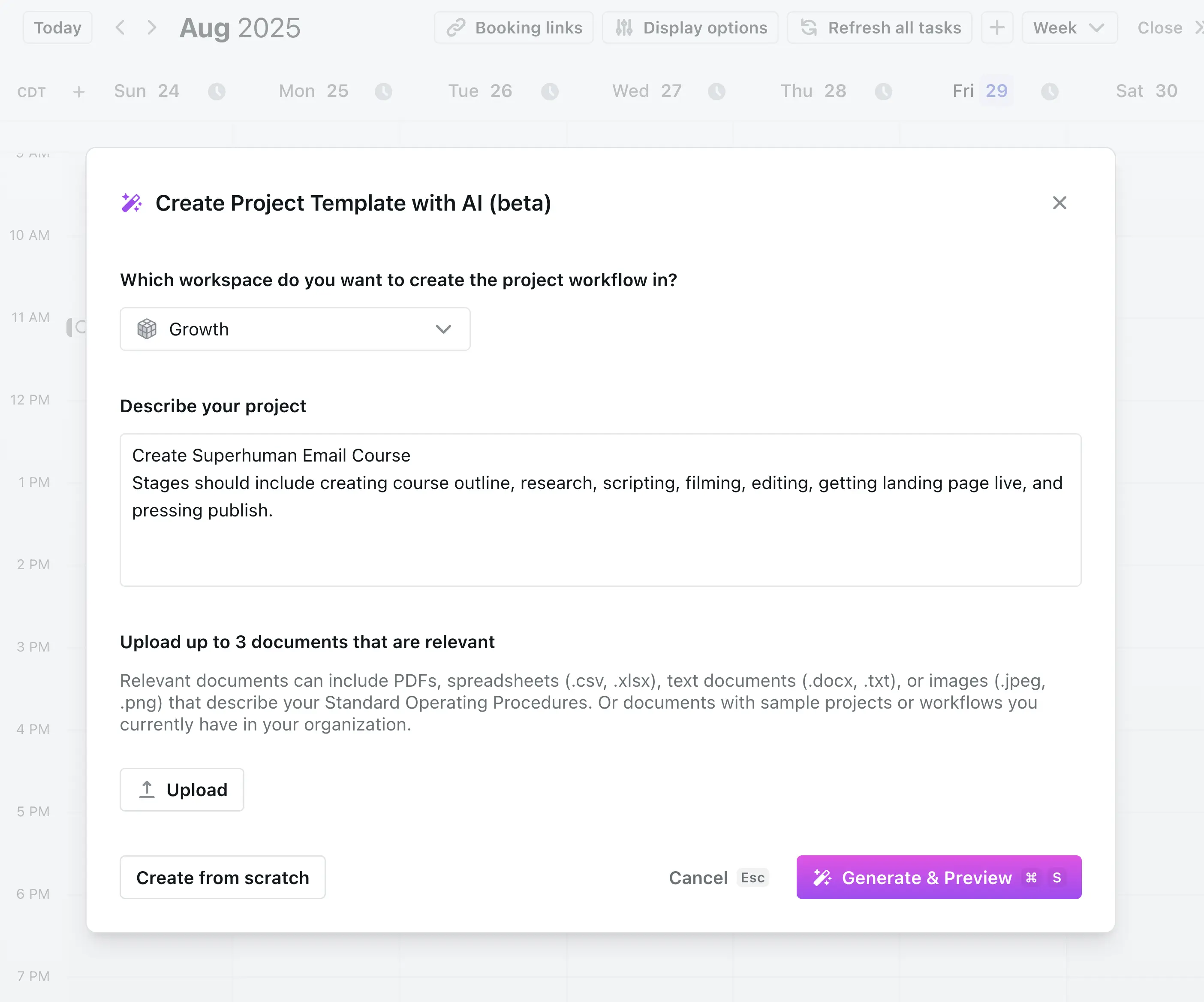
Use Motion's AI to create new projects.
Motion also has project stages, which is unique compared to most project management tools. Stages act like milestones, each one has subtasks that need to be completed before you can move on to the next stage.
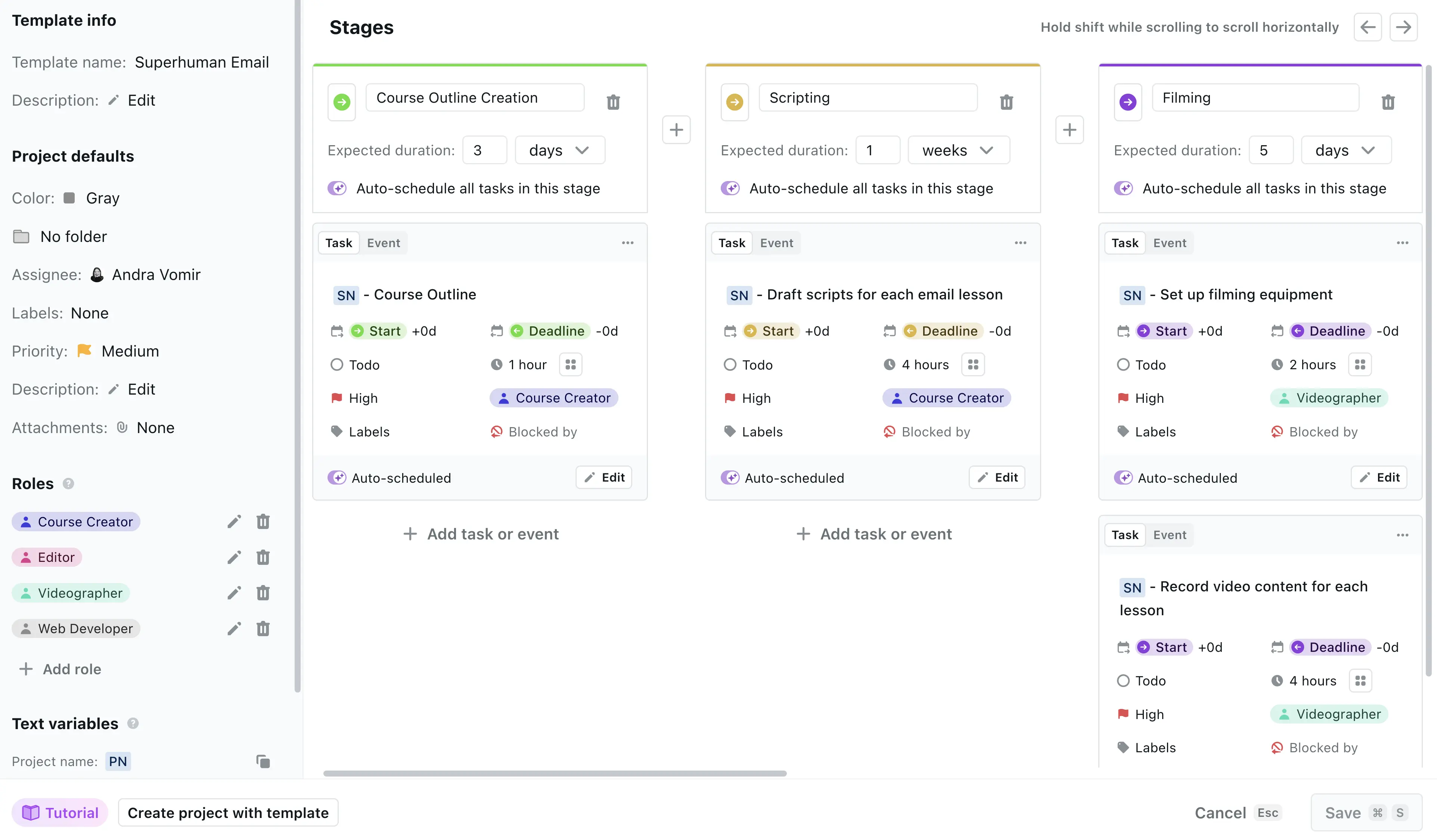
Create a project template once you're happy with the process.
Because Motion is tied to your calendar, you can set deadlines for each stage, and Motion will instantly show you whether your team is on track to hit them or if you need to readjust.
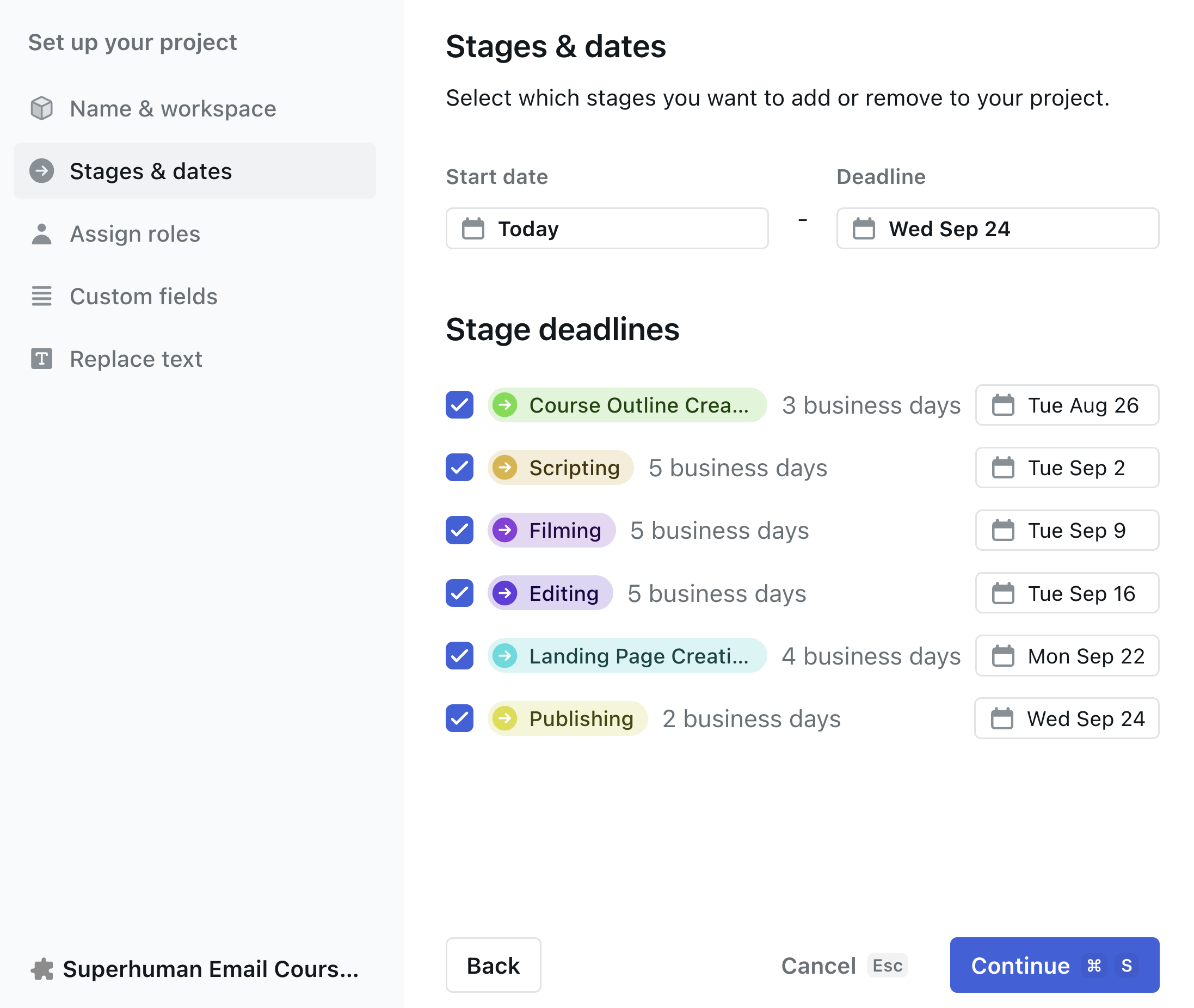
Here are the stages we use to create a new course (or if you remove that first stage, to create a YouTube video).
Kanban & Gantt Charts
Kanban & Gantt ChartsIn terms of your project management features, you'll get unlimited projects, a fully featured task management tool, equipped with the main task views you need, including list views, kanban boards, and Gantt views. There's highly customizable task priority, deadline, and task dependencies.
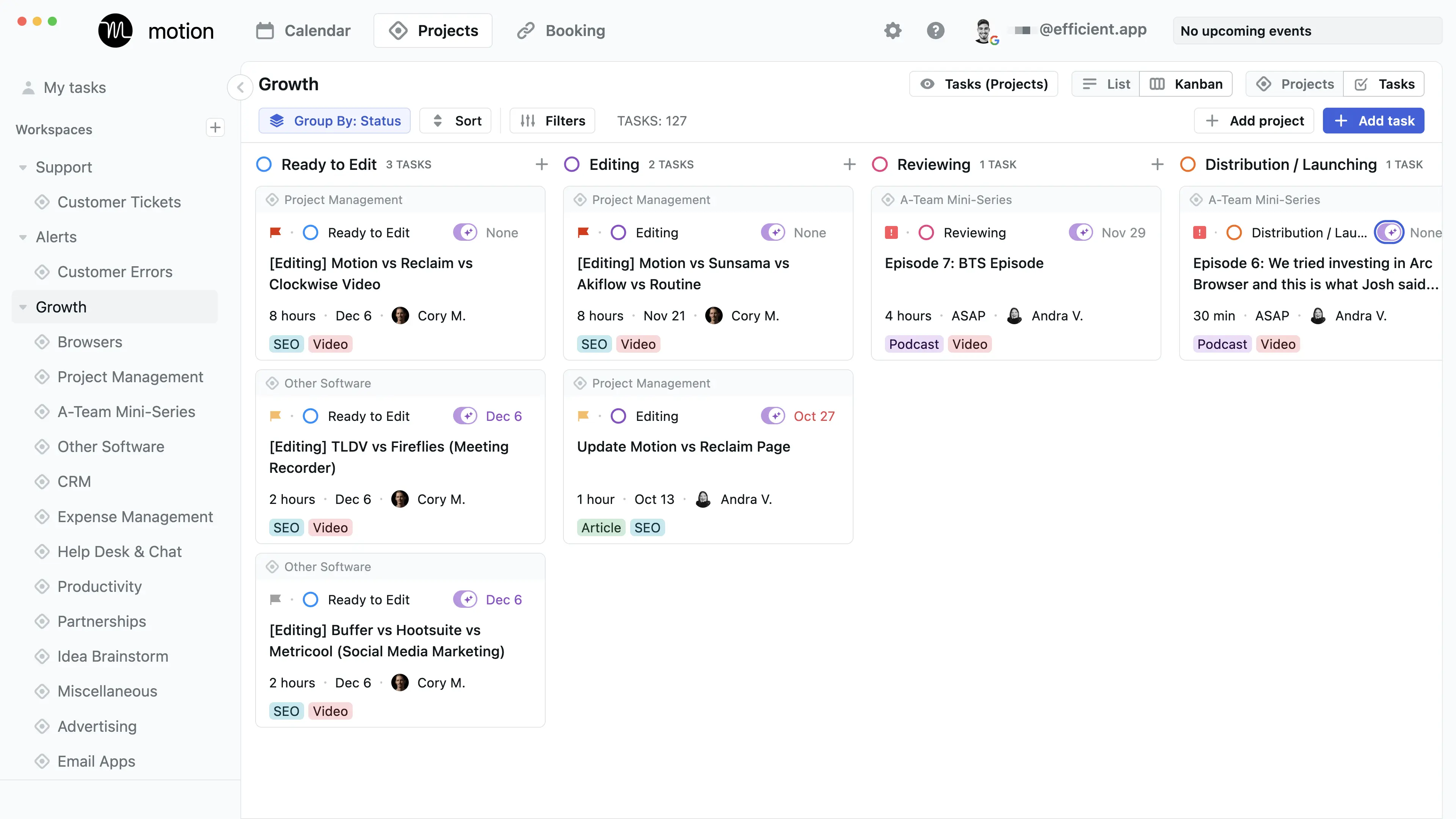
Motion Kanban Project Management Task View
I find myself using the calendar + gantt views most as I find the Kanban slightly overwhelming at times.
Team Workload
Team WorkloadMix the task time tracking functionality with Motion being able to see team member's actual calendar events and availability and what you have is an actual team workload view unlike any other.
The big miss with most project management software is that calendar is an afterthought, and yet if someone on your team is tied up in meetings all week and then they have critical tasks assigned to them, do you think they'll be able to get to them?
With Motion, this is made abundantly clear (even flagged automatically), whereas other project management tools literally require an executive assistant or full-time project manager to be monitoring in order to find these issues as they arise.
Additional Features
Additional FeaturesDaily Planner
Daily PlannerCompared to other daily planner alternatives Motion is pulling this entire category forward by leveraging AI, tasks mixed with calendar events, time blocking, and prioritization, to build an app that feels like more you have a personal assistant helping you manage your time. Motion is a great productivity tool for solopreneurs, freelancers, contractors and students.
Scheduler
SchedulerThis is where Motion excels when comparing it to the best schedulers on the market.
You can generate meeting scheduler pages and embed them on your website (that take into consideration your specific meeting times for that given event, e.g. we only do meetings on Tuesday/Thursday between 1–4pm, so that's reflected on the page). You can even have it check against team calendar availability (as well as your own work and personal calendar availability of course), allowing you to even generate the meeting request in plain text if that makes you feel better than sending someone to a meeting page:
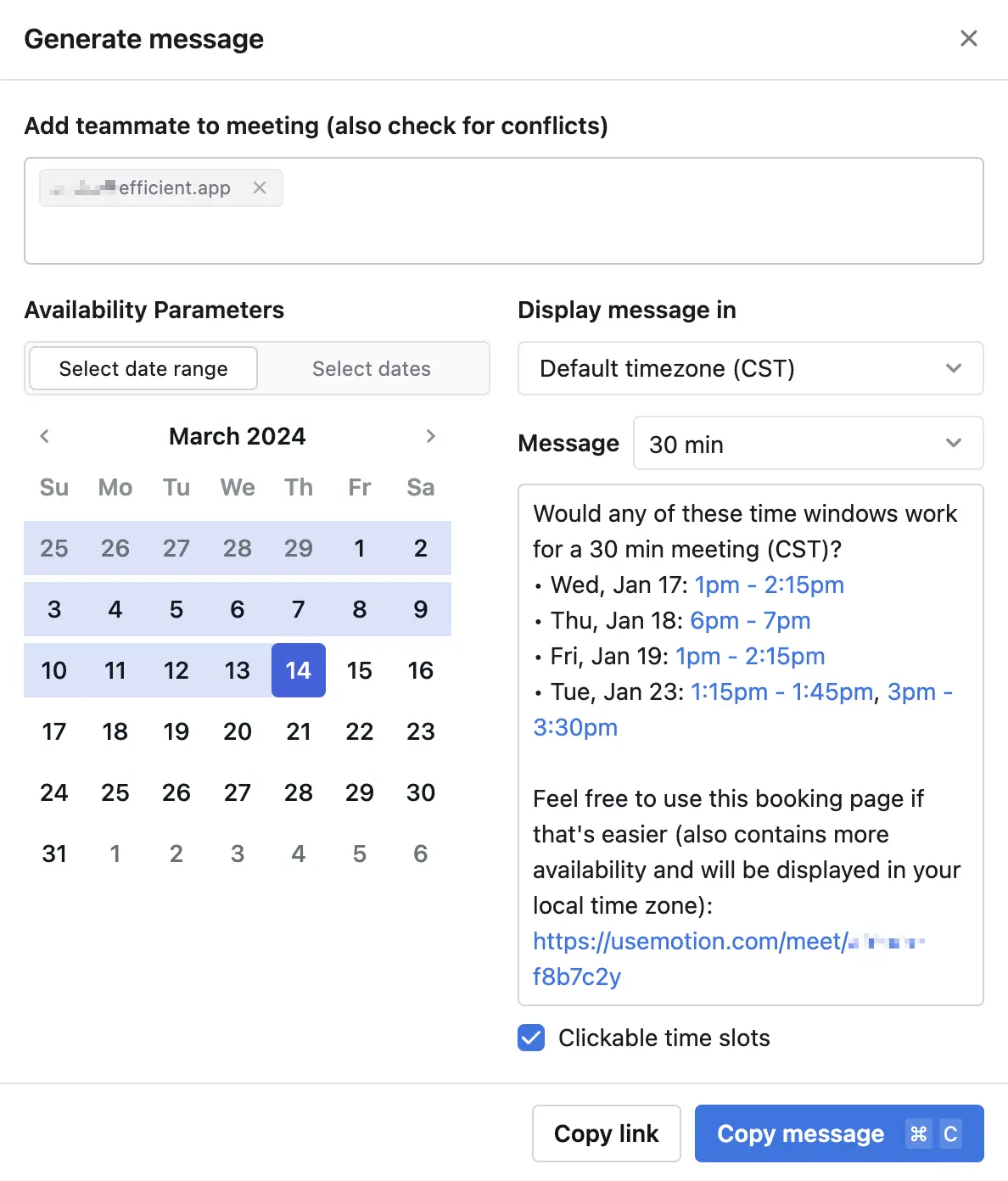
Create plain-text meeting scheduler requests that check against team calendar availability
AI Meeting Recorder
AI Meeting RecorderWe LOVE Motion's AI note taker, and if you're already using Motion for your projects, there's really no reason to use another one. It automatically joins your meetings (you just have to let it in), records video and text, and then uses AI to organize the notes for you.
The quality of the notes are fantastic. When Bob, a new team member, had his first call with another engineer, he tried Motion's AI meeting note taker for the first time and was blown away. He said they were better than anything he could have written himself! And we agree.
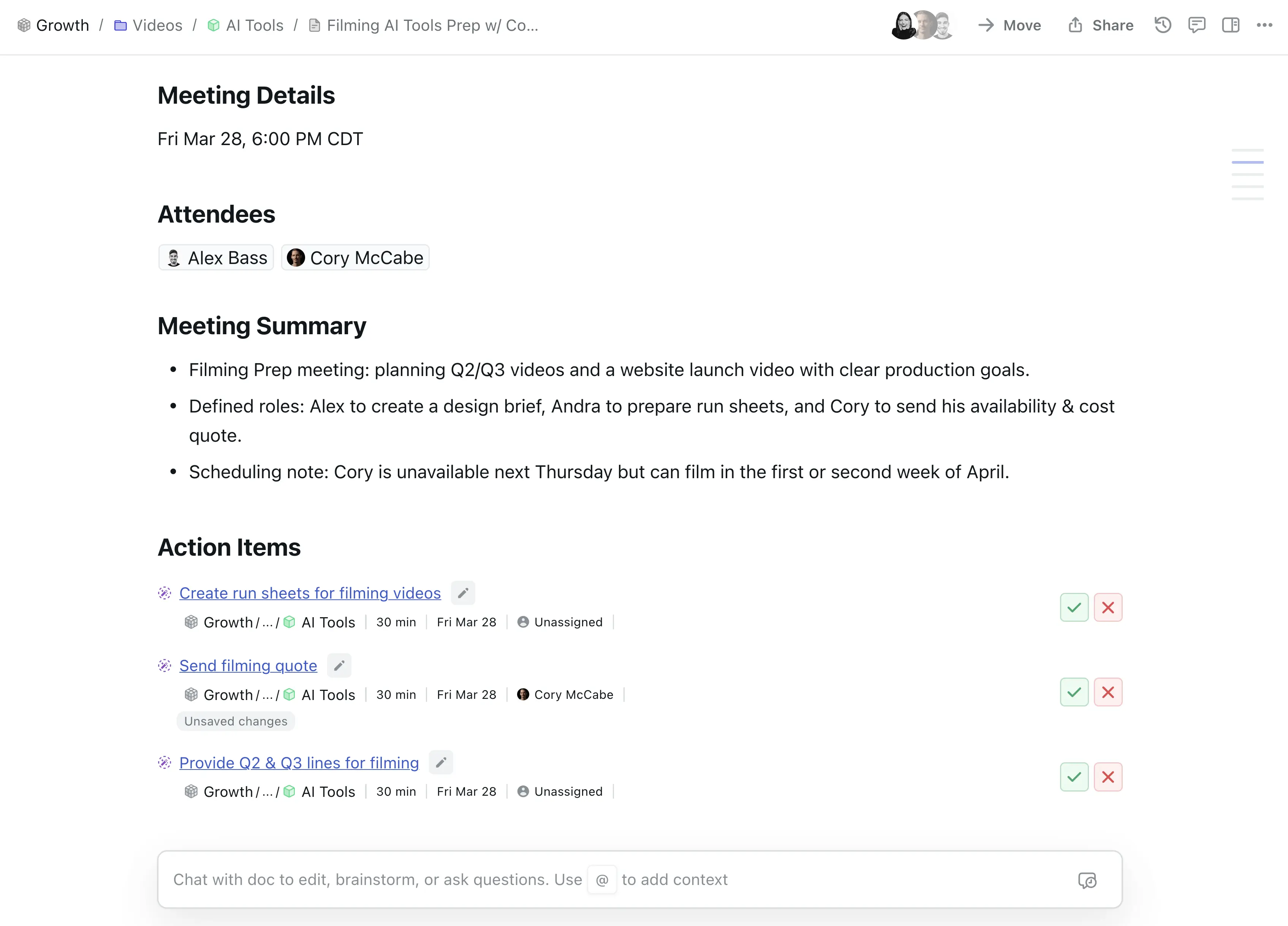
Motion's AI note taker even pulls out Action Items for which you can assign to the team in one click.
After each meeting, Motion pulls out to-dos and tasks for the team who were on the call. All you have to do is approve them.
And what's amazing is how integrated it all is. You can link meeting notes directly to projects in Motion, turn a note into a task, or even spin up a whole blog post from a single meeting!
It's seamless, it's powerful, and honestly, it's a 10 out of 10 feature. But heads up, if you don't end up using Motion and just want an amazing AI note taker, make sure to check out Granola.
AI Docs
AI DocsMotion also has AI Docs, which are great for storing processes or notes since they’re fully integrated with your projects. They’re not as robust as top note-taking apps like Notion, and the AI isn’t at ChatGPT-5 level, but they’re solid for basic note-taking and formatting. If your team doesn't have a knowledge base software yet, then Motion AI Docs are the perfect place to start.
We're starting to move more of our notes from Slite into Motion because having all our business context in one place is valuable. Just know that while AI Docs are convenient and integrated, they might be a bit limited if you're used to working with a dedicated knowledge base.
But as a heads up, when we really want to do serious writing (e.g. scripting or a full software review), we find ourselves opening Motion docs within Dia or ChatGPT Atlas (our browsers) because using their sidebar chat assistant is faster for writing in our tone, brainstorming, and doing research.
Travel Time
Travel TimeMotion also adds in many quality of life features that makes it stand out when comparing Motion vs Google Calendar for example, like Travel Time which you can add with the click of a button to any event:
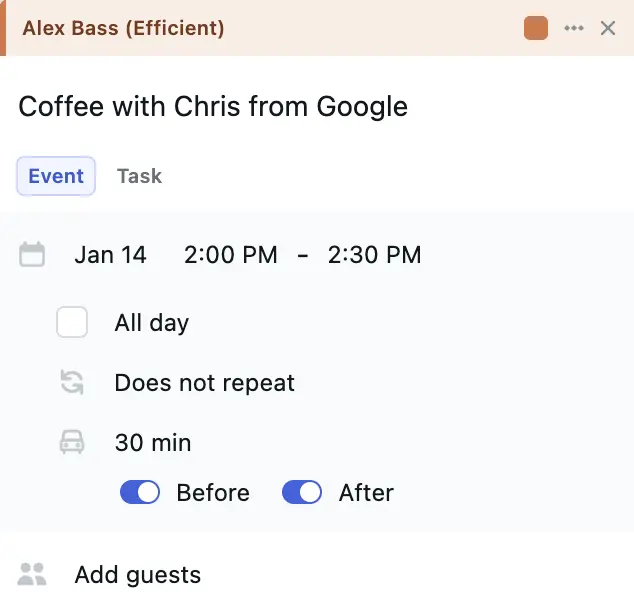
Easily add Travel Time before/after the event in 15 minute intervals in an intuitive interface
Time Tracking
Time TrackingEvery task in Motion has a duration and a "completed time" (so tasks can be partially completed). You can even break longer tasks into smaller pieces by enabling chunks. Pair that with automatic scheduling, and you'll see Motion's secret weapon in action, the AI at its core, that organizes your schedule like an executive assistant.
With that, Motion's time tracking is best used just to get a rough idea of how much time you spent on each task.
If you're looking to track time against work for invoicing purposes, Motion isn't quite there. In that case, we'd recommend pairing it with one of the best dedicated time tracking apps if you need to get super granular.
Keyboard Shortcuts
Keyboard ShortcutsMotion is always a keyboard shortcut away ([OPT] + [c] to view the calendar, [OPT] + [a] to quickly access your meeting scheduler, and finally [OPT] + [SPACE] to quick-add a task from anywhere on your computer. These shortcuts are one of the reasons we love using Motion. Whether you're in the browser and need to check your availability quickly, are curious if you have any upcoming meetings and then want to get right back where you left off, or simply think of a task you need added (for yourself or your team member), it's all just one keyboard shortcut away.
Mobile App
Mobile AppIn addition to the web app desktop app, Motion has an iOS and Android app that is fully-featured, including the full calendar functionality, along with your complete project task lists, and quick access to booking links while on-the-go.
A fun feature Motion recently added to the iOS app is being able to use Siri to create tasks while on-the-go. Simply ask Siri to "create a task in Motion to review that presentation ASAP" and it will pop it on our calendar, rearranging all your other tasks. Now they just need to bring the feature to Google Assistant users too!
The Motion project management tool on the mobile app is still in it's early phases. You can see your tasks in list view, but not on your kanban board for example. For this reason, we prefer to use the mobile app for tasks on the go but we prefer to use the desktop app and web app for project management and actually organizing projects/tasks and for getting work done.
API
APIWe have to hand it to the team at Motion on this one, they launched an API, and then almost immediately spun up a Zapier integration to make their API even more accessible to others, something that newer tools in the space haven't invested in which makes Motion stand out, and something we greatly appreciate.
The API is surely to improve with time, adding in more functionality, although it does allow for the major things you'd want to use it for already, like create/find/update of tasks, and most importantly, creating the magic auto-scheduled task.
When comparing Motion's API with some of the leaders in project management like Asana, Motion does about 85% of what it needs to do for most integrations. We also know it'll get closer to 90–95% once they allow for custom fields, as functionality around "search tasks by custom field value" is surely to come with it.
The one thing to note though is that the API does not currently work with the appointment scheduling feature. For example, it does not allow for the same API functionality that a standalone scheduler (see in our Cal.com review), will give you on that front. That said, you can build some of this functionality by getting creative using a tool like Mailparser alongside Zapier (e.g. logging new appointments into your CRM upon booking), although I will say, it's not all that straightforward. 😅
All-in-all, Motion's API is getting there, and is likely to do what you'd need it to do on the project management front. We'd only say be aware if you're planning on building robust integrations based on their meeting scheduler, because if so, you might be better off using one of the best scheduler apps in that case instead.
Integrations
IntegrationsMotion just released two native integrations, an email integration and Siri integration for the iOS mobile app.
Email Integration
The email integration allows you to easily forward your emails to Motion, and Motion will turn your email into a task and schedule it on your calendar. When forwarding your email to Motion, you can easily type in natural language the due date and priority. Motion will then find the best time to schedule the task using their AI schedular.
Siri Integration
On the go? Try this new way of scheduling tasks. Simply tell Siri to create a task in Motion for you! Motion will find the best time to schedule the task on your calendar. This is super useful when on-the-go.
Pricing
PricingWhen you look at all the software categories that Motion covers, it's quite reasonable for all that it does, combining: project management, AI note taking, AI docs, AI agent workflows (AI Employees), calendar, meeting scheduler, and an AI daily planner. So for a single user, you'd pay upwards of $100/mo if you purchased each of these tools separately, making Motion quite worth the price in looking at all that it can do.
- Pro AI: $19/seat/mo (billed annually). Best for professionals and small teams who want AI-powered project management, scheduling, and task planning.
- Business AI: $29/seat/mo (billed annually). Best for teams that need advanced reporting, capacity planning, time tracking, permissions, and centralized billing.
- AI Credits: Included with each plan. Pro AI includes 7,500 credits/seat/month and Business AI includes 15,000 credits/seat/month.
While some Motion app reviews mention that Motion pricing is expensive, it's actually comparable to Asana (for small teams, Motion and Asana are nearly identical per seat (paid annual). If comparing it to other daily planner apps, Motion is the only tool that has AI scheduling capabilities for tasks, and even with that it's priced nearly the same as it's competitors on the annual tier making it one of the more unique productivity tools on the market.
Whether you're a busy professional or a team, we think Motion is worth the price, we actually purchased the annual plan after just a week of using it.
Final Verdict
Final VerdictIs Motion worth it? Well hopefully this says it all: we've actually fully switched to Motion from Asana after using Asana for 7+ years 😄
Motion app has been a game changer for our team and has allowed us to remember tasks we would have otherwise forgotten, manage projects and better collaborate as a team.
Motion is definitely worth giving a try, especially if you have under 50 or so employees and are looking for a tool that is simple to use for everyone. Motion solidifies itself as a productivity tool that once you start using, it's hard to imagine life without it, the AI algorithm is something you feel missing from every other Motion alternative on the market.
That said, we finally found what we've been looking for in terms of the perfect tool for our team.
If you're looking for a Motion discount code or referral code, we've got you covered! For a limited time we're actually giving $100 off our Motion course for free using the link above.
Screenshots
Screenshots
Motion
Categories
CategoriesMotion fits into multiple categories based on what it actually helps you do. Each category highlights a different strength and the efficiency points it earned, helping you compare tools not just by features, but by how well they actually perform.
Keep exploring the best software across categories, or explore Motion alternatives
FAQ
FAQDo You Offer Motion Setup Consulting?
Do You Offer Motion Setup Consulting?We do not offer consulting services anymore, but we've done one better. For a fraction of the price from what we used to charge for software setup, we put together everything we know about Motion in our new Motion Course. We bring you inside of our account and show you exactly how we're using Motion here at Efficient App to create content and build product.