What is Chrome?
Chrome is the most popular browser in the world, owning over 60% of the browser marketshare, so chances are, you're reading this site in Google Chrome right now.
Love it or hate it, you should appreciate it. Without Chrome, the Chromium engine wouldn't exist, and why does that matter? Well the open-source browser foundation that was built by Google is likely powering whatever browser you're using right now.
All-in-all, Chrome is great. It was our main browser for over a decade. And yes, we tried all of leading browsers on the market (Safari, Brave, Firefox, Opera, Vivaldi, even giving Edge fair shot when they introduced OpenAI into the mix).
We continued going back to Chrome, it was just familiar and worked well, especially if your personal and work life are tied to Google (as many are).
Well... That was up until Arc (and now Dia) by The Browser Company.
Who Google Chrome is for?
Google Chrome is the best browser for you if you're solely looking for the most stable internet browser on the market. It's also best for those of you who are tied in with the Google ecosystem via Google Workspace/Gmail, etc.
Also, if you're using Windows, Linux, or an operating system outside of MacOS, Chrome is also for you.
Who isn't Chrome for?
If you're using MacOS, then there's actually some exceptional alternatives on the market. Now, that doesn't mean that Google Chrome isn't for you if this is the case, but what we are saying is that you have options, and should consider trying the browsers listed on our best browsers list.
If you're the type of person who likes to "upgrade apps" (e.g. you use one of the best email clients over Gmail or one of the best daily planner apps over Google Calendar) then you are going to love leaving Chrome for one of the more modern browsers on this list.
Key Features
Chrome has all of the normal features that browsers have, so we'll cover some of the more standout features (which isn't all that unique as most other browsers also have what Chrome has, and even more).
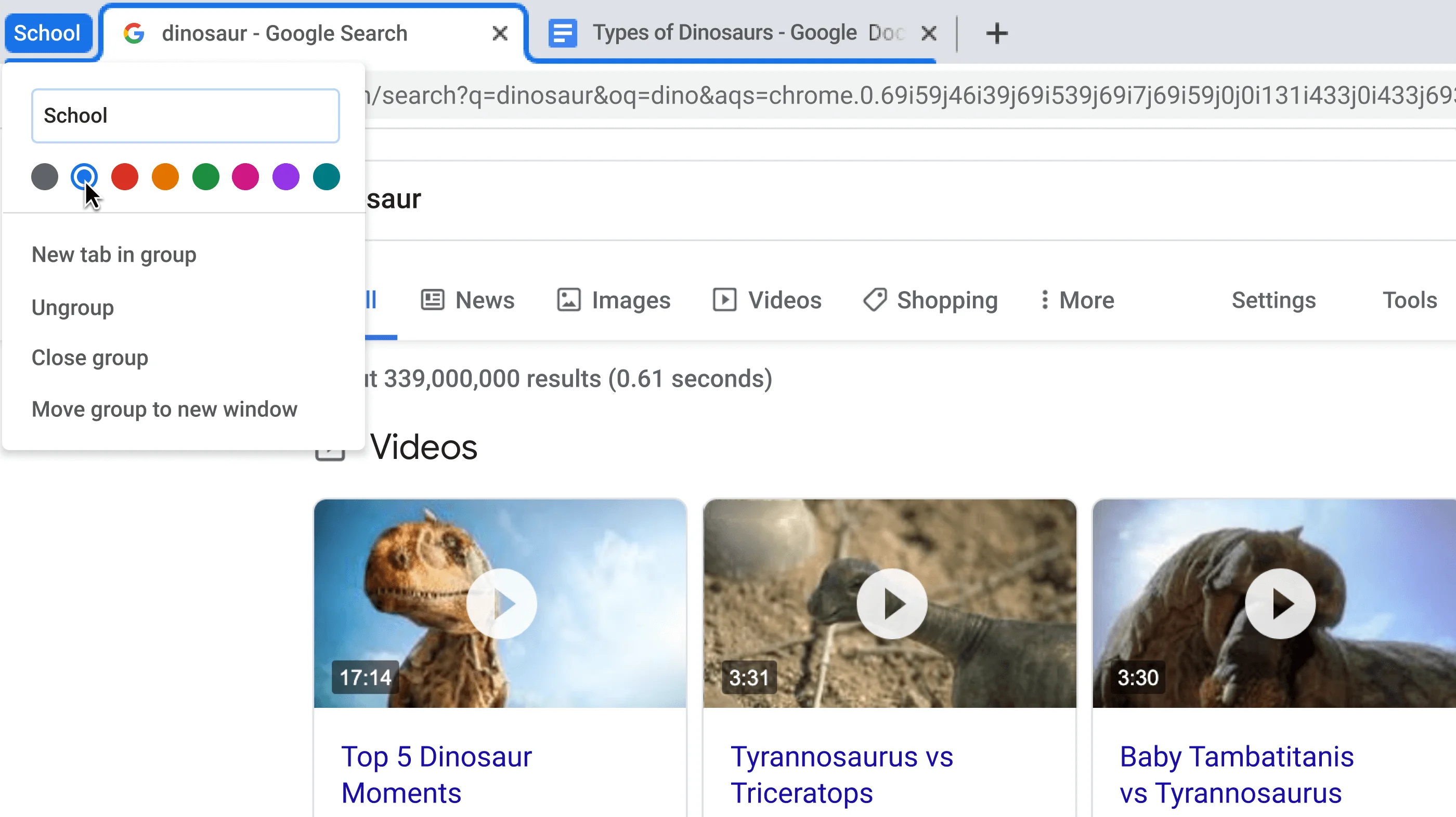
Tab Groups
Of all the Chrome features, this was one of all the key features that we were most excited about. If you're using Chrome, you've probably experienced first-hand tab overload. And heck, you've probably even experimented with alternative tab management browser tools like Workona or Toby.
Tab management is where Chrome has always struggled, and tab groups were set out to solve this issue:
Tab Groups in Google Chrome
Rather than describe all of the features you're probably already familiar with like tabs and bookmarks, I think it's time better spent explaining why you shouldn't really expect new features with Chrome.
When you have a product that has billions of users and hundreds of millions of companies relying on it, you need to focus on stability over everything else.
Is that why it took the Chrome team over a year of beta testing "Tab Groups" before publicly releasing it? Oh, and then only leaving it core to the new tab experience for a few months before ultimately disabling it and making it a manual opt-in feature.
Yeah, that's because of inertia. Billions of people are expecting the browser to work one way, you can't have core functionality change one day without pissing off potentially hundreds of millions of people.
Okay, okay, so all of that is totally fair... But also sorta a boring answer 😅 okay, you win—let's ruffle some feathers!
Ah good-ol bookmarks! Tried, true, and tested. Do they actually work well for referencing back what you saved? Nope! But they are familiar, so don't touch them!
Wait... You said they don't work well, let's dive into that for a moment. Hear me out: bookmarks weren't actually created to make finding pages you're looking for to be easier.
The more you use bookmarks, the less you search Google to find what you are looking for, and the less ads that Google can serve you. Ah! Misaligned incentives! Get overwhelmed with all your open tabs? Google wants this! It results in you closing the overwhelm of tabs, only to later search Google to find back what you're looking for.
What if bookmarks and tab management could be rethought and reinvented 🤔 well they can be, that's why much of Chrome's team have left Google to join Dia Browser to actually build out all the ideas that they had at Google but were killed because releasing them would actually hurt Google's Ad business. 🤯
Mobile App
The best part about Chrome for mobile is that it works cross-platform, from iOS to Android, and everything in-between. That said, it's quite standard with what you'd expect (for better or worse).
Things counting against it though are that they don't have the address bar at the bottom of the screen (which makes it far more reachable on mobile). Even Apple put the address bar at the bottom of the screen with Safari on iOS because it just makes sense.
This is where we feel the mobile app is lacking. It just hasn't changed much, just like the desktop app. But that's also what people love about it, so I suppose that's what you get with Chrome. At least they're consistent with who they are and what they're trying to accomplish.
Competition
Before Arc, I've have just told you that the major competitors on the market were pretty much the same thing, with slight opinionation. Take Brave, the privacy-focused opinionation. Looks and feels almost identical to Chrome, but you don't need to sign up with an email address to use it (you instead have a hash key).
Final Verdict
If you're on MacOS, give Dia Browser a shot, it's essentially what Chrome could have been if they didn't rely on an ad business (although it's coming soon to Windows as well). It genuinely rethinks from the ground up of what a browser is, and could be. They bake in delight into every interaction, and it just does more.
 Google ChromeRecommended
 ChatGPT Atlas