Comparison Summary
Comparison SummaryLinear nails engineering workflows and feels modern, while ClickUp tries to do everything and ends up slow and less polished.
Only use ClickUp if you absolutely need its all-in-one approach; stick with Linear for a smoother daily experience.
 LinearBest
Best for engineering teams
Best for engineering teams ClickUp
The "All-In-One" Tool
The "All-In-One" Tool
At a Glance
At a GlanceRecommended Alternatives
Recommended Alternatives MotionBest
Best AI project management for small-mid-size teams
Best AI project management for small-mid-size teams
Editor's Verdict
Editor's VerdictInnovation
InnovationLinear stands out here because it isn't just tweaking what's already out there, it's actually built a new kind of project management tool specifically for engineers, ditching the old Jira-style bloat and focusing on cycles and real integrations with coding tools. That's a clear break from the copycat mold.
ClickUp, on the other hand, tries to be everything at once. They're innovative in scope, aiming for an all-in-one platform, but too much of it feels unfinished. The ambition is there, but the follow-through isn't.
If you care about real innovation, actually changing what project management can be, Linear is the one that delivers. ClickUp's big vision doesn't land as solidly in practice.
AI Assistance
AI AssistanceLinear's AI features are actually built into the workflow and get real praise for how much time they save, especially for engineering teams. You get automatic issue summaries, backlog prioritization, sprint reports, ticket triage, and even direct Slack integration that spins up issues from conversations. It also ties into top code tools, so engineers get real AI help on product development, not just surface level tricks.
ClickUp's AI exists, but users say it isn't something they rely on. Most haven't made it a core part of how they get work done, so it feels more like an add-on than a go-to helper.
If you're running an engineering team and want AI that actually makes project management smoother and cuts busywork, Linear is on another level. For non-engineering teams, neither option stands out, but if you're an engineer, Linear is the obvious pick for real AI impact.
Daily Focus
Daily FocusLinear makes daily focus way easier. Its clean design, speed, and keyboard shortcuts mean you get in, do your work, and move on without getting bogged down. Engineering teams especially feel the difference, since everything is set up to keep you moving fast every day.
ClickUp, while powerful, gets in its own way for daily work. The cluttered interface and constant clicking make it easy to lose focus or feel overwhelmed, which just slows you down.
If you want something that actually helps you stay focused on your own tasks day to day, Linear is the clear choice. ClickUp just isn't as smooth or efficient for this.
Ease of Learning
Ease of LearningLinear is way faster to pick up if you're running engineering projects. Its minimal interface and built-in engineering best practices mean you can get started without any real setup or hand-holding. You'll actually be up and running in less than a day, no problem.
ClickUp, on the other hand, is a beast to configure. Unless you hire an agency or have someone dedicated to wrangling it, you'll get lost in all the customization options and the steep learning curve. It's not something you just jump into and start using right away.
If your team is managing engineering work, Linear is the clear choice for getting started quickly. If you need something for non-engineering projects, though, Linear's workflow and language will slow you down, but ClickUp won't be any easier out of the box, just a different set of headaches. For pure ease of learning, especially for engineering teams, go with Linear.
Team Adoption
Team AdoptionLinear is a breeze for engineering teams to adopt. The team was up and running in five minutes, no training or hand holding, and people even sent positive feedback on day one. Its tight integration with coding tools, Slack, and terminal access means engineers barely have to change their habits. That's rare, and it shows how well Linear fits the way engineering, product, and design teams actually work.
ClickUp, on the other hand, demands a lot more upfront. It's highly customizable, but that means you have to do serious setup and team training before people will actually use it. Without that, adoption falls flat and the team won't just naturally pick it up.
If you're leading an engineering, product, or design team and want something everyone will actually use right away, Linear is the clear choice. But if your team is outside that core audience, like marketing or sales, neither of these is a perfect fit, Linear will feel too limited, and ClickUp will need a big push to get everyone on board. For pure engineering team adoption, Linear wins by a mile.
Screenshots
Screenshots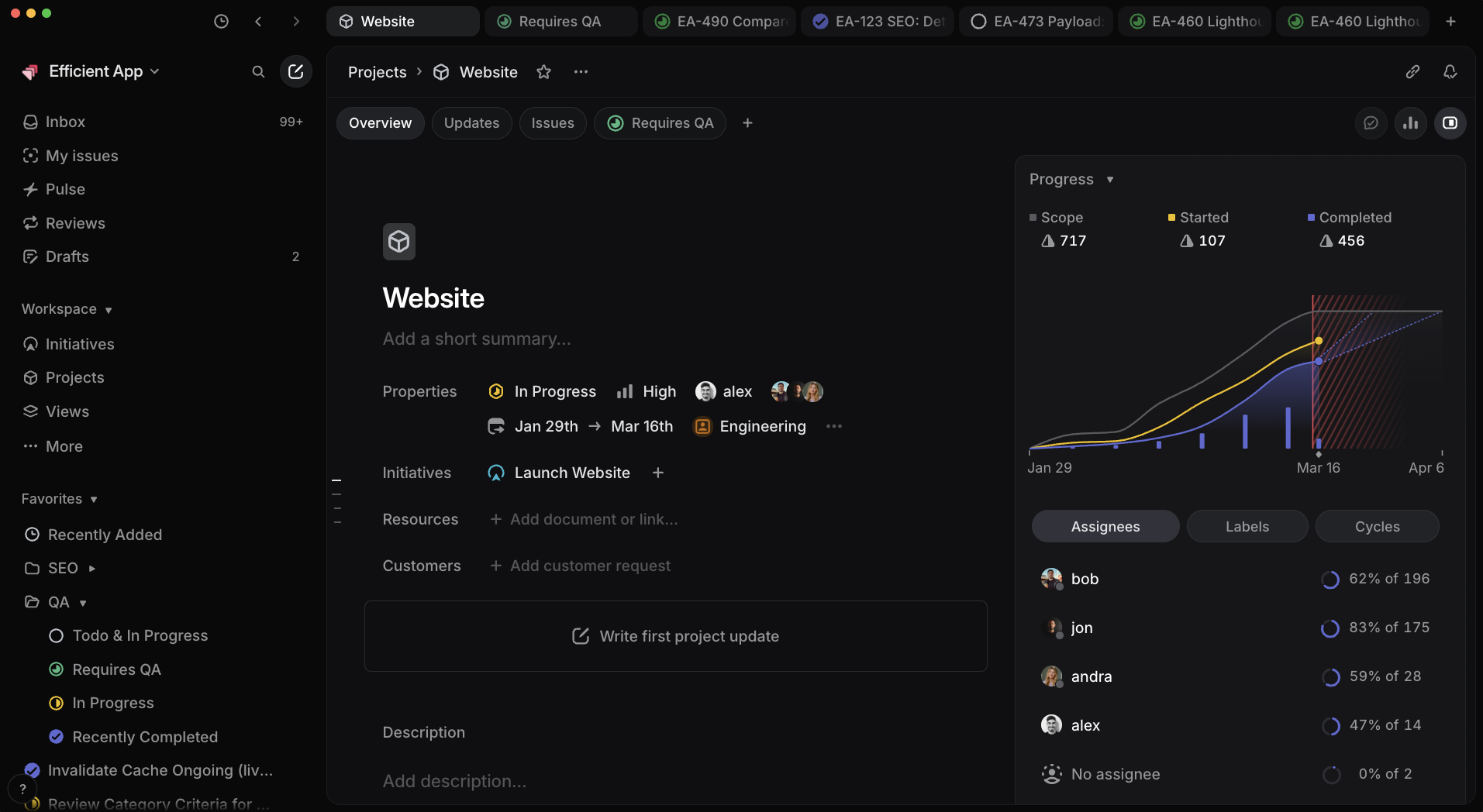
Linear
Linear Project Progress Reporting