Comparison Summary
Comparison Summaryfolk feels like a spreadsheet for managing contacts and makes it easy for individuals or small teams new to CRMs, while HubSpot is expensive and has a clunky user experience.
Only use HubSpot if you have a specific reason, otherwise pick folk for a smoother and more affordable start.
CRM
CRM folkRecommended
Best for solopreneurs and small teams
Best for solopreneurs and small teams HubSpot
For enterprise teams needing marketing automation
For enterprise teams needing marketing automation
Sales
SalesComparison Videos
Comparison VideosI tried every CRM. Here are the worst (and best). *not sponsored*
I tried every CRM. Here are the worst (and best). *not sponsored* 11:29
11:29I tried every CRM. Here are the worst (and best). *not sponsored*
I tried every CRM. Here are the worst (and best). *not sponsored* 13:56
13:56Best Small Business CRM?
Best Small Business CRM?Recommended Alternatives
Recommended Alternatives LightfieldBest
Best AI CRM
Best AI CRM WonderlyRecommended
Best for home remodeling businesses
Best for home remodeling businesses
Editor's Verdict
Editor's VerdictEase of Learning
Ease of Learningfolk makes onboarding basically effortless for individuals and tiny teams. You get started in a few hours, the interface feels familiar if you know spreadsheets, and pipeline templates mean you skip the tedious setup. There's no digging for features or reading documentation, everything is just where you'd expect.
HubSpot, on the other hand, throws up roadblocks right away. Even basic features like auto-logging emails require a bunch of careful setup, and you're constantly at risk of missing things unless you handle technical details exactly right. Instead of jumping in, you're wrestling with caveats and troubleshooting from the start.
If you need a CRM your small team can just pick up and use with no surprises, folk is the clear pick. HubSpot only makes sense here if you're willing to spend extra time on setup and aren't expecting things to just work out of the box. For fast, painless onboarding, folk wins by a mile.
Workflow Presence
Workflow Presencefolk makes it much easier to stay in your flow if you're used to spreadsheets or working out of Google Workspace or Microsoft 365. You can pull in contacts from Gmail, LinkedIn, or X with a click, see team emails and calendar events right in the app, and send bulk messages without jumping between tools. For individuals or small teams, this cuts out almost all context switching and manual admin.
HubSpot, on the other hand, forces you to follow specific steps every time you want emails to show up. If you miss a checkbox or forget to connect an email, conversations go missing and you end up piecing together threads by hand. This adds friction and slows down your workflow, especially for sales teams.
If you're a solo user or a small team wanting your CRM to just feel like a smarter spreadsheet, folk is the obvious pick for keeping everything in one place and reducing context switching. HubSpot's extra admin gets in the way, unless you absolutely need its other features. If you're scaling up to a big team with lots of integrations, folk's limits might start to show, but for keeping your workflow present and low-friction day to day, folk is the clear choice.
Team Adoption
Team Adoptionfolk makes it way easier for a team to actually get started and stick with it, especially if your group is used to spreadsheets or Notion. There's no learning curve, people jump in and start adding contacts right away, and nobody gets tripped up or needs extra training.
There's no info on how HubSpot handles team adoption, so if you care about your team actually using the CRM without hassle, folk is the clear pick here.
AI Assistance
AI Assistancefolk makes a real difference with AI by letting you send personalized emails to entire groups and clean up messy contact info in one step, so you skip a ton of manual grunt work you'd usually get stuck doing by hand.
HubSpot's AI help is way less reliable, you have to follow a rigid checklist just to get emails logged, and if anything's off, the tool just drops those emails without warning. Instead of saving time, you end up babysitting the process to avoid missing key messages.
If you want AI to actually take repetitive tasks off your plate and trust it to handle them, folk is the obvious choice here. HubSpot just doesn't deliver the hands-off help you'd expect.
Integrations
Integrationsfolk is way smoother if you just want to pull in contacts and sync basic email or calendar info, one click and you're set, no headaches. For anyone moving up from spreadsheets or managing simple workflows, it covers all the basics without making you fight the system.
But as soon as you need more complex or deeper integrations, folk runs out of steam fast. You're stuck with Zapier for most connections, and even then, some data just won't play nice. The API is too limited if you're thinking about building anything advanced or handing it off to a bigger team.
HubSpot, on the other hand, can connect to your inbox and other tools, but it makes you jump through a ton of hoops. Automatic email logging is fragile and needs lots of setup, and if you miss a step, conversations can disappear without warning. Compared to other CRMs, you'll spend too much time babysitting integrations that should be invisible.
So, if you just need quick, basic integrations and you're not running a big team, folk feels much easier and covers your needs out of the box. But if you're planning to scale or need integrations that go deep and work reliably for a real team, neither one nails it, HubSpot is more capable on paper but drags you into messy setup and maintenance, while folk just can't handle the complexity. For simple, get-started-fast use, go with folk. For more serious integration needs, you'll be frustrated with both, but HubSpot at least tries to cover more ground, even if it's a pain.
Screenshots
Screenshots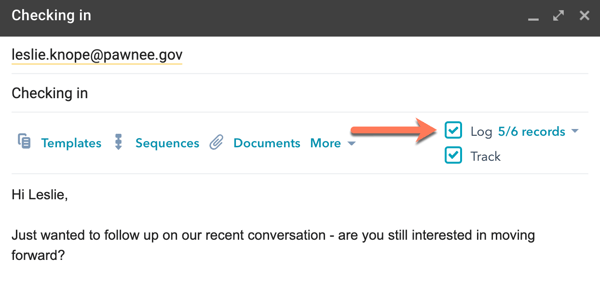
HubSpot