If you're already using ChatGPT as your daily AI chatbot, then Atlas brings along with it all of your personal context and memories, making it a super powerful browser, with ChatGPT always readily available.
Dia is more LLM agnostic, has a more refined UI, but is missing the deep context that ChatGPT already has about you if you're an avid user.
We believe there are better options available in this category, read below to learn what this software does well, and what they could do better. ⤵
.webp)
.webp)
.webp)
.webp)
.webp)

Bring ChatGPT with you across the web for instant answers, smarter suggestions, and help with tasks—all with privacy settings you can control.
ChatGPT Atlas is a Chromium-based browser built by OpenAI that feels a lot like Google Chrome, but instead of Google Search, you have the full power of ChatGPT available everywhere you go.
ChatGPT Atlas has an AI agent mode that can navigate the web on your behalf. It has ChatGPT with you everywhere (even highlight some text and tell it how you want to modify it and it'll do it inline right there).
Because it's a browser, you also have the ability to @ mention tabs to pull in added context, and it also has deep memory on what you're searching from day-to-day. Other than that, it's really just ChatGPT in the browser.
Think of ChatGPT Atlas as more of an upgraded UI/UX for the ChatGPT desktop app than that of a full replacement for your primary browser.
If you compare it in that way, then it's a no-brainer to install and use it instead of the ChatGPT desktop app.
For example, clicking on a link mid-chat expands the site to the left-hand-side, with chat sitting on the right. It's just a better user-experience than it popping you out to whatever default browser you have set.
From there you can easily ask additional questions about the site you're on, or even reference other open tabs along with browser history. And depending on how complex of a question you ask, their built-in AI agent mode can even pop in and start navigating and completing tasks for you.
So what is the biggest "Pro" for ChatGPT Atlas? It's that it feels like an upgraded desktop app on all fronts. It just feels "right".
Now this is a browser after all, right? Well, when looking at it as one of the best browsers on the market, it feels like you're using a browser that's still in alpha (not even yet beta).
When comparing it to the other agentic browsers in the space, e.g. Dia and Comet, Comet just feels way more fleshed out and refined in many of the micro interactions, interacting with extensions, bookmarks, you know, all the things that make a browser feel like a browser.
So Comet browser feels more like it's in beta, so a generation or so ahead of Atlas browser.
While Atlas is technically free, the features that you're probably seeing teased all over social media and the marketing videos are actually primarily paid (at least for now).
To unlock their AI agent functionality, you must be on ChatGPT Plus ($20/mo) or higher. The same goes for memory and file recall (prior uploaded documents) as well.
So while Atlas is free, it's a pretty restricted version of it.
This is where we'd recommend also giving Comet a shot, especially if you don't have a paid ChatGPT account already, because many of the AI agent features that Comet also has, are readily available to free users.
Do you use ChatGPT? If yes, absolutely install Atlas browser, and just treat it as more of a replacement for the ChatGPT desktop app.
In-fact, use ChatGPT for work and personal, and have 2 separate accounts? Use Atlas to login to one of them, and the ChatGPT desktop app to login to the other one, and boom! You've now got built-in account switching (sorta).
If you're not a paying user of ChatGPT, then I'd recommend you give Comet browser by Perplexity a shot if you want to experience the AI agent mode and other agentic features without purchasing a paid subscription.
.webp)
.webp)
.webp)
.webp)
.webp)

AI won’t exist as an app. Or a button. It’ll be an entirely new environment — built on top of a web browser.
Dia Browser is the latest project from The Browser Company (the same team behind Arc Browser), and while it’s an interesting experiment, it feels more like a stripped-down Chrome with an AI sidekick than an actual serious browser contender.
The Browser Company was acquired by Atlassian for $610M, where they will continue building both browsers (focusing on Dia) but with more financial backing to hire more. Although typically acquisitions by the likes of Atlassian have led to stagnation (e.g. Loom). We're cautiously optimistic about this one though since the agentic browser space requires so much financial backing, with Comet by Perplexity investing billions into building out their competitor to Dia.
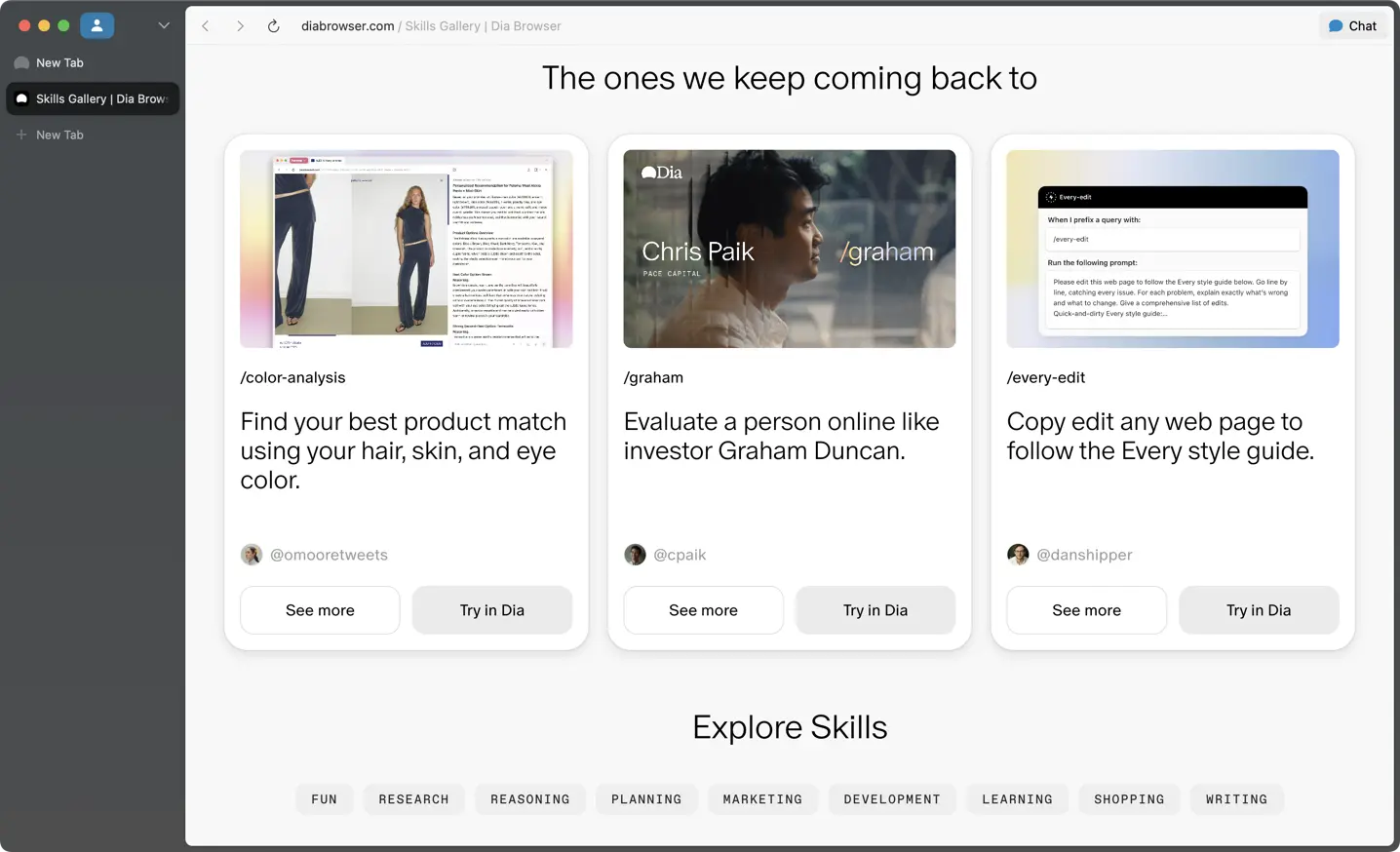
Dia is for those who are super excited about agentic browsers (think of a baked-in AI chat sidebar, that can co-pilot the browser with you at times).
If you're someone that likes the idea of being able to have pre-built prompts that can be ran that interact with and take into consideration the content on the page you're visiting, then you'll love their "Skills" functionality (this will either immediately click for you as to what's possible, or not):

Sorta. The main competition going on right now is between Perplexity's Comet vs Dia. And while I see some promise behind Dia, I am definitely finding myself only using it for some personal searching. Like going in the depths on researching to buy something. It hasn't been able to replace Arc Browser as my day-to-day work and productivity-focused browser.
It's also incredibly difficult for me to break the habit (or even want to) use ChatGPT less (I use the desktop app, triggering it with CTRL + spacebar), and it seems the team really wants you to embrace their AI chatbot in-place of ChatGPT to get the full benefits (of getting your browser to learn and understand you.
With all of that, if you’re someone who just wants a clean browser with built-in AI to summarize articles or answer questions, speak to your open tabs and YouTube videos to help with research, then sure, Dia might be worth giving a shot. But if you actually care about productivity, speed, and having real control over your setup, Arc still feels lightyears ahead (yes, even in maintenance mode). It's clear that Dia was built for a totally different audience (e.g. my parents or those who haven't taken to embracing AI just yet, then absolutely yes, Dia feels like a solid gateway into this).
.webp)
.webp)
.webp)
.webp)
.webp)