What is Brave?
Brave is a web browser that was originally built more as a cryptocurrency/blockchain-focused browser, tied quite closely to the BAT token (Basic Attention Token).
The whole premise was that you can get paid in BAT tokens via their Brave rewards program, by referring others to use Brave, and simply using Brave in your day-to-day. These tokens could then be used to support creators and websites.
They are essentially trying to take back control from the traditional ad model, and compensate their users versus selling their data, like that of Chrome.
For that reason, they have ad-blocking enabled by default (similar to Arc and Dia, which just enables the uBlock Origin chrome extension on the back-end).
They also have things like a VPN and a crypto wallet baked in at a core—this will either totally connect with you, or mean nothing. If the latter, it's probably not the right browser for you.
Who is Brave Browser for?
Brave browser is a private browser through-and-through. If you're looking for the browser with the most privacy features, like enhanced tracking protection from site trackers, it has those security features baked right in at the core. That's actually what Brave has built it's name on.
So if you're someone that has a major distrust for Google services, and is open to the minor inconveniences that come with focusing on online privacy, Brave may be the browser for you.
That said! It is still built atop the Chromium engine, which is essentially Google's open source project at the core, but it is void of Google Services baked in, so you'd just have to trust that the open source project is truly protecting your data. Most of the leading browsers are built atop Chromium as it stands. This actually makes it way easier to switch over to because all the same extensions and bookmarks will transfer over fluidly.
Who shouldn't use Brave?
If you wouldn't identify as a heavily privacy-focused individual, more specifically, someone that is interested in the security benefits that come from leveraging the blockchain, and aren't heavily into crypto, Brave wouldn't be your best choice (here's a list of the best browsers).
If you're someone that usually loses passwords (e.g. aren't using a 3rd party password manager like Dashlane), or wouldn't be great at remembering a seed phrase to backup/restore all of your data (bookmarks, passwords, etc.) then Brave will probably be a bit of a nightmare to use.
Key Features
Design/Experience
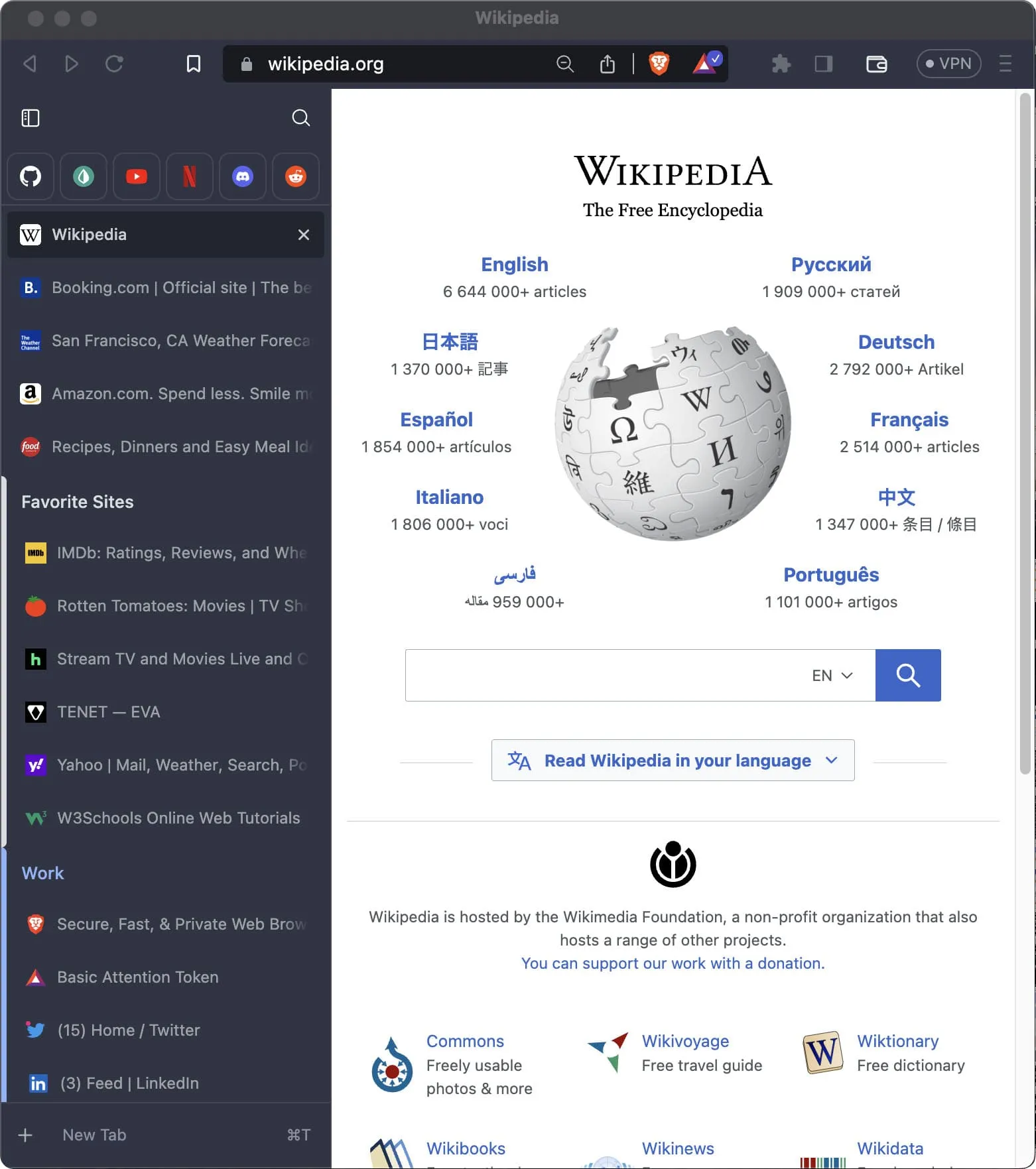
Brave looks and feels a lot like... Well, Chrome/Chromium. They've modernized the interface a bit by adding in optional features like vertical tab support:
Looks eerily similar to that of Arc, inspiration taken much?
That said, it still looks and feels like most browsers do—for better or worse. They don't seem to be taking any risky bets or overly experimenting on the design/UI/UX-front, which is honestly fine for what most people are expecting to get out of their browser.
Extensions
The interesting thing here is that Brave, like many of the leading browsers on the market use Chromium at the core (e.g. Chrome, Arc, Opera, Vivaldi, and even more recently Microsoft Edge).
What this allows for is the same browser extension support, and more broadly, all these browsers have the same underlying rendering engine (open sourced by Google).
Point being, changing browsers between Chromium-based browsers makes switching between them pretty seamless (low friction), and Brave is no exception here.
Final Verdict
Brave often connects most with heavily privacy-focused individuals, for whom are typically more in the crypto space. For example, at Consensus 2023, most people I talked to were using, or at least familiar with Brave.
A asked them what they liked most about it, and their responses were almost entirely around the privacy aspect. For example, "they don't even know what I'm bookmarking—my account is tied to a hashed key, so I can anonymously save my environment, and re-access it with my unique token—no email address/identification required."
And look, I get it, it's impressive to how they are leveraging the blockchain to store some of this information without tying it to identity, but personally for me, I'll take the benefits that come with using a traditional database and user account, like most other modern browsers like Arc and Chrome rely on for storing and syncing your data between devices.
If you're considering Brave, I genuinely think you already know yourself. But if you're not quite obsessed with privacy, to the level of at times potentially inconveniencing yourself (e.g. you forget your unique hash/key, you lose your history and settings—there's no "forgot password" per-say).
If you think privacy is important enough to not want to use Chrome though, there are genuinely other privacy-focused alternatives (in that they aren't trying to sell your data unlike Google with Chrome is), like Arc Browser. If you're on MacOS (Windows coming soon), definitely recommend giving that a shot.
 BraveRecommended
 ChatGPT Atlas