Review Summary
Review SummarySprout Social is an all-in-one social media management tool for enterprises and agencies.
It's not our top pick for most teams (you will likely not need most of it's features), but if you have dozens of people who need to approve a social post before it goes out, it is one of the best options available.
Sprout Social Alternatives
Sprout Social AlternativesNot sure if Sprout Social is the right fit for you? Check out these alternatives:
 OrdinalBest
Best for B2B teams posting on LinkedIn
Best for B2B teams posting on LinkedIn
Key Features
Key FeaturesTagging
TaggingTagging allows you to tag content and then use those tags to filter down by performance later on. It's one of Sprout Social's best features.
We share podcast clips all the time on our channels, and usually work through a batch of about ten pulled from a single episode. That's ten captions, ten uploads, ten sets of hashtags...everything, ten times over. And sometimes that was just repetitive in the kind of way that makes you want to automate it by day two.
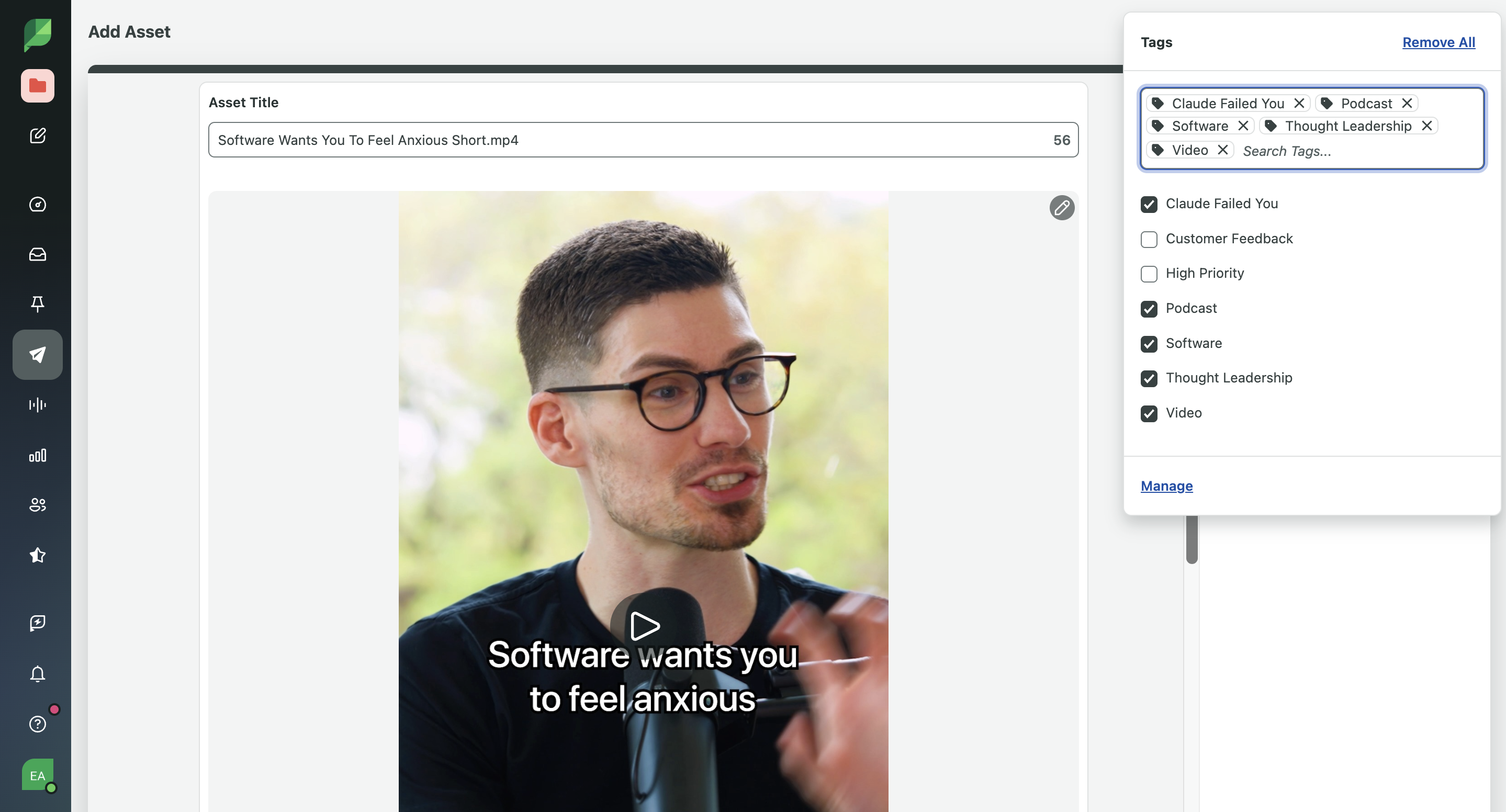
What changed when I was working in Sprout Social: when I uploaded a batch of episode clips, I was able to tag every clip with the content type, the topic it's about, so something like "vibe coding" or "software," and the episode name itself. So a single clip might carry "podcast," "clip," "vibe coding," and the episode title, all stacked.
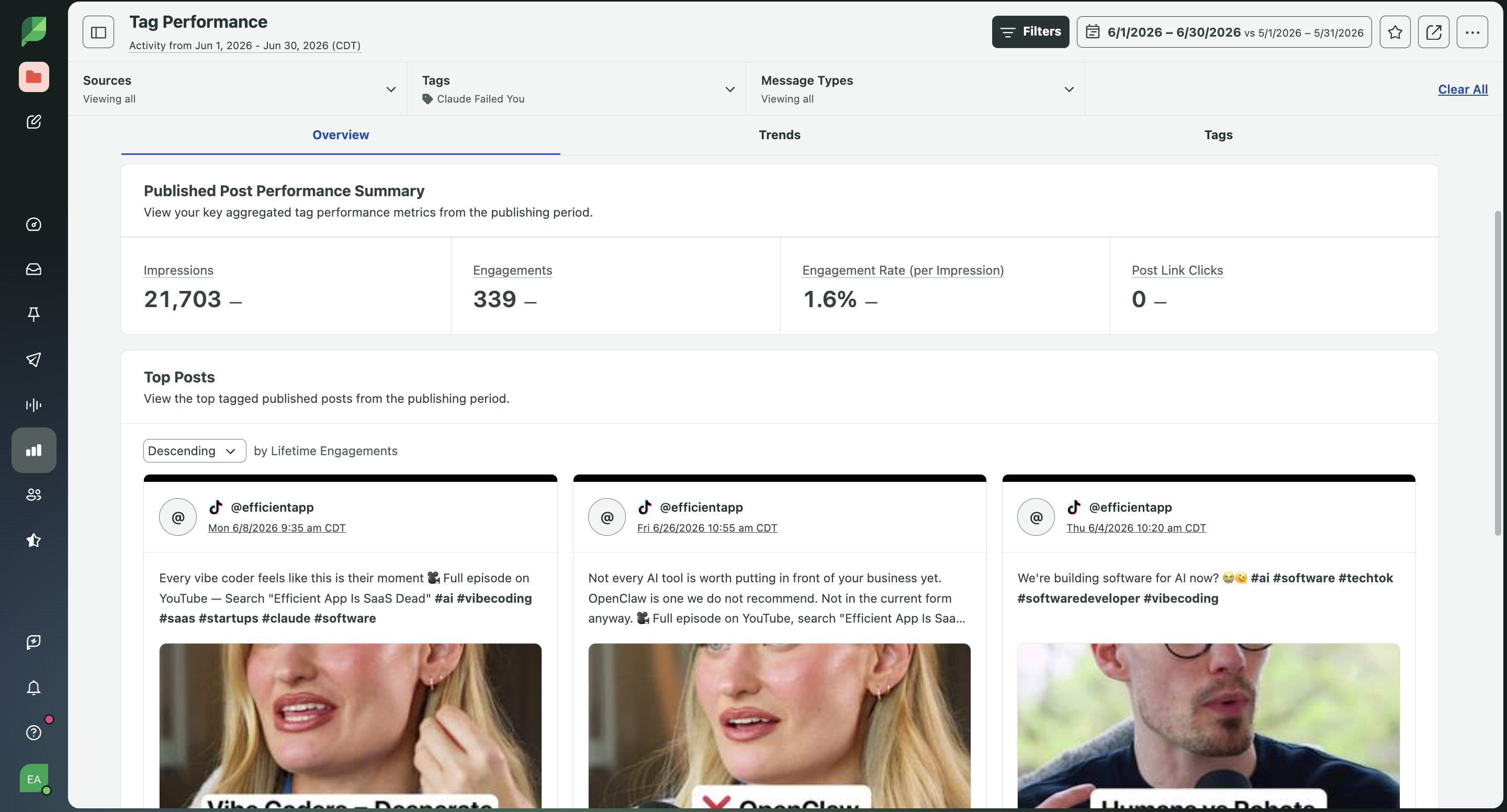
And then when it's time to see how that episode actually performed, I could pull a report filtered to just that episode tag and get nothing but those ten clips. Or I could zoom out and filter by "podcast" and "clip" together, and now I'm looking at how that whole content type is performing across every episode we've ever clipped.
I also appreciated that you don't have to be perfect from day one. Say we decided halfway through the year that we wanted to track every podcast clip by guest as well as by episode. We wouldn't have to accept that all the old data was lost. You can jump into the publishing calendar, bulk tag older posts, and then all of that historical content becomes reportable too. So your reporting isn't limited by whatever tagging system you happened to have the day you published it.
Side note: We actually liked this workflow so much while testing Sprout Social that it became one of the first things I looked for when comparing other tools. Hootsuite, for example has tagging too, although it kind of feels clunky and more like it's there for internal organization, or finding a post later. Our current tool, Ordinal, has Labels and Campaigns that cover many of the same use cases, so we didn't have to give up this style of reporting just because we didn't go with Sprout Social 👏
Asset Library
Asset LibraryYour asset library lets to pre-save repeatable captions. It goes hand-in-hand with tagging.
Take the same podcast workflow as an example: instead of retyping my hashtag block every single time I caption a clip, I built it once as a text asset, something like #vibecoding #creatoreconomy #ai #buildinpublic #founders #startupfounder #saastools #futureofwork #indiehackers #productivity #attentioneconomy, and saved it. Same with the "🎥 Watch the full episode: [link]."
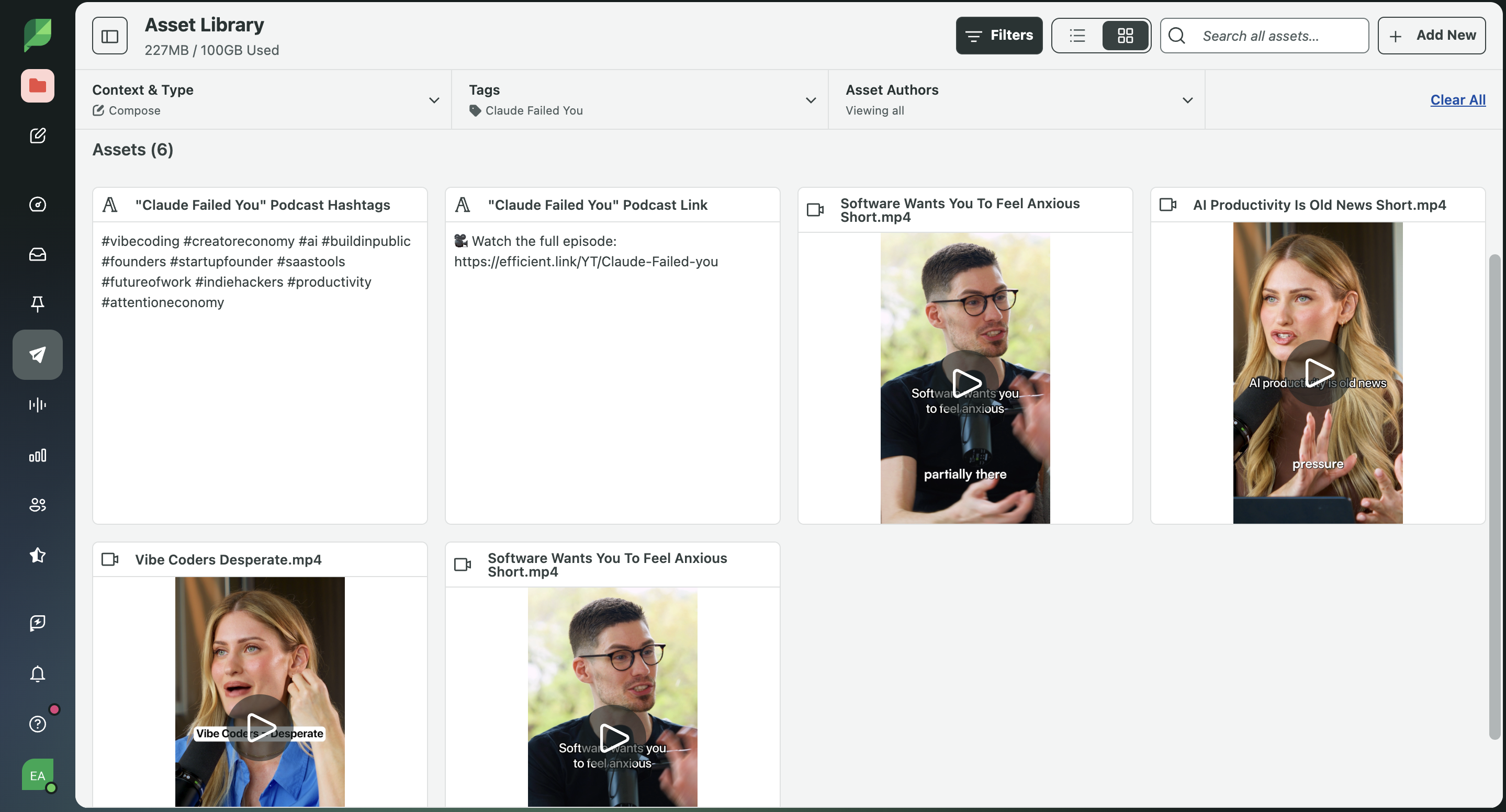
So now when I'm working through that batch of ten clips, I'm not rewriting those pieces over and over. I can just upload the clips into the library tagged the way I want, and the repetitive text is just sitting there waiting to be dropped in.
Ten posts used to mean ten captions written from scratch. Now it's ten unique hooks, and everything else is a couple of clicks. If you find yourself typing the same stuff over and over, this feature will absolutely become one of your favorites.
Approval Workflows
Approval WorkflowsI went deep on Hootsuite's approval workflows when I was testing it, and it had custom chains, full audit trails, even the ability to log a client's approval that happened outside the platform entirely. But it was clunky and kind of started feeling like process for the sake of process.
Sprout Social gives you approval workflows that actually flow. When you're building out workflows, you add steps, and for each step decide whether all reviewers need to sign off or just one. Internal review can be "any one of these three people" while the client step stays "this one specific person, every time." There are templates to start from too, so you don't have to build a workflow from a blank slate unless you want to.
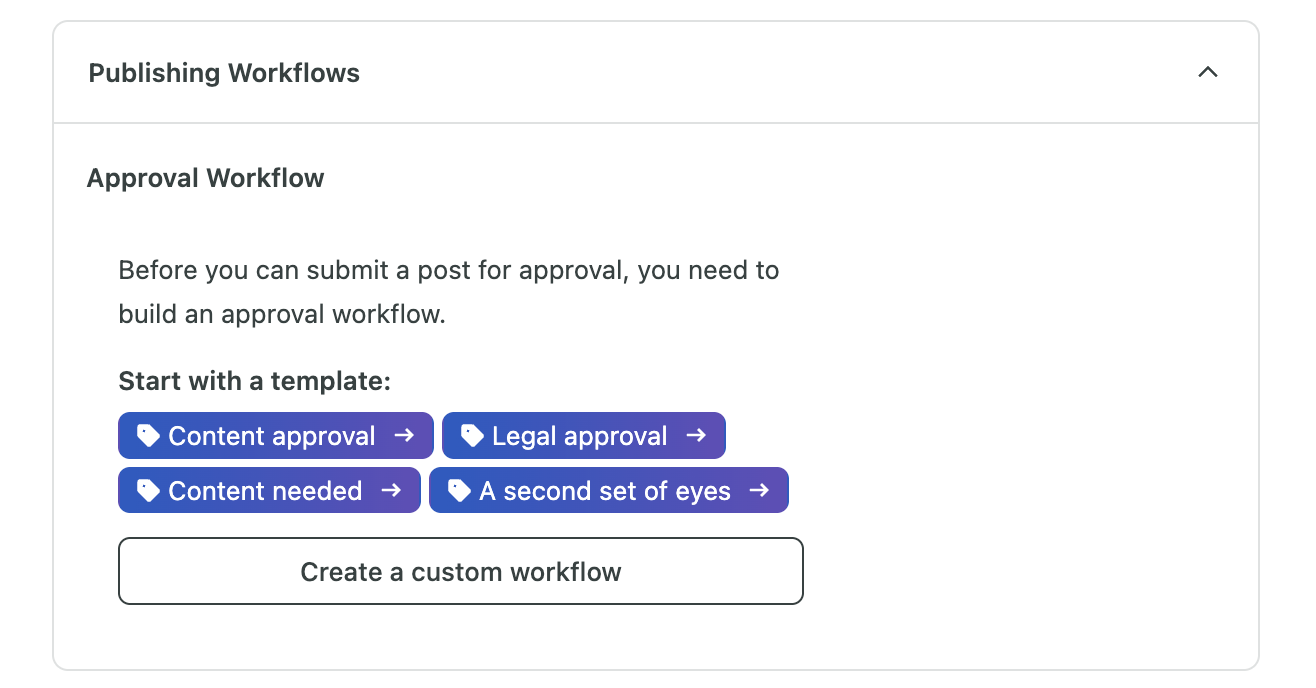
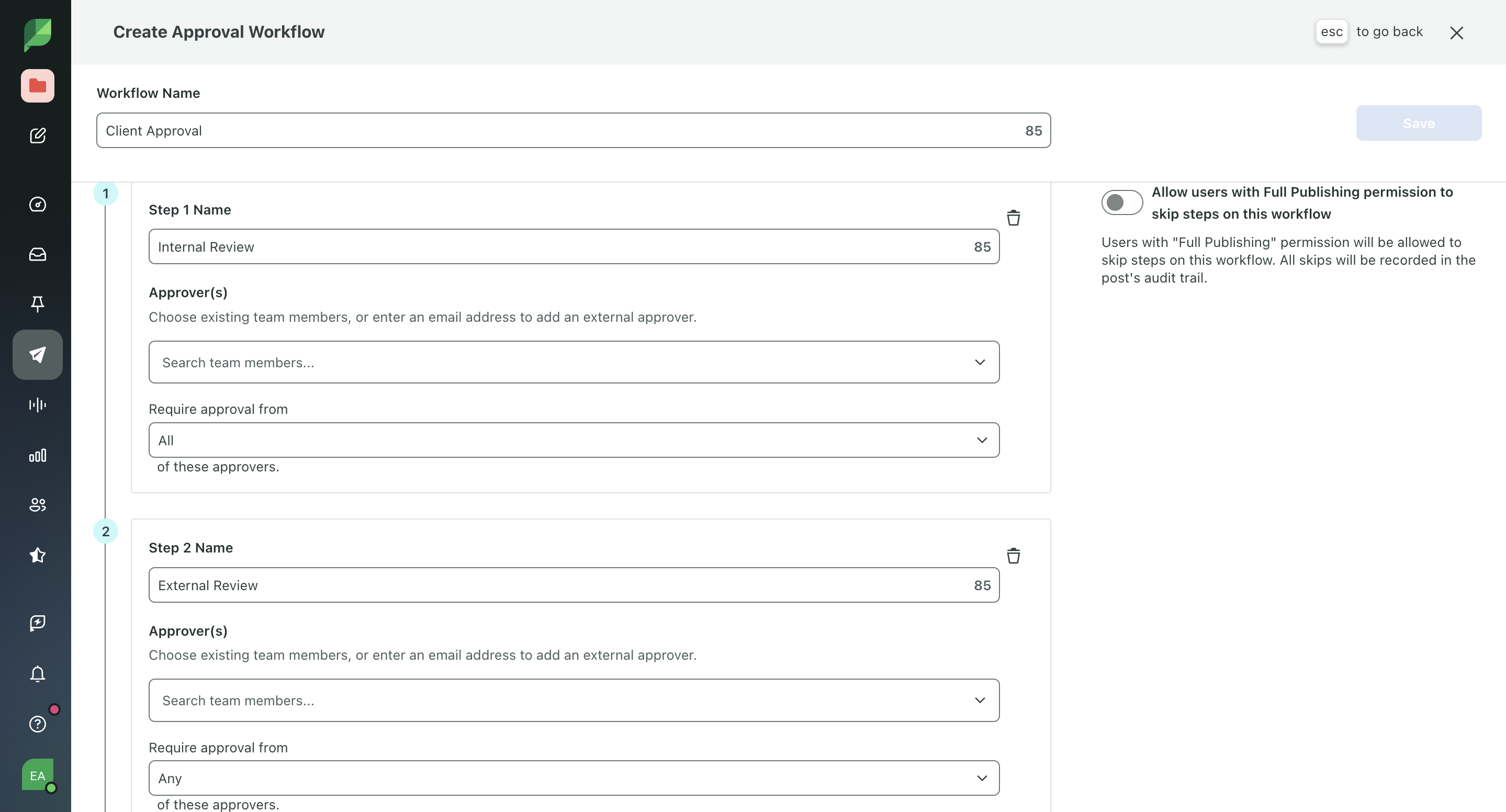
From the agency side, Anna said "A lot of tools technically have approval workflows. But when I tried to set them up the way an agency actually works, they fell apart. You could choose who needed to approve a post, but you couldn't say, Our team needs to approve this before the client ever sees it. Sprout Social can.
If someone on my team rejects a post, it goes back for edits. I'm not just stopping a bad post from accidentally going live. I'm stopping a typo, weird caption, or half-finished idea from making my team look sloppy in front of the client."
Groups
GroupsSprout Social's Groups let you bundle social channels and team members together: a group for Client A's accounts, a separate group for Client B's, with the right people attached to each. When you're composing, you're not staring at a single dropdown with every client's channels mixed together, which is exactly how you end up posting Client A's content to Client B's page at 11 pm on a Friday.
Anna also pointed out something I hadn't even considered. "Lots of agencies give clients a Sprout Social login so they can review and approve content themselves. Groups make sure those clients only ever see their calendar, their approval queue, and their social accounts. They can't wander into another client's workspace because, from their perspective, it doesn't exist. I just assumed every agency tool worked this way. Apparently they don't. A lot of scheduling tools assume one team, one brand, and bolt on client separation as an afterthought, if at all."
Social Listening
Social ListeningFrom what I've seen, listening tools seem to be something people either lean on constantly or barely touch. Social listening is used for catching a complaint before it spreads, noticing a trend forming early enough to actually use it, or knowing what's being said about your brand somewhere you weren't already looking.
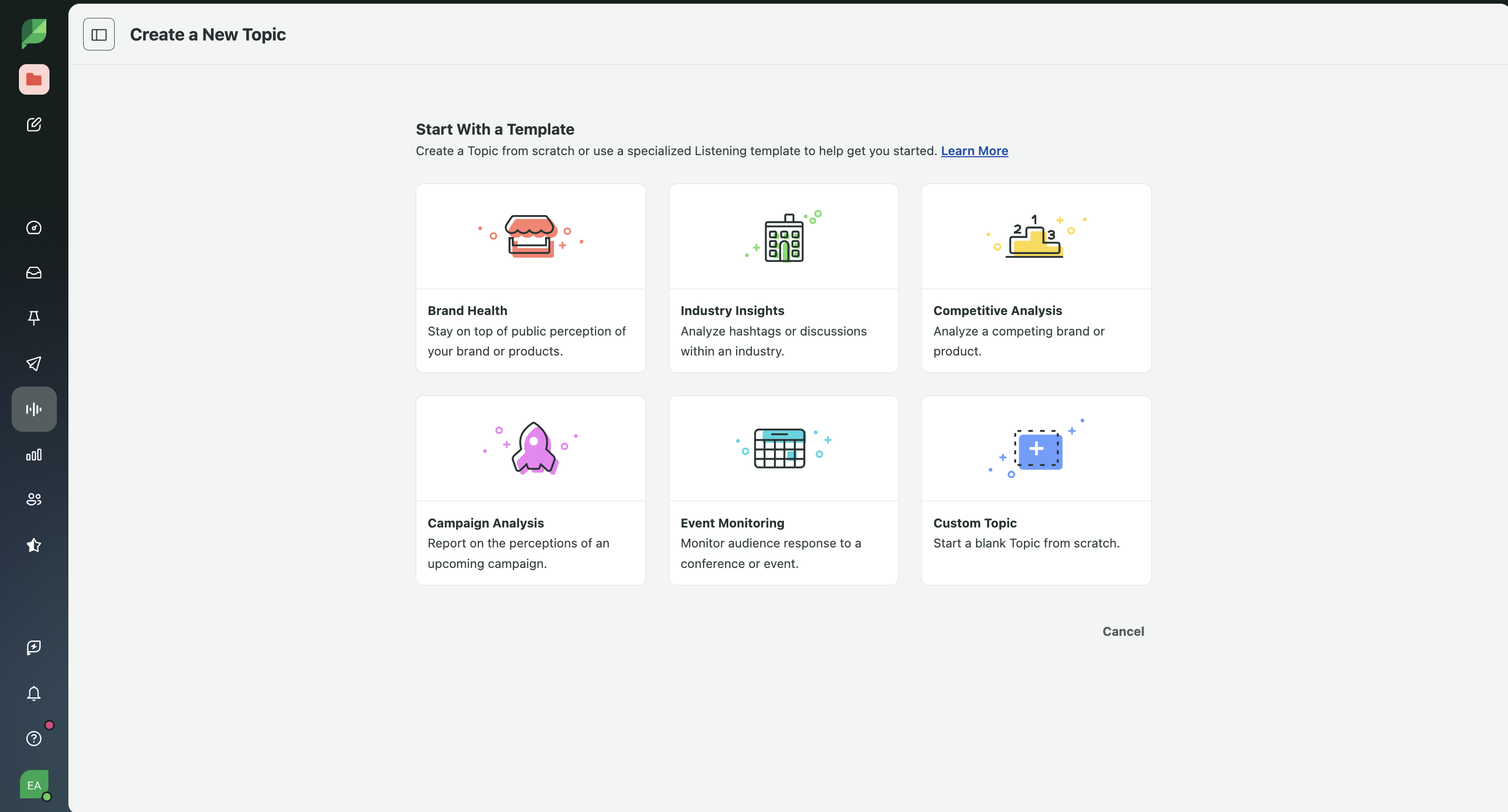
You can build searches around your brand, competitors, or topics you care about, and Sprout Social will tracks sentiment over time, so you can tie a dip or spike back to a specific campaign or moment. Then ask the AI layer questions about everything it's finding instead of digging through dashboards yourself, that's one of the interesting parts for me. The AI isn't replacing your judgment, it's helping you find patterns faster.
Additional Features
Additional FeaturesAI Assist
AI AssistSprout Social has a built-in AI assistant that helps you draft and edit post copy directly inside the composer. If you've had writer's block when it comes time to schedule content or just find yourself needing a quick hand rephrasing something, you understand where this feature fits in.
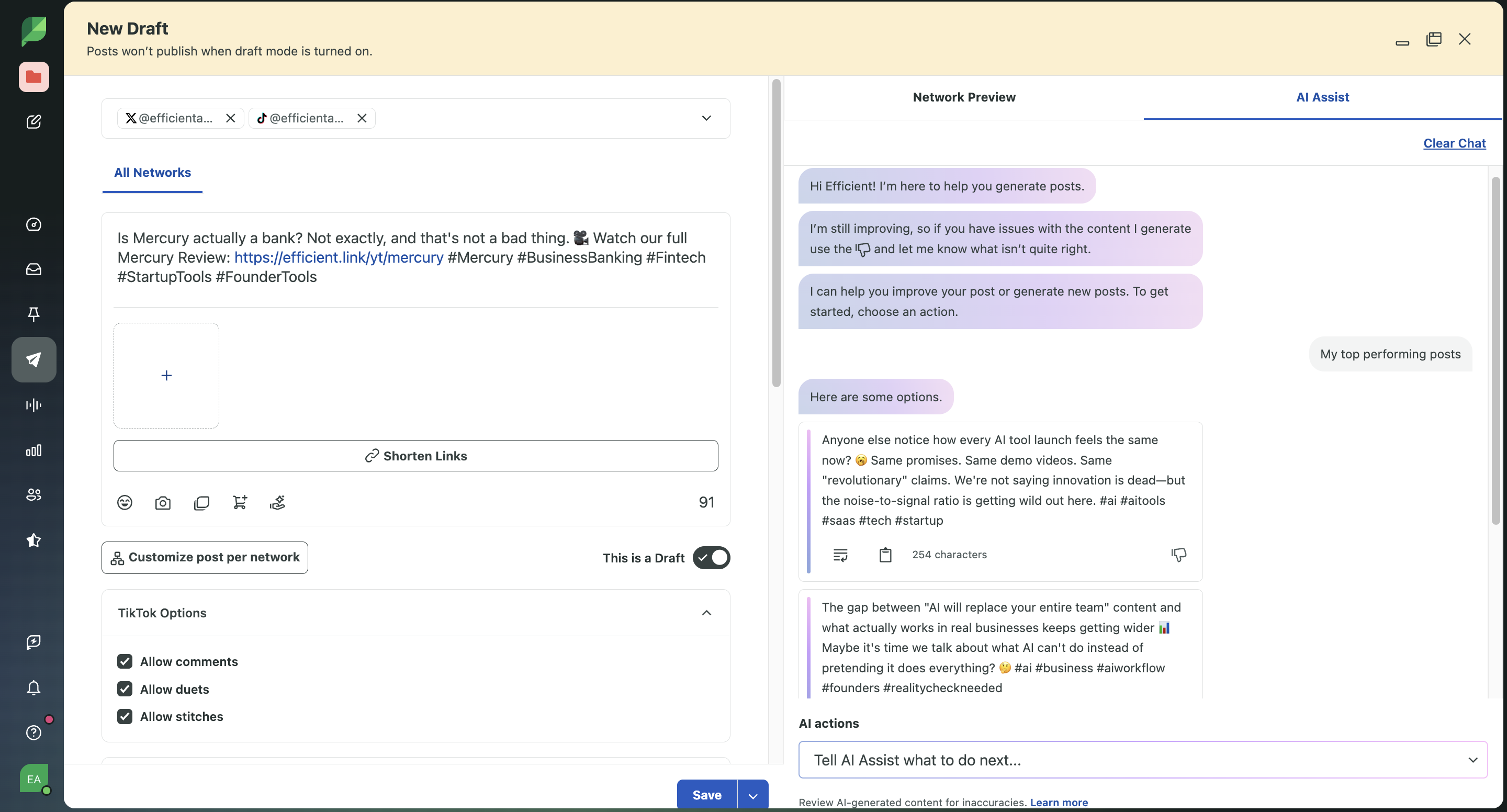
You can point it to your top-performing posts and have it generate captions based on what's already working, feed it an existing post as a jumping-off point, hand it a custom topic, or even give it a URL to an article and let it pull a caption from that.
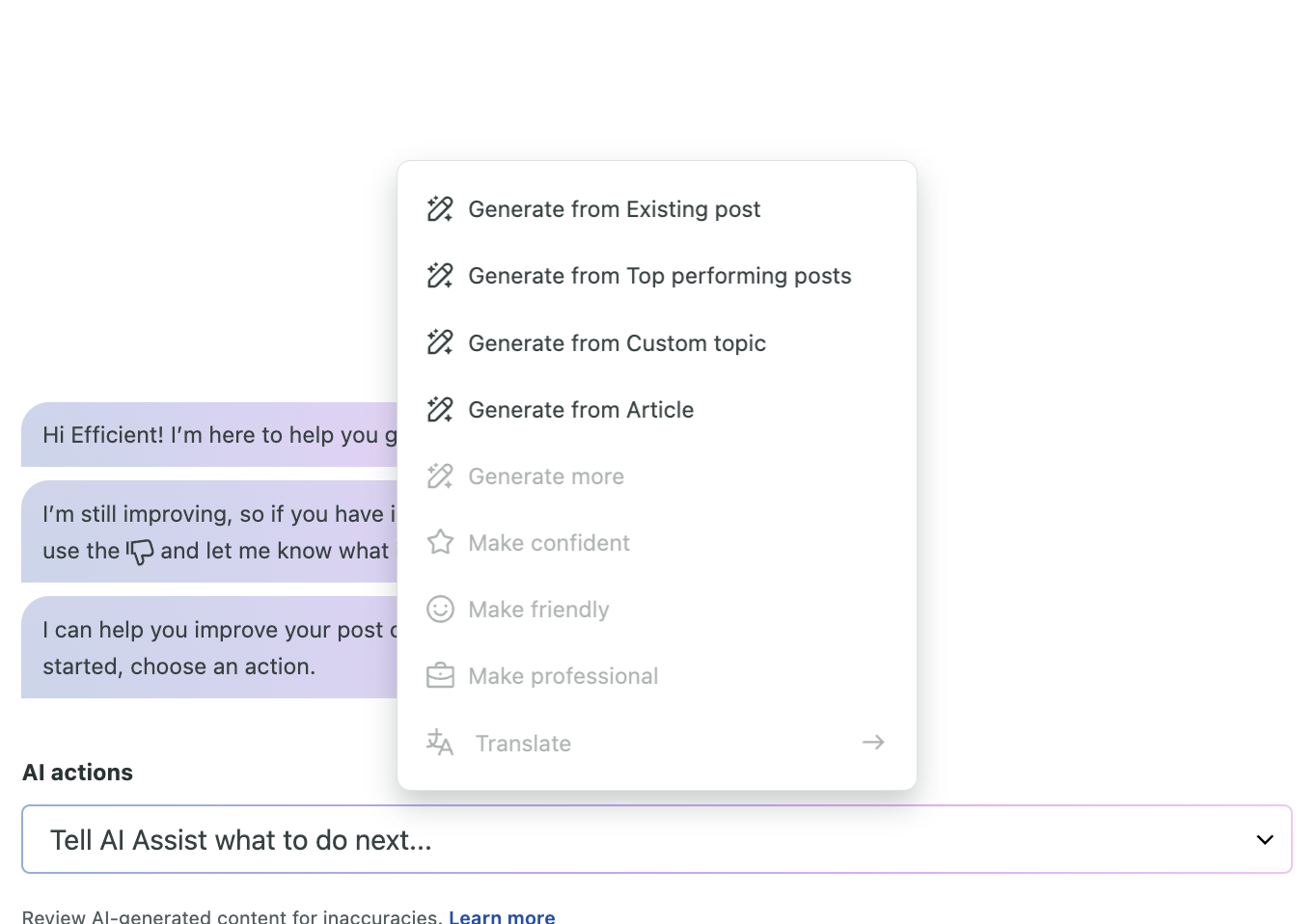
There's also a Brand Voice setting where you select a profile, or a few, and it tailors the writing to match. So if your TikTok voice and your LinkedIn voice are distinct (and they should be! 👀) being able to select exactly which profile's voice you want it to match before it writes anything is useful.
We still write our own content, and I don't think that's changing anytime soon. But this is the one of the few built-in AI writing assistants I've tested that felt actually thought out rather than bolted on or just plain bad (looking at Metricool for this one 😵💫). Sprout Social's version felt like someone actually sat down and thought about how a real content team would and should use it.
Optimal Send Times
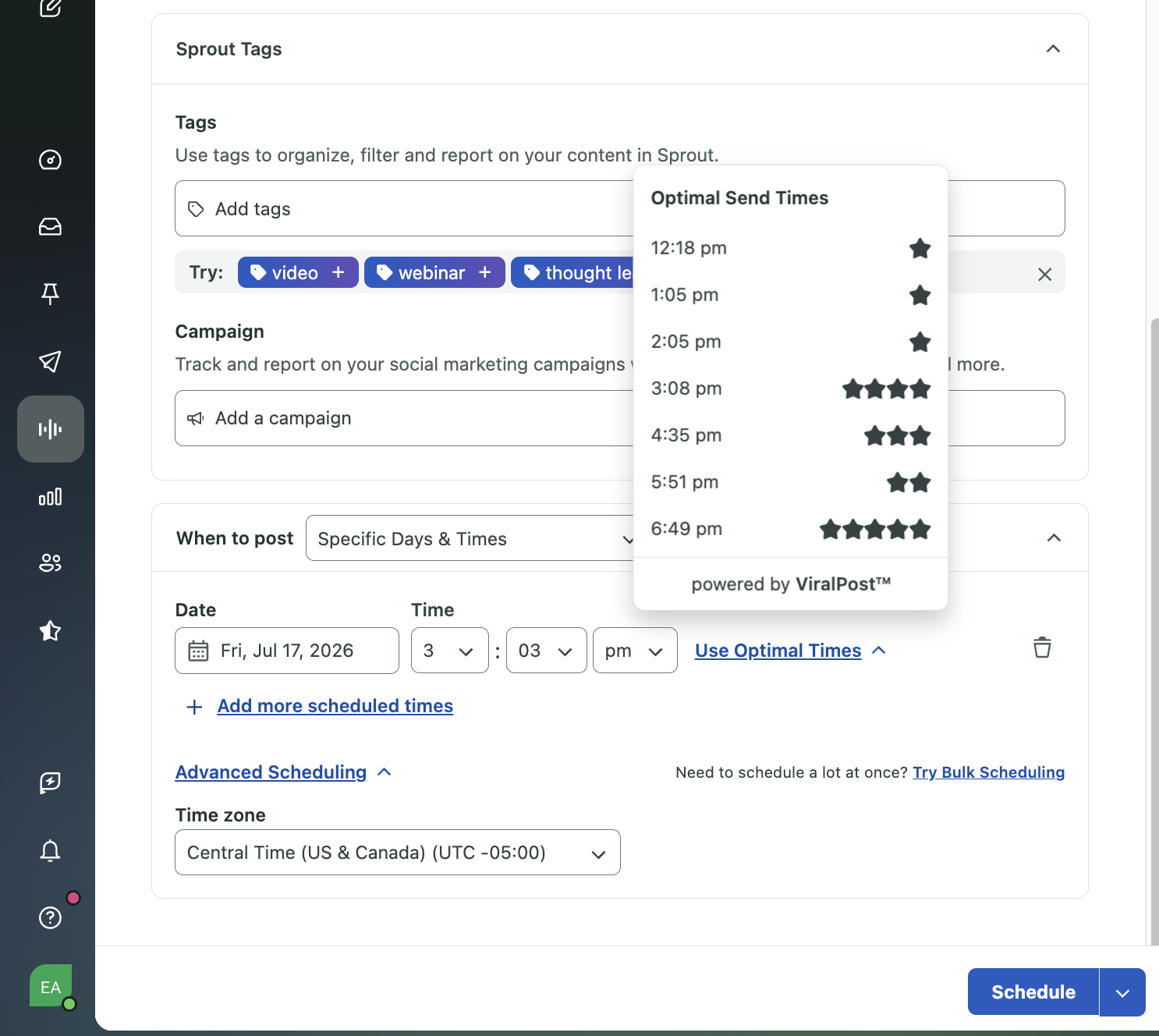
Optimal Send TimesInside the Compose window, Sprout Social shows you the top seven ideal send times for whatever profiles you've selected. We've tried this feature in other tools, like Buffer, and weren't particularly impressed. But we did notice that in Sprout Social, the suggested times actually changed based on engagement patterns it was picking up.
Reply Approvals
Reply ApprovalsIf you're handling multiple client inboxes, you've probably needed approvals for community management at some point. Sprout Social gives you a separate approval layer for inbox replies, not just outbound posts, for that very reason.
This covers scenarios like if a client who wants to personally sign off before anyone responds to a negative comment, a reply you're not totally sure about and want a second set of eyes on before it goes out, or a junior team member's work needs a quick check before it's live and public.
This year, Sprout Social expanded its Reddit partnership so brands can now engage with their own subreddits straight from the Smart Inbox and publish to brand profiles and subreddits directly, instead of treating Reddit as an outside-the-workflow afterthought.
Pricing
Pricing- Standard, $199/seat/month (billed annually): Up to 5 social profiles, Smart Inbox, basic reporting. No tagging, no approval workflows. Best for a true single-user setup, but most teams outgrow the 5-profile limit faster than they expect.
- Professional, $299/seat/month (billed annually): Unlimited profiles, tagging unlocked, internal approval workflows, digital asset library, competitive reports. This is the floor for anyone doing what we described above, best for growing teams or single agencies just starting to formalize approvals.
- Advanced, $399/seat/month (billed annually): Adds external approvers (up to 3 per workflow), automation, API access, sentiment analysis. This is the tier that delivers the full internal-then-external layered approval.
- Enterprise, custom pricing: White-glove onboarding, SSO, dedicated support, and Social Listening included by default rather than as a paid add-on. Built for the largest agencies and enterprise teams.
Note: the pricing here does add up fast. A 5-person team on Advanced runs somewhere around $24,000 a year before any add-ons like Listening or Premium Analytics, which aren't included at any published tier and require a custom quote.
Final Verdict
Final VerdictIs Sprout Social worth it? If you're an agency managing enterprise clients and need super strict approval workflows and content tagging, then it's one of the best social media management tools available.
But if you're an agency or brand that is more focused on LinkedIn posting, I don't think you can get anything better than Ordinal so I'd encourage you to check them out first. Sprout Social isn't solving for "how do I get my whole team organically amplifying this post." It's solving for "how do I manage a dozen client accounts without anyone seeing the wrong calendar."
Screenshots
Screenshots
Sprout Social
Categories
CategoriesSprout Social fits into multiple categories based on what it actually helps you do. Each category highlights a different strength and the efficiency points it earned, helping you compare tools not just by features, but by how well they actually perform.
Keep exploring the best software across categories