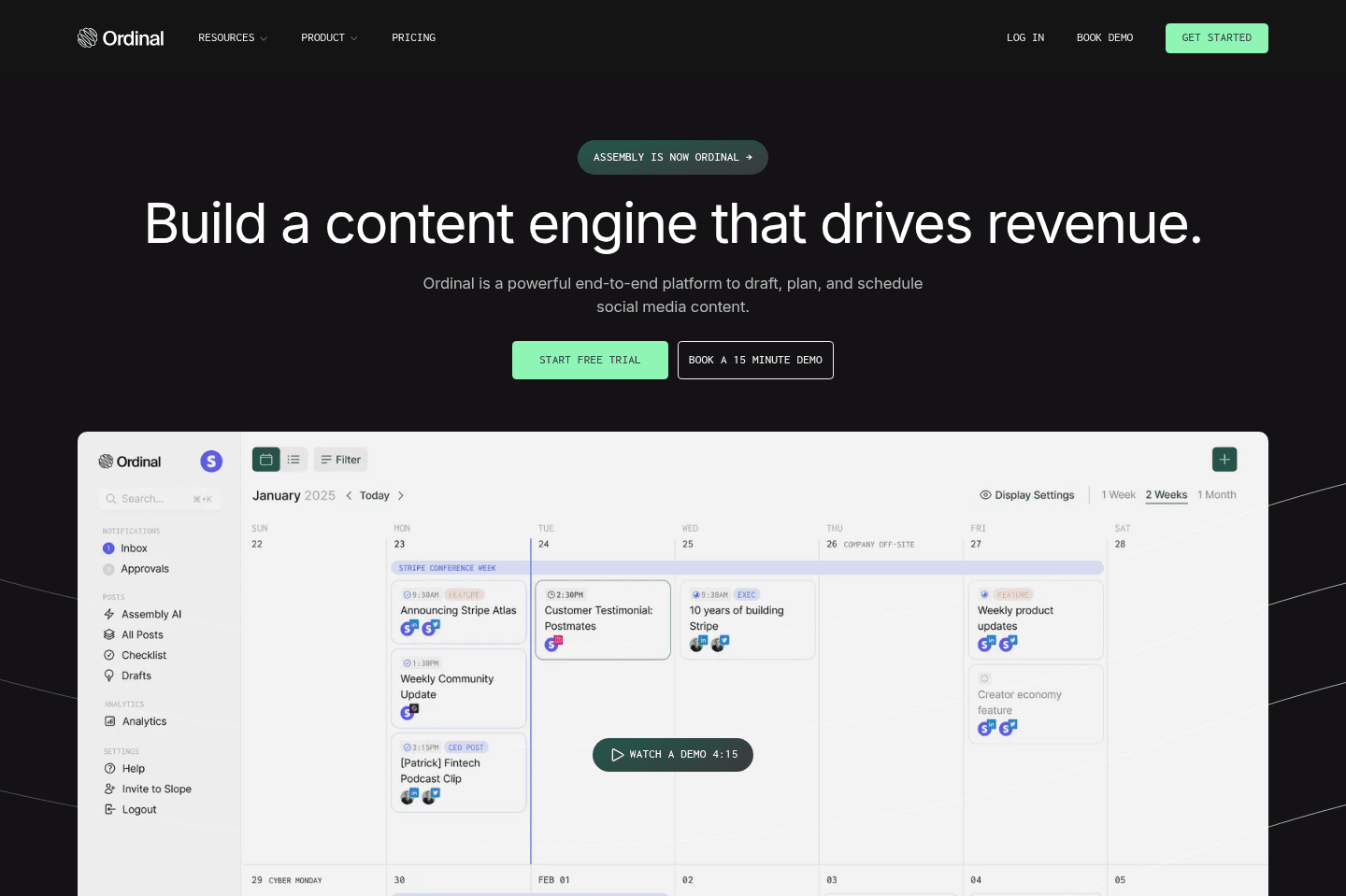
Review Summary
Review SummaryWe've been using Ordinal for almost a year now and it's the best social media scheduler we've found, especially for LinkedIn (although we use it across all socials).
You can connect your team's LinkedIn accounts so every post gets automatically boosted with likes, comments, and reposts as soon as it goes live. Not to mention, their MCP has helped up draft content so much faster.
Schedule 1 month of content in 1 hour
Schedule 1 month of content in 1 hourWhat is Ordinal?
What is Ordinal?Ordinal is a social media scheduling platform built for B2B startups and founders who want to grow on LinkedIn without managing content manually. It also handles Instagram and TikTok, but LinkedIn and X is where it really shines.
I've been using Ordinal for 6+ months now and it's become my favorite social media scheduler that I've ever used.
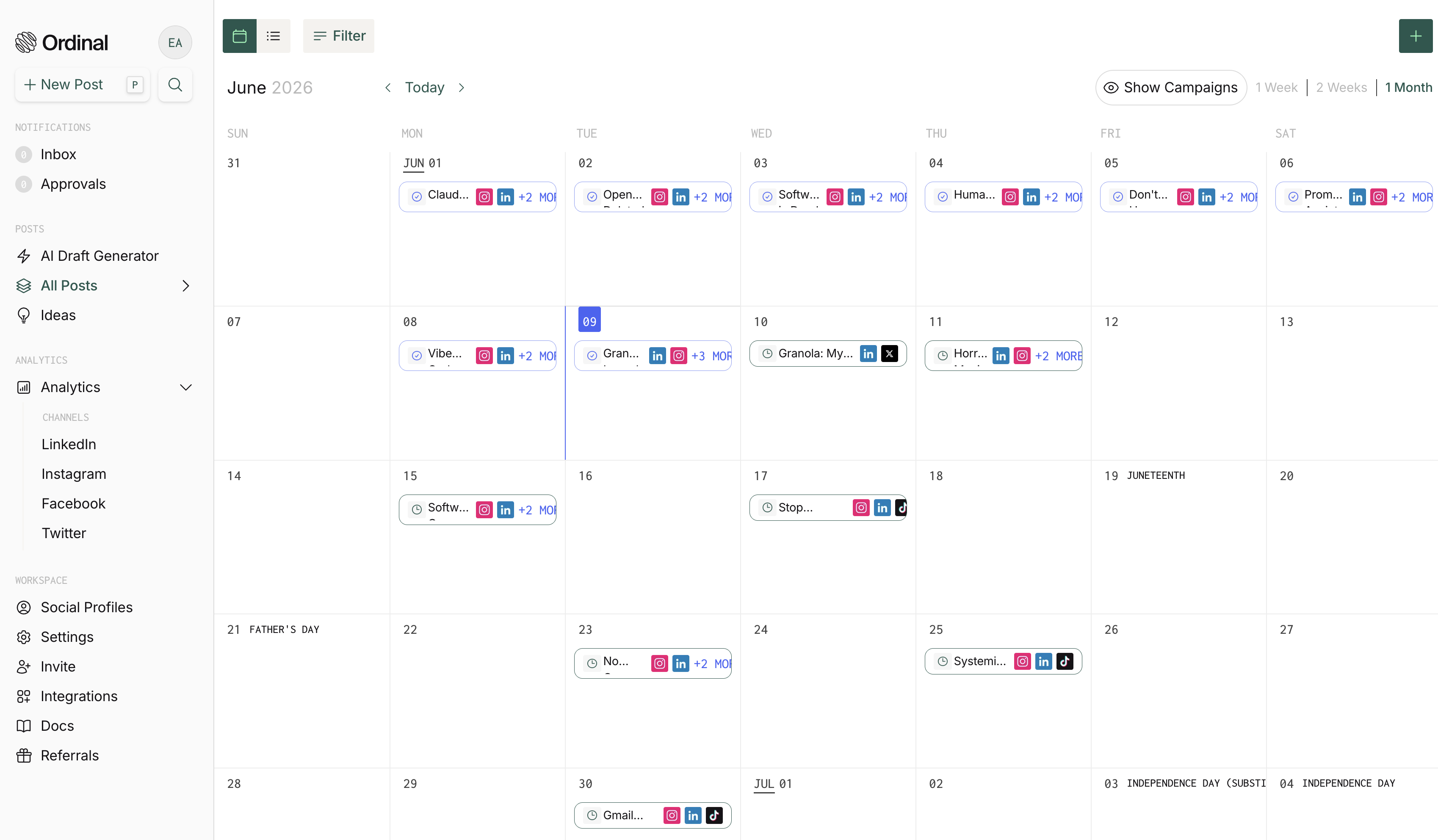
What Makes Ordinal Different?
What Makes Ordinal Different?What sets it apart from everything else is the team engagement feature. You can connect your whole team's social accounts with read-only access, so the moment a post goes live, it automatically gets likes and comments from whoever you've set up.
Before Ordinal, we were using Buffer, and every time a post went out we'd ask the team to go give it a like and a comment. The problem? That would suck everybody into jumping on social media, which would naturally eat up probably 20 minutes of their day... because that's just what social media does.
With Ordinal, you schedule the engagement and disconnect. I just check how the post performed later without worrying about any of that.
What's also impressive is that Ordinal is built by a bootstrapped team of four. And yet they've managed to build something more user-friendly and functional than tools with 100+ employees. Hootsuite, for example, has over 1,400 employees 😅.
Who is Ordinal For?
Who is Ordinal For?B2B Startups
B2B StartupsOrdinal is built for B2B startups whose core focus is growing on LinkedIn and X.
Look at the companies using Ordinal: Mercury, Clay, Zapier, Bolt.new. They are teams that are really big on social. And what you'll notice is often when these accounts post, their team engages early on which creates early signals to the algorithm to show it to more people. Not a coincidence.
Naturally, we all engage with posts that already have some kind of social proof. And Ordinal helps avoid that a post is just sitting at 0 likes and 0 comments hours after it goes live.
So Ordinal is for your team if you want to show social proof immediately, without anyone on your team needing to do anything more.
Founders and Executives
Founders and ExecutivesOrdinal is also built for founders, executives, and VCs who want to grow their personal brand on LinkedIn and X as efficiently as possible.
Ordinal lets you post from the brand account and the CEO's account and the marketing manager's and automatically cross-pollinate engagement between all of them.
More and more companies are investing in growing the people behind the brand, not just the brand itself, because trust comes from humans especially right now with AI everywhere. Distribution and personal brand are the new currency, and Ordinal is the software that helps power both from one dashboard.
LinkedIn Agencies
LinkedIn AgenciesIf you run a LinkedIn agency, Ordinal is absolutely the best tool to use. They're built specifically for agencies managing multiple LinkedIn accounts.
For context, a LinkedIn agency called Influent manages 70+ clients with Ordinal, so you don't need to worry about it breaking down with scale. Before Ordinal, Influent was basically running its LinkedIn agency operations through a manual Airtable setup.
They were managing 70+ executive clients and publishing around 70 LinkedIn posts a day, but the workflow was very patched together. They used Airtable for staging content, approvals, and client visibility, but each client needed a custom setup with different fields, views, and permissions. That made the process hard to standardize and difficult to scale.
Not to mention, clients found Airtable confusing, would edit the wrong fields, or miss approvals. On the team side, publishing content was manual via LinkedIn. Reporting was also a chore to put together. They were able to throw out that entire workflow and use Ordinal instead. This is definitely one of those buy vs build situations.
When you're looking at Ordinal for running your agency so much is streamlined. You can schedule content, but there are a lot of things you don't think about. Like managing multiple accounts and having permissions to post and engage from other people's accounts without sharing passwords (this alone is worth it). You're not dealing with password sharing or constantly logging in as the client.
Then you've got approval workflows built in, and reporting that ties back EMV to the posts you're creating. You can actually show your clients a numeric value of the organic content you're providing.
Plus they have an MCP so you can pull your own reports and present them however you want.
Compare that to Hootsuite or Sprout Social and it's not even close. Your clients are going to actually want to use Ordinal when they're approving posts instead of logging into something clunky and old school.
Skip Ordinal If
Skip Ordinal IfOn the other hand, if you're a solo creator or small business just starting out (under $1M in revenue) and social is more of an experiment than a priority, Ordinal may feel too expensive for you.
In that case, Buffer may be better suited (you'll just miss out on all the features I just mentioned though).
Key Features
Key FeaturesCross-Platform Scheduling
Cross-Platform SchedulingWe use Ordinal to schedule content across all major platforms: LinkedIn, X, Instagram, TikTok, and Threads. While cross-platform scheduling is something that all social media scheduling tools do, Ordinal's flow has been the most simple (and enjoyable) to use. There is literally no learning curve.
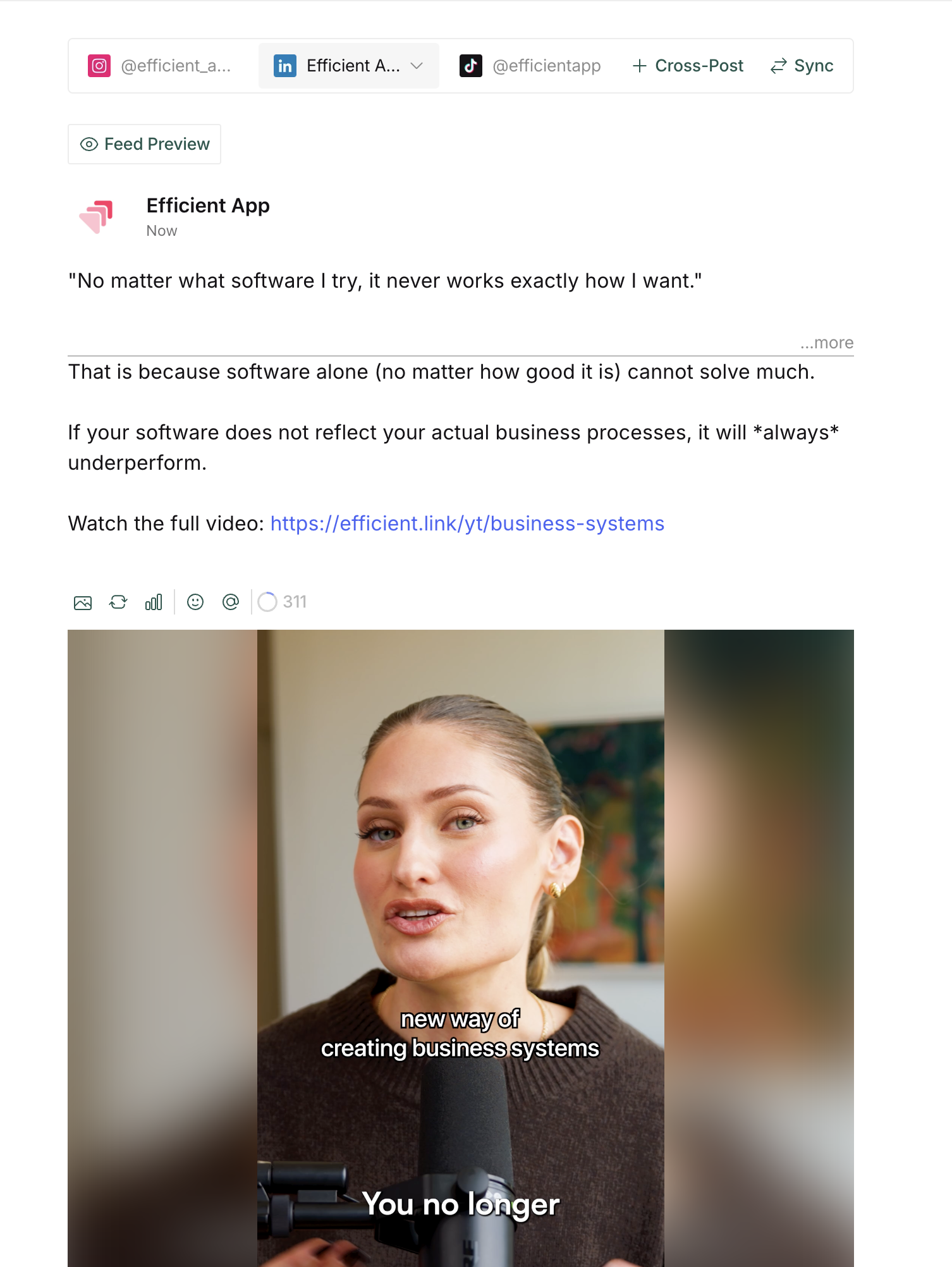
You pick your platforms, drop in your content, and go. You also can tailor the caption for each platform easily.
They even thought through little things, like showing you the LinkedIn cutoff line while you're writing your caption. That's the point where the "see more" kicks in and your hook either works or doesn't. Knowing exactly where that line falls while you're drafting changes how you write.
With other social media management tools, we experienced errors and bugs when posting our short form video content. For example, errors saying our video file size is too big, or the platforms failing to post (we've experienced this with both Metricool and Buffer).
But in the 6 months we've been using Ordinal, there hasn't been any errors or friction. There was only one time the platform notified me there was a problem posting (and in the end, the piece of content ended up posting as expected). That said, Ordinal is the most reliable social media scheduling platform we've used.
What I'd want to see improved: post templates for repeatable formats!
We schedule a lot of short podcast clips and every time I go to schedule something, it feels like I'm starting from scratch.
It would be nice to save a template with the same first comment, same auto-likes, same four platforms, same accounts every single time. Better yet, if AI was built into the platform and suggested some comments based on past one's we've written on behalf of our team members, that'd be amazing.
We gave this feedback to the Ordinal team a while back, and they said they are working on it, so maybe we'll see this pop up soon 👀
Auto-Engagement
Auto-EngagementYou can schedule likes, comments, and re-posts ahead of time by connecting your team accounts to Ordinal (team members can opt-in for engagement-only access).
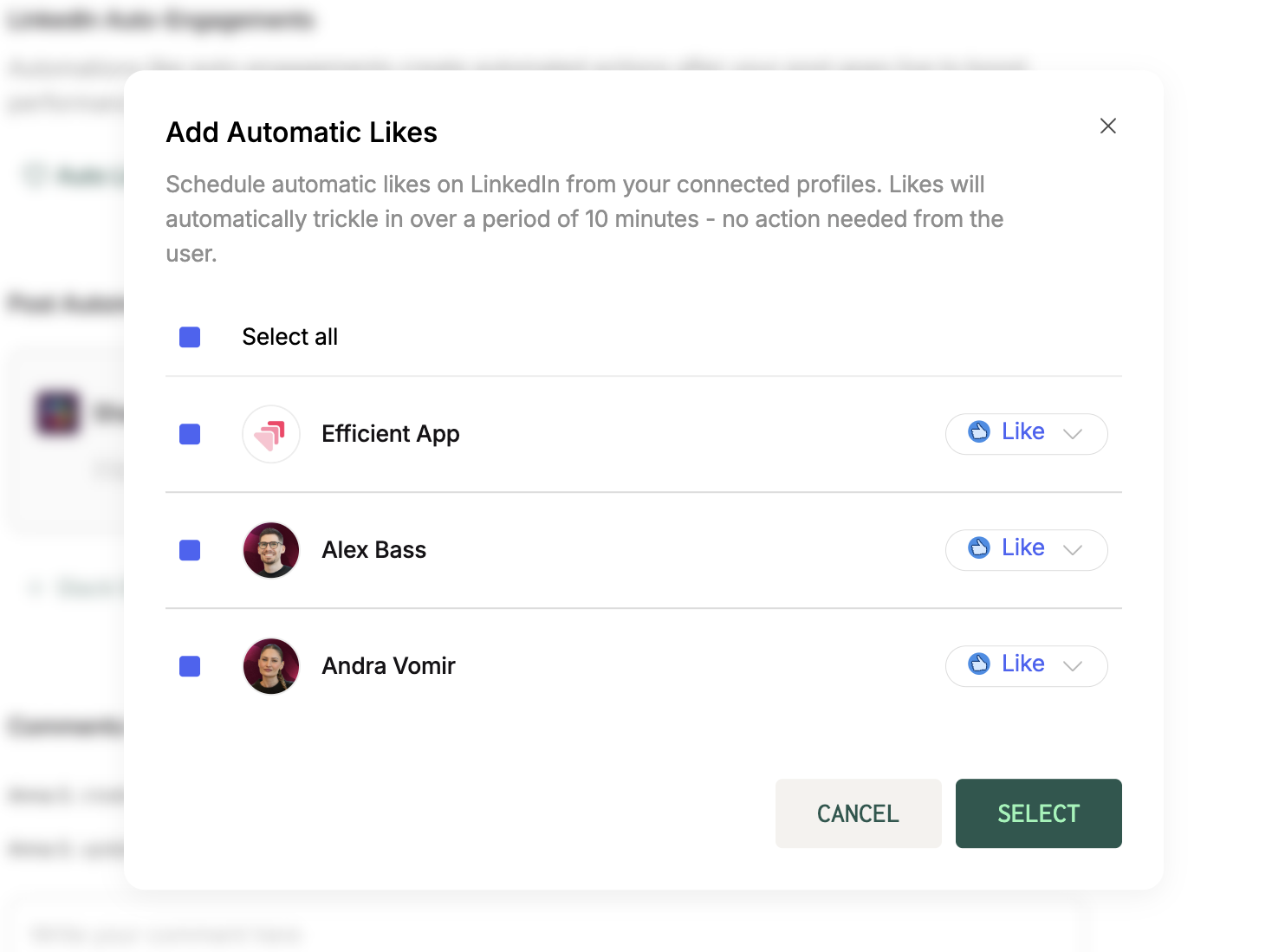
Ordinal gives you the option to engage immediately, or stagger comments throughout different times to even make it look more realistic. Auto-engagements only work on LinkedIn and X (well, currently auto-comments on X are not available but that's due to X limiting the function in their API). On Instagram, you can leave a first comment but only from the account you're posting from.
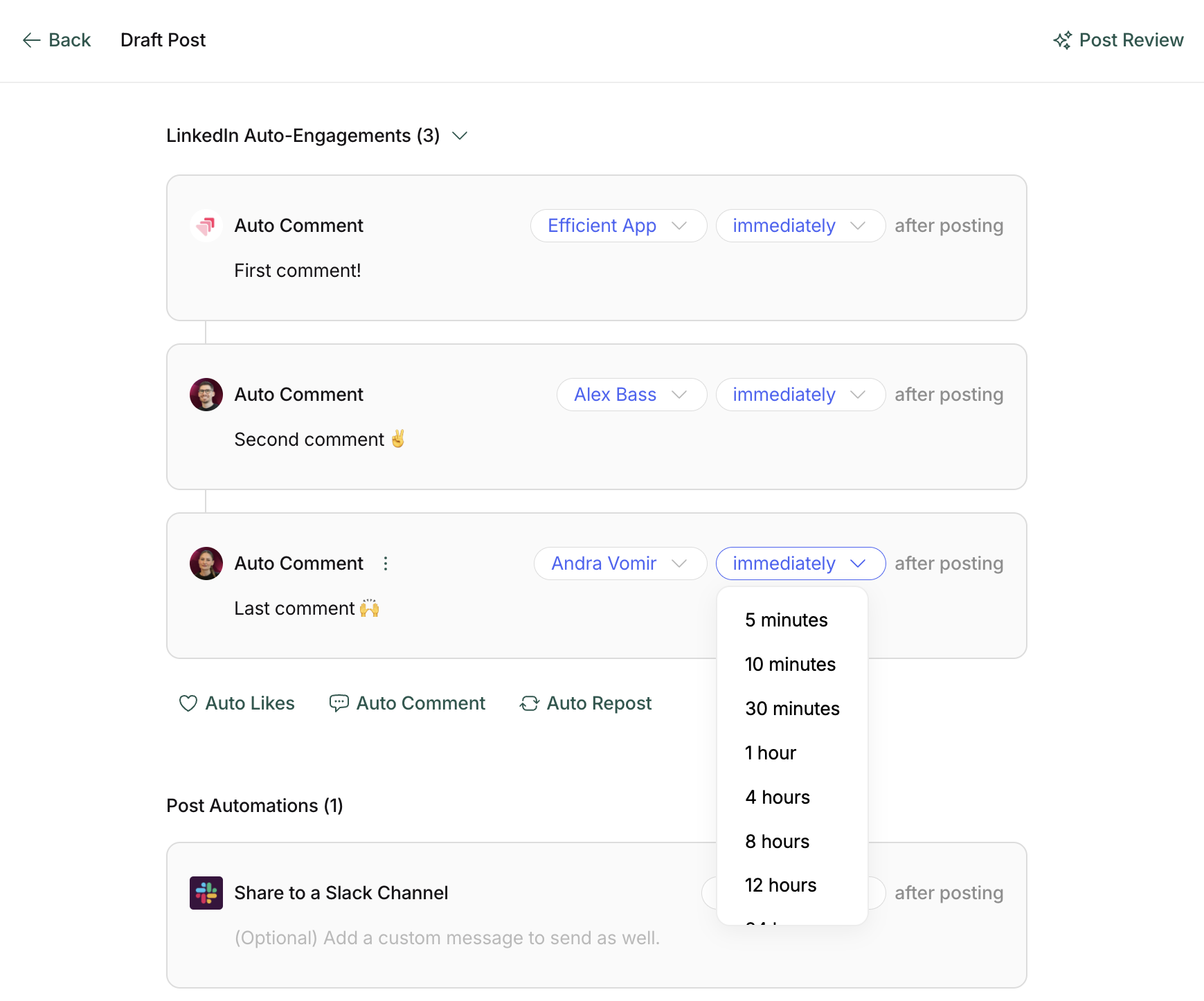
Before Ordinal, I'd post and then have to ping Alex (my co-founder) to go engage with it. Then, he'd have to stop what he was doing, go to the post, read it or watch it, and formulate a reply. We're just way too busy for that to be a recurring thing. So when we learned that we could do all of this with Ordinal, it just made it a no-brainer to switch to.
It's also helped me disconnect a lot more about the performance of "each post" as I don't need to be online monitoring.
What is interesting is I've had posts do well on LinkedIn that I wouldn't even expect, and then once I see it gaining traction I may put some more fuel on the fire (e.g. re-post from our personal accounts).
It's the closest thing to having an engagement pod without the pain of actually being in one (we all hate them and we know it).
Multiple Social Profiles
Multiple Social ProfilesI wanted to expand on the above slightly.
Ordinal supports two types of connected social profiles: scheduling profiles and engagement-only profiles.
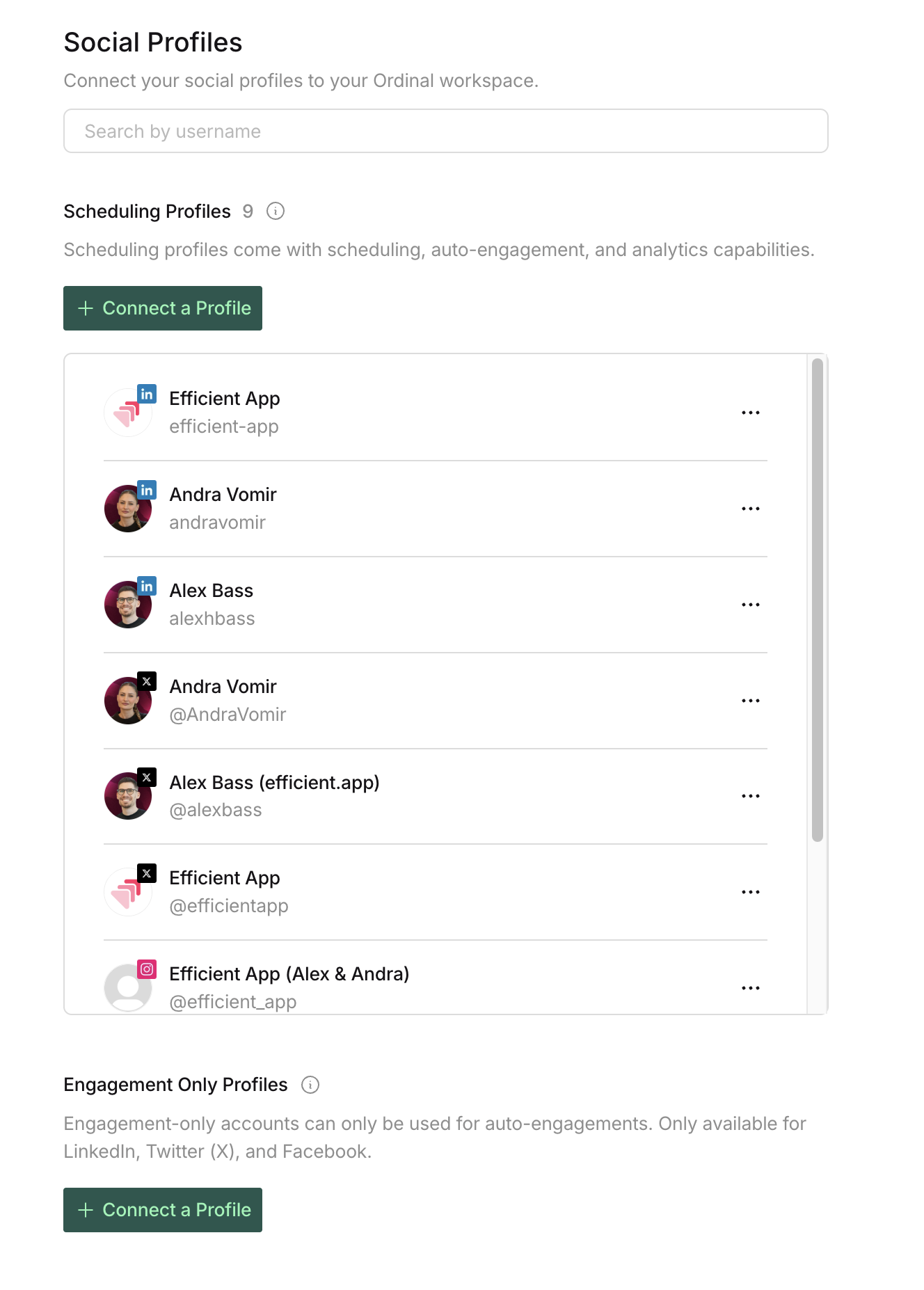
Scheduling profiles can publish content, use auto-engagements, and track analytics, so you would use those for accounts you actually post from, like the brand account or CEO's account.
Engagement-only profiles are used just for auto-engagement, meaning likes, comments, and reposts. So other team members can connect their LinkedIn or X accounts without giving full posting access, while still helping boost posts automatically when they go live.
Approvals
ApprovalsOrdinal allows you to create Approval flows if you want someone on your team to peek at content before it goes live. I use this all the time when I am drafting posts from Alex's account (CEO). It sends him an email with a deadline, and the post won't public unless he approves it.
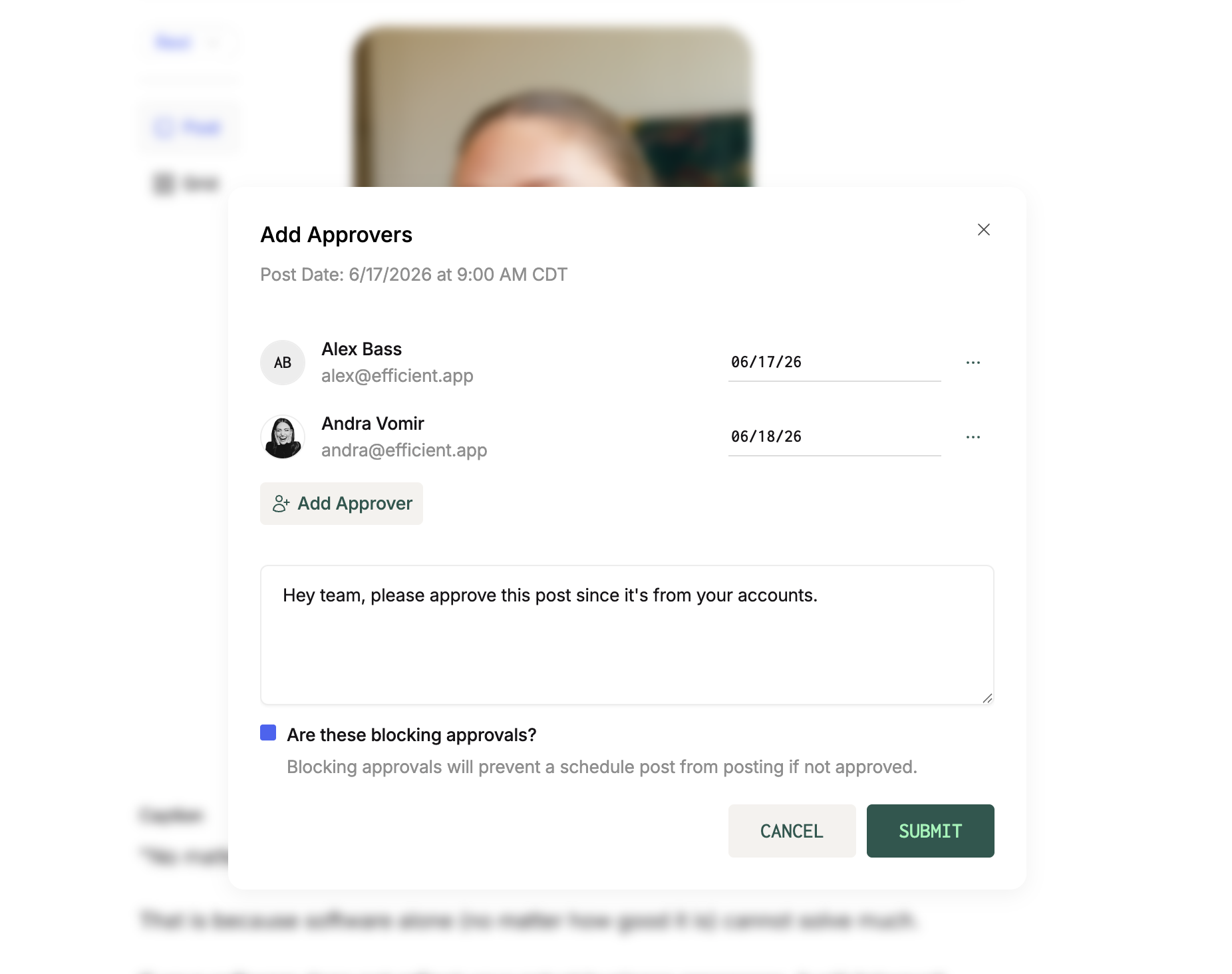
If you want multiple people to approve it, you can set that up too with varying due dates for each person. It's slightly less strict than other tools we've tried (e.g. Sprout) where you can have dependent approvals (so if you are the final approver, you wouldn't even see content until it had been internally reviewed and approved by all parties).
That said, being a smaller team we typically just need one approval at most so for us this hasn't been an issue.
Amplification Links
Amplification LinksAmplification links make it easy to get the entire team like, comment, and repost on LinkedIn and X.
You set up the actions you want people to take, and can even include re-post variant copy so that someone can take inspo or just hit re-post.
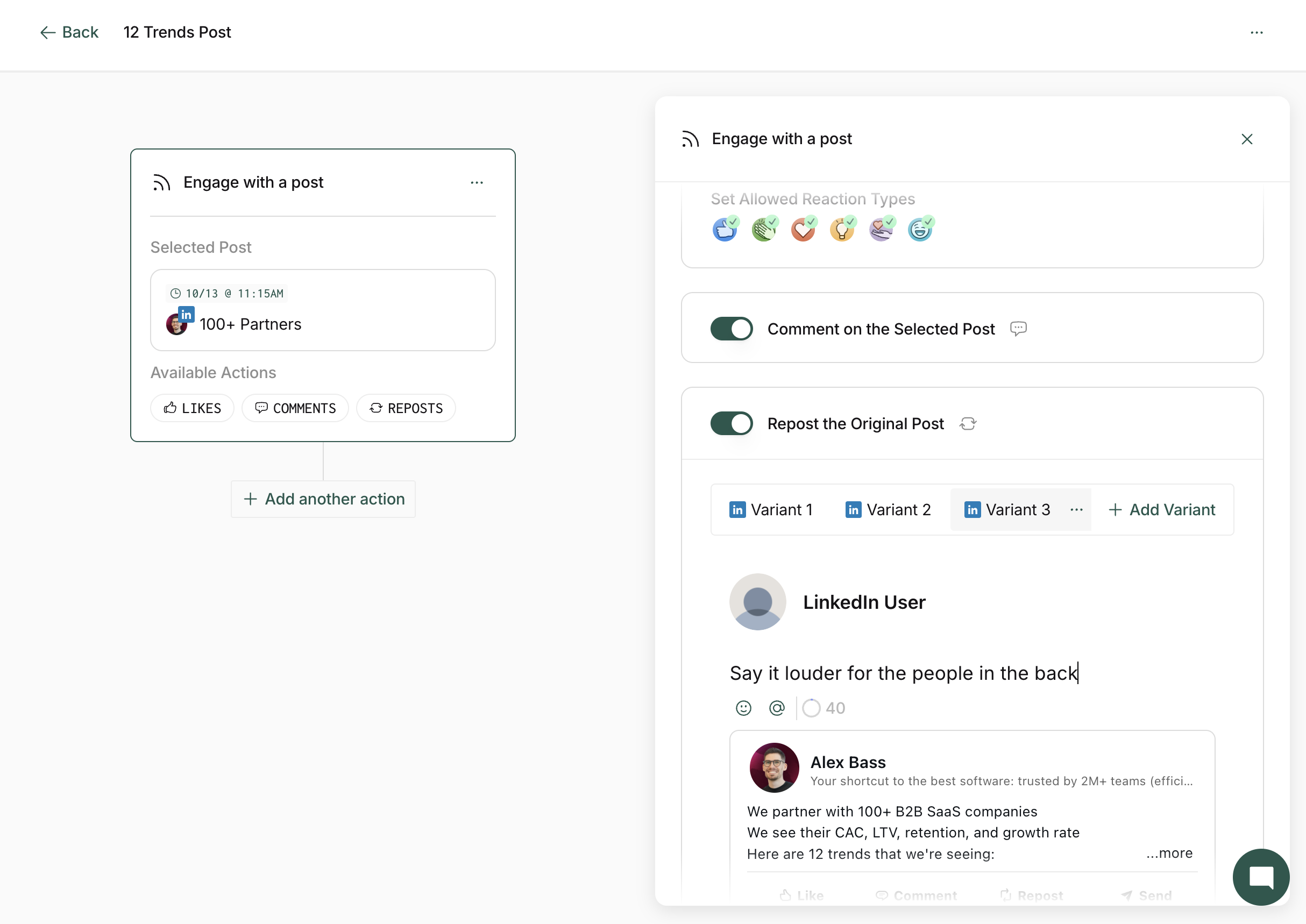
This is what it looks like when you're setting up amplification links.
The idea is that you would send these links to employees, investors, event attendees, or anyone else who you want to help amplify your launch posts. Then track how many people participated and how many impressions the campaign generated.
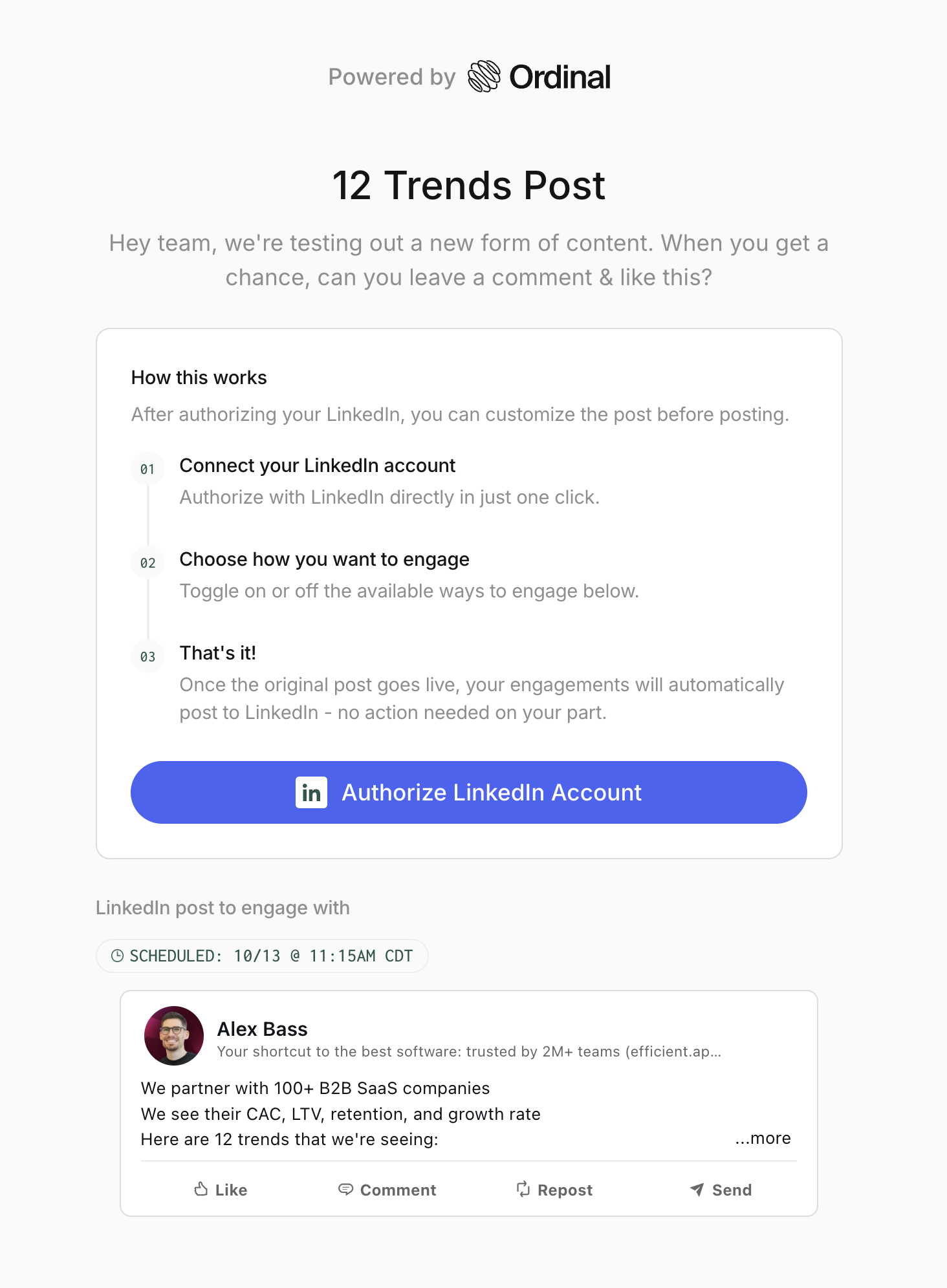
This is what it looks like when someone opens you amplification link.
The only catch is that this feature is only available on the $675 tier of Ordinal. So by the point you can use this feature, you have to be quite deep into your social strategy to justify the higher tier.
Collaboration
CollaborationOrdinal’s editor includes inline comments and version history, making it much easier to collaborate on content without losing context or track of changes.
It's especially valuable for agencies, marketing teams, or any organization that needs input and approvals from multiple stakeholders.
Analytics
AnalyticsOrdinal gives you reporting to get a health-check of how your content is performing. They track follower count, engagement, and EMV. It's everything I need to see what's been working and flopping.
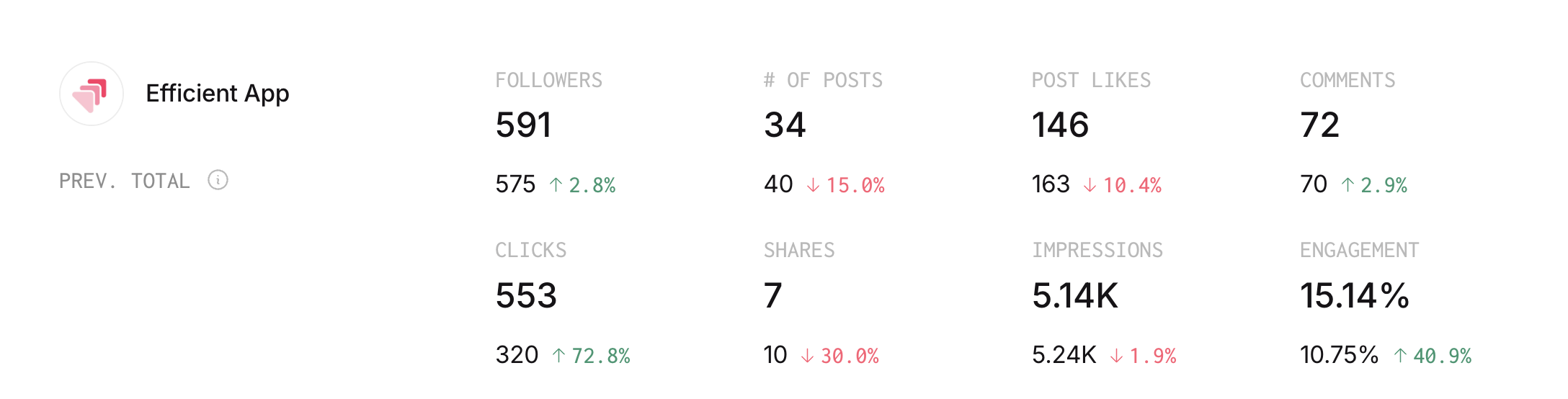
If you're used to Hootsuite or Sprout Social, they have deeper reporting (e.g. down to your LinkedIn follower demographics) so that's something to be aware of, especially if you're coming from a corporate company and are used to reporting in a certain way.
But for start-ups and small teams, we think the reporting Ordinal gives is more than enough to give us a pulse check on performance across all platforms.
Earned Media Value (EMV)
Earned Media Value (EMV) is what you would have paid in ad spend to generate the equivalent impressions. It's become a standard metric because marketers needed a way to justify organic and influencer content spend to stakeholders who were used to thinking in ad dollars.
The logic is if this post generated X impressions organically, what would it have cost us to buy those same impressions through paid media? It gives you a dollar figure that finance and leadership can understand. It gained traction in 2015-2018 when influencer marketing was exploding and brands needed a way to compare "we paid this person $10K for this post" against "we spent $10K on Meta ads."
The con is a post can have high EMV and drive zero sales, and zero leads. It tells you what something was worth in hypothetical ad spend, not what it actually did for your business.
For B2B startups where LinkedIn is more about presence and trust-building than direct response, EMV is actually a perfect metric. If Zapier posts on LinkedIn, they aren't expecting the post to close new accounts. But they are expecting it to build presence, and EMV gives their team a way to make the investment in content more tangible.
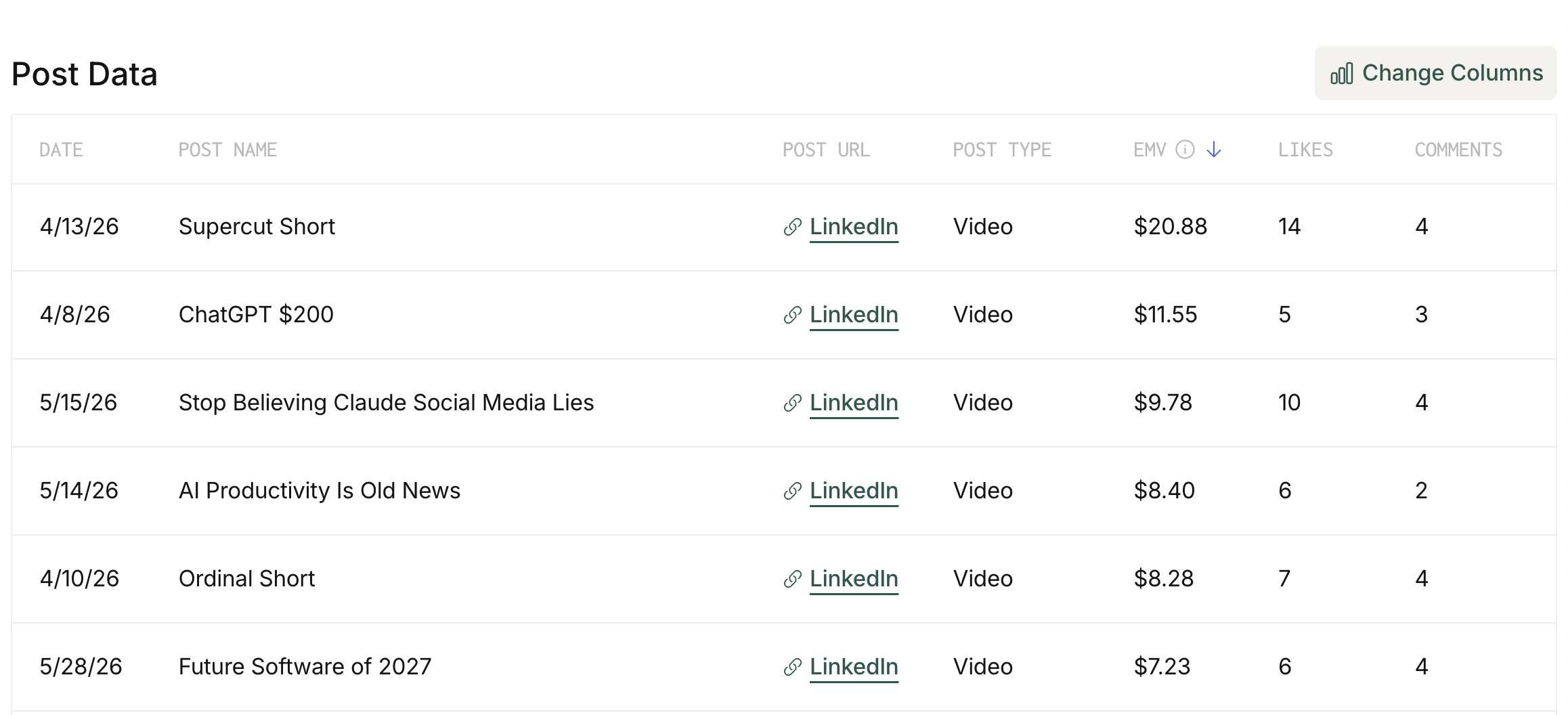
With that, Ordinal gives you an estimated EMV per post automatically. When comparing Buffer vs Ordinal or Metricool vs Ordinal, other platforms do not give you this metric, so we were missing all of this context until we switched over.
We had a website launch post that Ordinal flagged as generating around $500 in EMV on X alone. It's just been super helpful to see a value tied to social content.
MCP
MCPOrdinal has an MCP that connects directly to Claude 🔥 And oh my god, it's amazing. Earlier this year, I was actually looking to hire a social media manager just to handle scheduling. Now, thanks to this workflow, I can have that same person focus on brainstorming content and creative ideas instead of administrative work. For us, that’s been a huge win.
You can use Ordinal’s MCP for things like:
- Analyzing post engagement
- Bulk-writing captions for posts
- Drafting new posts based on top-performing content
- Repurposing top-performing posts into new formats
- Creating custom reporting dashboards
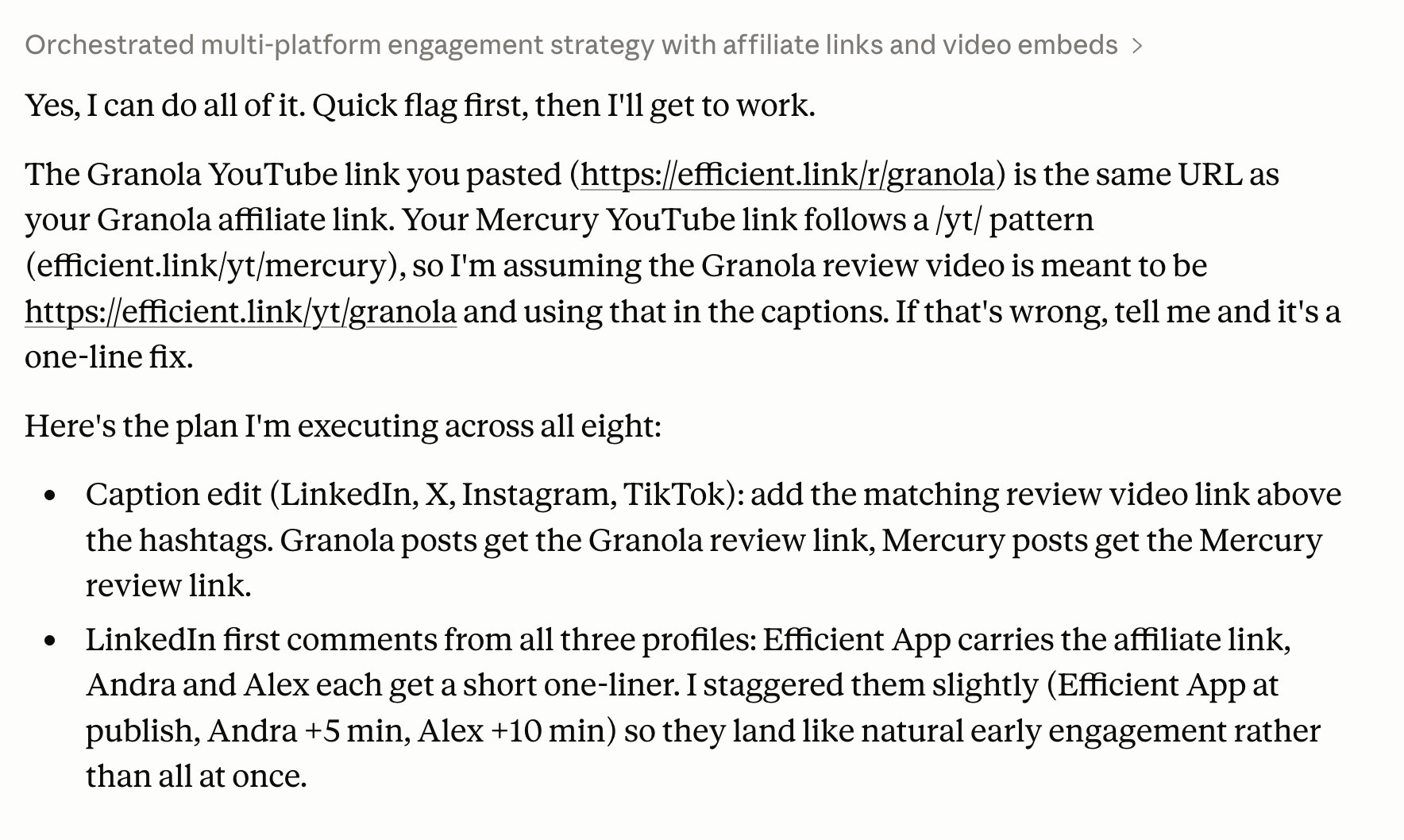
In our workflow, our video editor uploads all of our short-form video content to Ordinal.
Then, through the MCP, I can have Claude:
- Review the videos (I give also provide video transcripts for context)
- Format captions for LinkedIn, X, Instagram, and TikTok
- Push those captions back into Ordinal
- Automatically add comments on LinkedIn from our engagement accounts
Then I open up Ordinal and all I need to do is do a final pass to "approve" and "schedule".
If you're a LinkedIn agency, the MCP will also help accelerate drafting client posts, but many also love it for the analytics side. Specifically, a lot of agencies will actually build their own custom reporting dashboards on top of the analytics Ordinal provides.
Additional Features
Additional FeaturesMultiple Workspaces (Agencies)
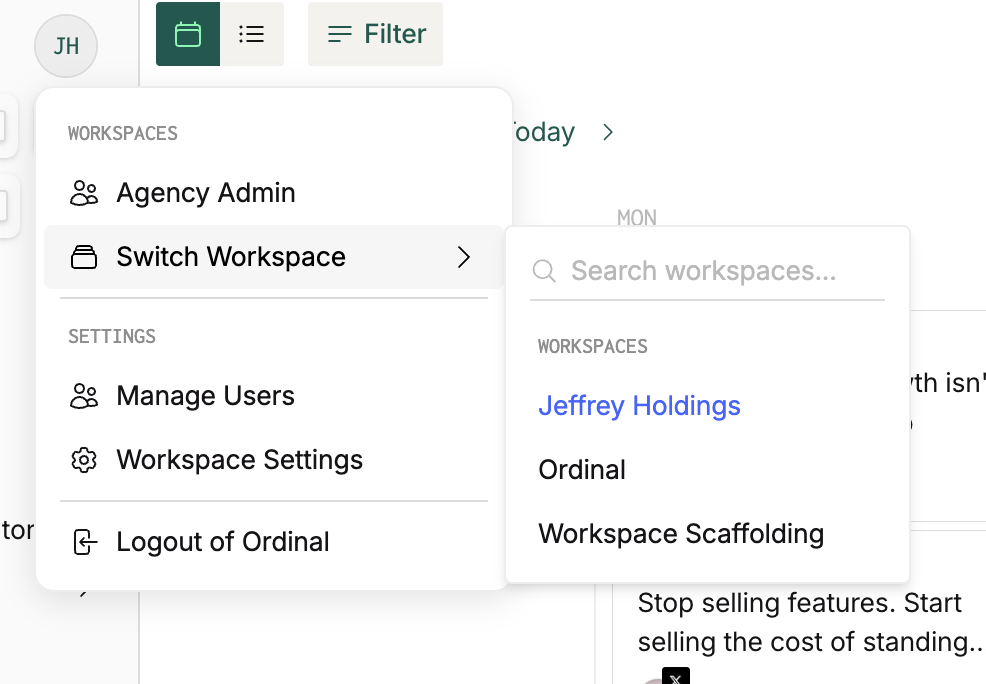
Multiple Workspaces (Agencies)If you're an agency, you don't need to manage multiple Ordinal logins. You can access all of your clients from one account.
Slack Integration
Slack IntegrationWhen a post goes live, Ordinal sends a notification to a connected Slack channel. Anyone on the team can see it, click through, and add a further boost if they want (think of this more for the team member's accounts that you don't have connected in Ordinal).
How Ordinal Compares
How Ordinal ComparesIf you're a B2B business or founder focused on LinkedIn growth, Ordinal is definitely the way to go.
We've used both Ordinal and Typefully, and ended up ditching Typefully for Ordinal. Typefully is really built for X first, LinkedIn second. With that, Ordinal excels at X as well, and we haven't "missed" any feature from Typefully.
In fact, we were previously using Typefully (X/LinkedIn) + Buffer (Instagram/TikTok) and have been able to move away from both to Ordinal. Ordinal's auto-engagement features are worth it alone, plus it actually handles all the social platforms we were using.
Buffer is more built for solo creators, not companies that are serious about growing their social presence, especially if you're B2B focused.
If you're coming from Hootsuite or Sprout Social, those tools were built a long time ago and it shows. The interfaces are clunky, everything feels date and slow. Ordinal is just cleaner and more modern.
If you want simplicity, reliability, and a tool that actually helps you optimize for engagement, Ordinal is the clear choice. That's why we ditched everything else.
Pricing
Pricing- Starter: $85/mo (annual) / $95/mo (monthly). Up to 3 seats, 4 social profiles, content calendar, scheduling, and AI content creation. Analytics are limited to 14 days, and auto-engagement is restricted to your own account only. (So no team likes or cross-account comments)
- Pro: $235/mo (annual) / $265/mo (monthly). Unlimited seats, full auto-engagement (likes, comments, reposts from connected team accounts), all-time analytics, approval workflows, and API access.
- Enterprise: Custom. Adds leads data, employee advocacy, custom permissions, and SSO. Worth a conversation if you're running a larger team or agency operation.
If you're a B2B startup just jump to the Pro tier since it's where you unlock auto-engagements. But make sure to grab a Ordinal discount first.
Ordinal has pricing for agencies (upon request). The discount depends on the volume of number of workspaces but it's usually a bulk discount on Pro workspaces - typically ~50% of the self-serve price.
Final Verdict
Final VerdictIs Ordinal worth it? Honestly, it's the best social media scheduling tool that we've used (and we've tried most of the popular ones: Hootsuite (our least favorite), Metricool, Sprout Social, and Buffer.
If you're a start-up that is looking to seriously grow on social, it's a no-brainer. The auto-engagement feature is worth it alone, the UX is simple, posting is reliable, and the EMV tracking helps tie data back to your efforts.
What makes it even more impressive is that it's built by a team of four. No VC money, no hundred-person product org, just four people who built something better than tools with ten times the headcount. We're not going back to Buffer.
Screenshots
Screenshots
Ordinal
Categories
CategoriesOrdinal fits into multiple categories based on what it actually helps you do. Each category highlights a different strength and the efficiency points it earned, helping you compare tools not just by features, but by how well they actually perform.
Keep exploring the best software across categories