What is Motion?
Motion is a calendar-first, AI-powered project management system that brings your tasks, meetings, documentation, and team workload into one tool.
Previous to using Motion, we used Asana for seven years. It kept us organized enough, but I was spending at least an hour or two every week just "cleaning up" the tool so it wouldn't fall apart. Deadlines would shift, priorities would change, and suddenly half the board was out of date. That's why we switched to Motion five years ago and haven't looked back.
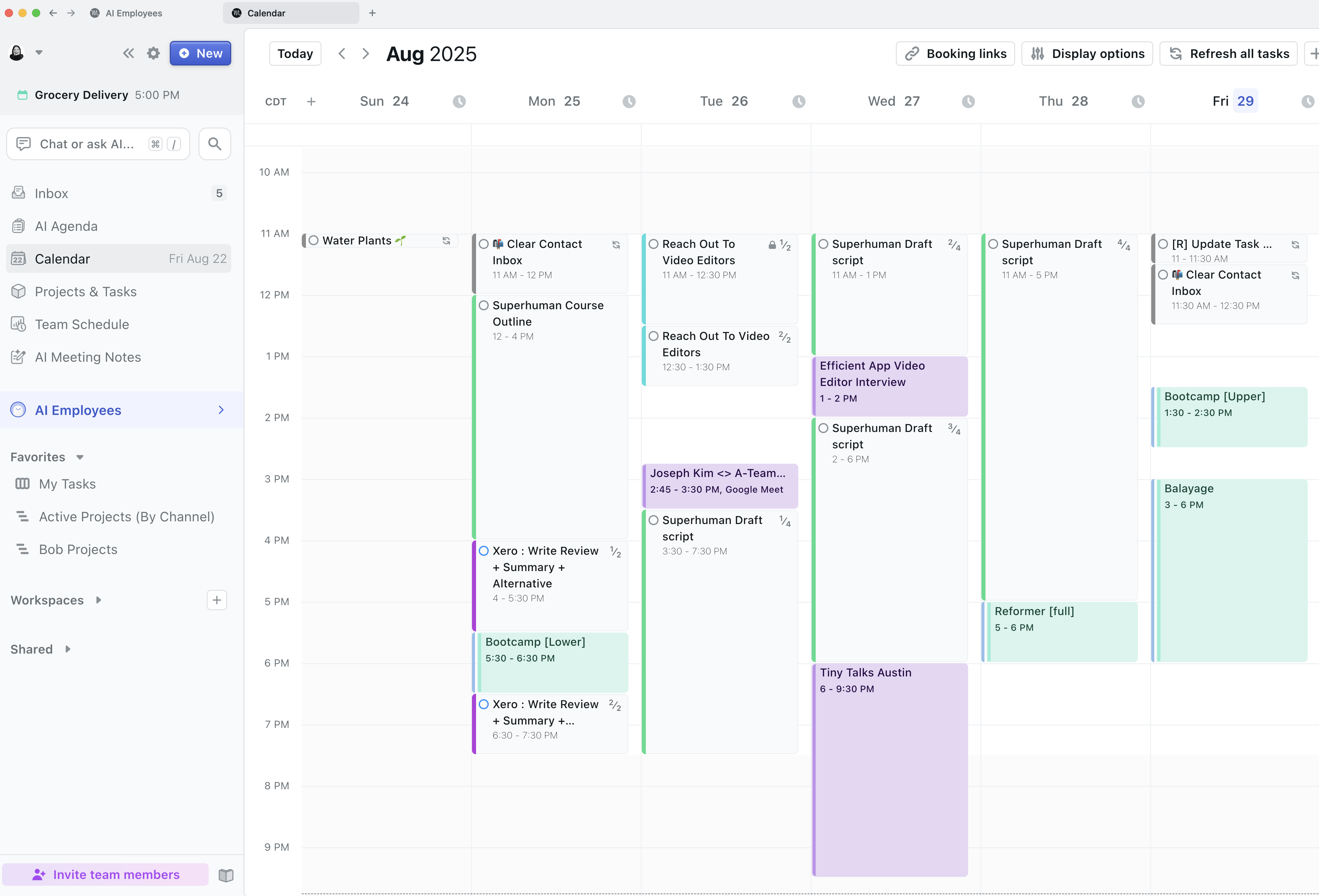
The core thing Motion does differently is it actually schedules your tasks onto your calendar automatically, based on deadlines, priorities, and availability.
And when plans change, which they always do, it updates everything for you. What really got me early on was the deadline visibility. If our team has 5 hours of meetings in a day and 8 hours of work scheduled, Motion flags that we're at risk before it becomes a problem.
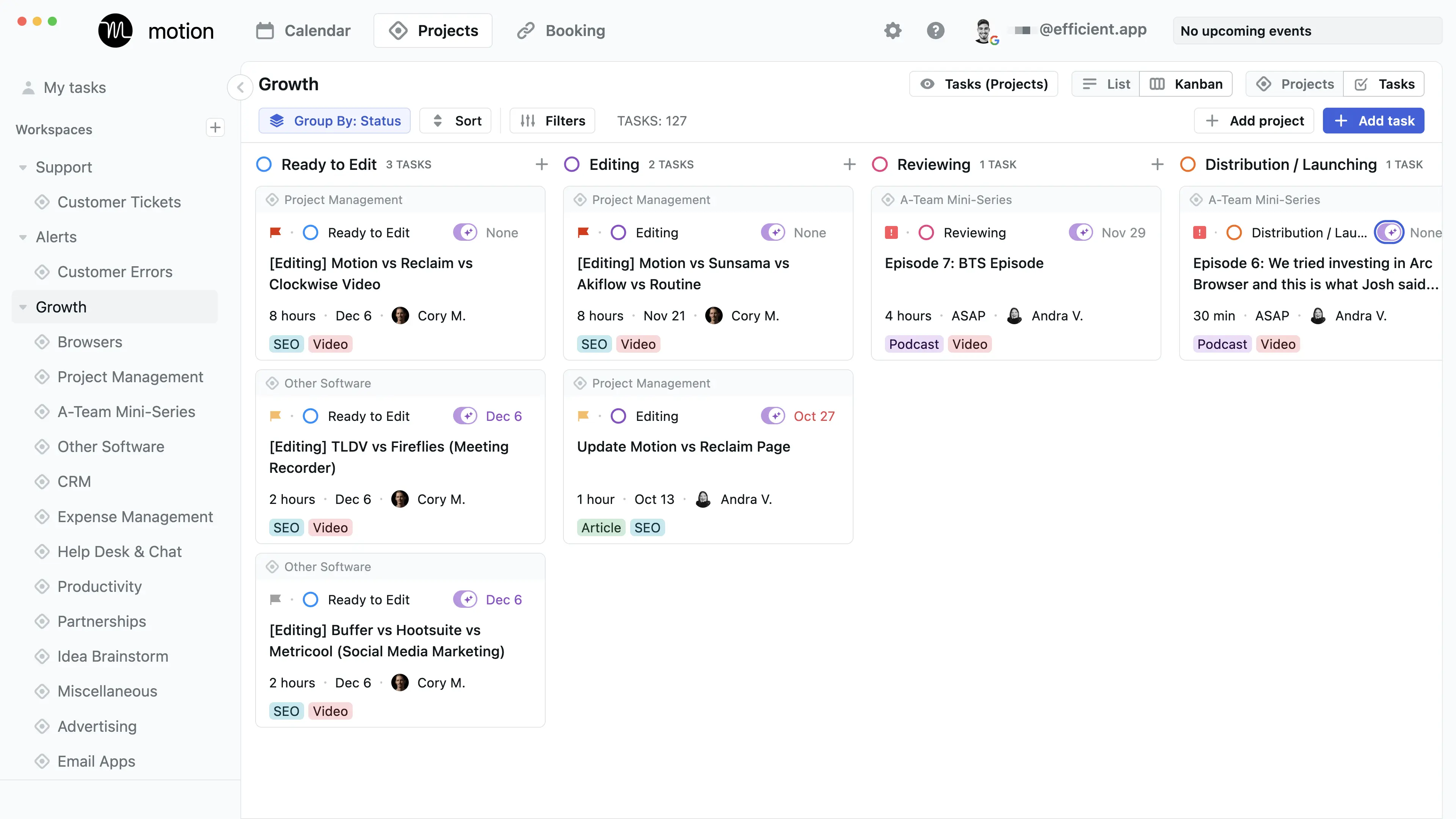
We use it to manage our entire YouTube production process, from scripting and filming to editing, reviewing, and distributing.
Recently, Motion has become more of an all-in-one tool. On top of being a calendar and project management tool, you can also store all of your notes and documentation in the app via their AI Docs and meeting recorder. This is especially helpful as you can tie meeting notes to projects, and when asking the Motion AI Assistant it has full context on projects, discussions, and notes.
And they didn't just tack on these features either... their meeting recorder is one of the best we've used (for instance, it creates tasks automatically at the end of each call, allowing you to assign it to team members directly).
So if you want a project management tool that will help your team just focus on getting work done (instead of babysitting your project management tool), give it a shot.
Pros and Cons
Pros
- Only calendar-first project management tool on the market
- Automatically schedules tasks directly on your calendar using AI
- Takes your entire schedule (meetings + work) into account
- Has most traditional project management features (gantt charts, kanban views)
Cons
- Not ideal if you don’t want AI automatically managing your schedule
- The interface can feel cluttered
- Minimal reporting & dashboards
- Not for enterprises
Key Features
Project Management
Motion has all your traditional project management capabilities including kanban, gantt charts, and list views. But on top of that, they also have a calendar at the core that schedules tasks from your projects onto your calendar. No other tool fully integrates at this level.
Calendar
Motion is the only project management tool on the market built with a calendar at the core. We use it as a full replacement for Google Calendar in our day to day (on top of using it for project management). Motion is truly one of the best calendar apps on the market if you're looking for something powerful.
AI Auto-Scheduling
Managing your workload is tiring, we experienced it ourselves every time we had to rearrange our tasks and priorities when using Asana. That's why daily planner apps came on the market, allowing you to pull in tasks from other project management tools and plan them on your calendar.
But Motion chose not to integrate with daily planner apps, and instead become one of the best daily planning apps themselves and built powerful project management features on top (while also using AI to automatically create your schedule for you like an assistant would). So what does this mean?
Didn't get something done? No worries, Motion will reschedule it for you based on the priority on your calendar. At risk of missing a deadline? Motion will warn you and you can fix it with a few clicks. Want to push back the deadline of a bunch of projects? Tell their AI Chat and it'll do it for you.
You can even forward emails into Motion and it will automatically create a task and schedule it on your calendar.
Workflow Templates
Workflow Templates in Motion are reusable project templates that define exactly how your work gets done from start to finish. They include your roles, stages, tasks, and key details so every project follows the same structured process.
Once set up, Motion uses the template to automatically schedule everything on your team's calendars and adjust timelines when things change. This makes starting projects incredibly easy & fast!
AI Docs
Motion’s AI Docs are great for keeping processes and notes right inside your projects, perfect if you don’t already have a knowledge base software in place. That said, don't expect it to be as powerful as Notion or Slite. Motion AI docs are more suitable for basic documentation and notes.
The best part of using Motion Docs for all your notes is that you can quickly tag projects and tasks within the docs itself. And when searching across your projects with Motion's AI Assistant, you get a full picture of project updates (it takes into account your projects, docs, and even meeting notes so when you ask for an update, it can truly give you an accurate picture of what happened).
But as a heads up, when we really want to do serious writing (e.g. scripting or a full software review), we find ourselves opening Motion within Dia or ChatGPT Atlas (our browsers) because using their sidebar chat assistant is faster for writing in our tone, brainstorming, and doing research.
Meeting Recorder
We love Motion's Meeting Recorder, and if you're already using Motion for your projects, there's really no reason to use another one. It automatically joins your meetings (you just have to let it in), records video and text, and then uses AI to organize the notes for you. It also automatically creates tasks from the meeting notes and all you need to do is approve or deny them.
Pricing
- Pro AI: $19/seat/mo (billed annually). Best for professionals and small teams who want AI-powered project management, scheduling, and task planning.
- Business AI: $29/seat/mo (billed annually). Best for teams that need advanced reporting, capacity planning, time tracking, permissions, and centralized billing.
- AI Credits: Included with each plan. Pro AI includes 7,500 credits/seat/month and Business AI includes 15,000 credits/seat/month.


 MotionRecommended
 GoHighLevelRecommended