Superhuman just announced the launch of Team Comments & Shared Conversations!
We've been using it for several weeks now and we're finding so many unintended benefits: less fatigue replying to emails, quicker team collaboration, and higher impact replies as a team across the board.
If you're an existing Superhuman user, all of the new features you're going to read about are available at no extra cost, so you can go ahead and press CMD + K, check for updates, and then just start using it as soon as it rolls out to your account.
If you are new to Superhuman or want to upgrade your Superhuman experience further by getting your team onboard, make sure to use/share this link to get a free 1 month trial.
How It Works
How It WorksThere are two components to this new feature.
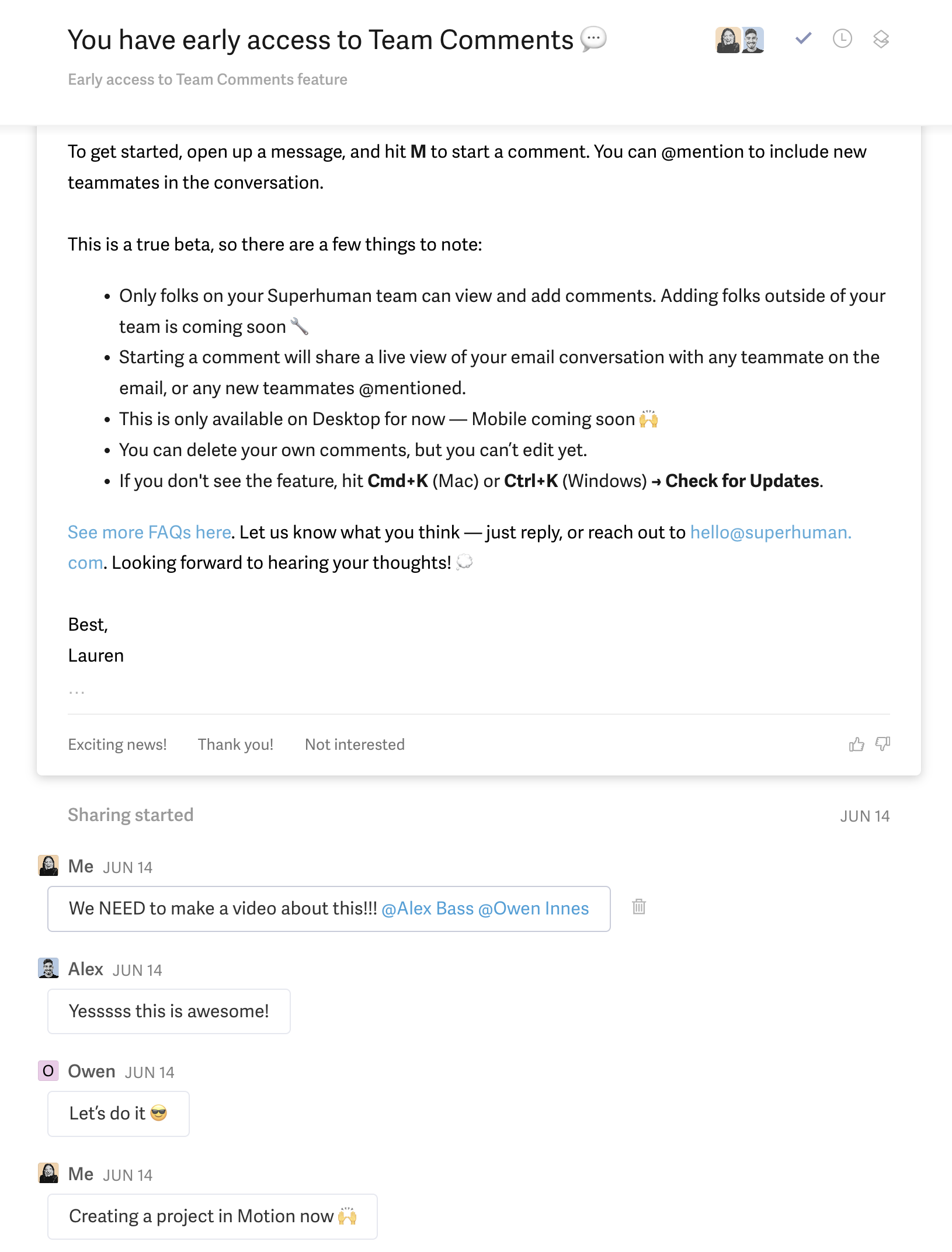
Superhuman Team Comments allow you to collaborate with others within each email thread.
Team Comments
Team CommentsFirst, you have the ability to collaborate with internal team members using the "Team Comments" feature. Simply hit [m] for mention on your keyboard, and @mention any team members that you want to have access. Upon sending the message (CMD + Enter), you'll be prompted to share the conversation with them.
Upon jumping into your inbox, you'll see the share icon indicating that the conversation is, well shared. And every time a new comment is added, the email thread is then bumped to the top of your inbox for you to see.
Essentially, you now have the ability to chat within your inbox, keeping the conversation about emails, on email (instead of moving them over to Slack).
Multiplayer Features
Multiplayer Features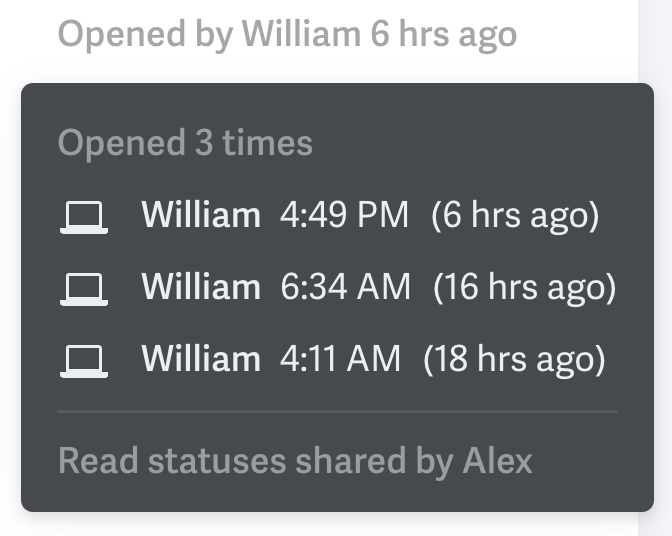
Team Read Statuses
One final perk of having your entire team using Superhuman is that you can also take advantage of the other multiplayer features. Our favoriutes include:
- Team Read Statuses: You can stop asking your team "Did so-and-so open that email?" because you can see for yourself (I love this feature)!
- Team Reply: You can see when someone else on your team is replying to an email.
- Team Snippets: AKA Shared email templates. We don't use this one often but that's because we also use a Help Desk where we do keep a ton of email templates, so if you're not using a Help Desk then this is super handy).
Five Benefits
Five BenefitsOkay, okay, we hear you—a new feature is a new feature, but what are practical applications of Shared Conversations & Team Comments? Here are 5 benefits we know you'll enjoy with your team (because we've experienced them in even just our first few weeks of using them):
1. Deeper Team Collaboration
1. Deeper Team CollaborationHow many times have you wanted to put your 2 cents in before your team member replies to an email? Heck, maybe you even sent them a message in Slack hoping they see it before they reply, but alas, they reply with "oops, just seeing your note in Slack now".
Or what about when you want to ask a team member for some quick thoughts, but you're completely drained by the idea of screenshotting the email thread for context and messaging them in Slack (especially on mobile), so you decide to just wing it instead? That sounds like me at-least a few times per week prior to the launch of these features 😅
With Team Comments, we're finding that we're communicating more with one another and actually checking in with one another before responding.
The result? Our replies are more fully-featured, covering now in a single email what would take 3 or more before—saving everyone time in the process.
Not to mention less cases of the dreaded double-send "Just adding a quick note that I forgot on to the prior email, please don't forget to read the first one!".
2. Responsibility Equally Distributed
2. Responsibility Equally DistributedYou know when you get an email with your team CC'd but you're not sure what you should say back? But because your name just so happens to be in the "to" field, you're the lucky winner and everyone is assuming you're the who will bare the burden of responding.
With Team Comments, you can far more easily pull in the appropriate team members for input, whether its someone from a totally different department or someone who is a part of the email thread.
If you're someone already CC'd on the email, do your teammate a favor and leave a quick comment that will help them out (or even just offer them some words of support because you know that feeling all too well).
We actually find ourselves drafting partial responses for one another in the comments section just to help get the ball rolling at times. The person responding can simply copy/paste the comment into the email reply box and send it off with final touches.
So instead of the responsibility of responding falling on one person, Team Comments makes it more of a shared responsibility.
3. More Clarity
3. More ClarityWhat about when an email is addressed to you and another team member, and the (convenient) way you happened to read it made it feel like it was more addressed not to you but them? Well this just in!
The email is going to sit on read for a week because they did the same exact thing, assuming the ball was in your court instead (oh the stories we tell ourselves to push off work onto others 😅).
Then after some time you realize a mistake was made when working on Inbox Zero and you casually ask the other person "You're going to respond to XYZ person right…?" "erm, wait I thought you were going to…"
This pain-point has been totally eliminated since we started using this Superhuman collaboration feature—Now we can just @ comment one another and say "Hey, I'm actually dreading responding to this, any chance you can take this one?" Or "I'll respond and say 'xyz', anything to add?"
Until having these features, we didn't even realize how much fatigue we were experiencing every day from even just the smallest level of uncertainty that we had surrounding who was going to be running with an email that was addressed to multiple team members.
4. Higher Business Impact
4. Higher Business ImpactThis is especially helpful for those of you who aren't using a help desk already—it's a great entry point for sales and customer support teams.
If you're trying to move a project forward or close a sales deal, you can now have your entire team's help right at your fingertips.
Is someone else on the team more equipped to take over an email thread? Tag-teaming them in or quickly asking for help via Team Comments has been such an unlock to ensure nothing is missed and each and every email sent is high impact 🤜🤛
And we know first hand that more collaboration on sales emails directly lead to higher close rates and even higher revenue.
Especially if you're a small team like us, it's easy to get in your head, and just having another person giving an encouraging nudge for you to "2x your price" is exactly what you need to get just that.
5. Fun Team Vibes
5. Fun Team VibesTeam comments has not only made us more efficient when it comes to collaboration, but it's been fun getting more insight into ways we can help one another.
Almost every message from Alex that I've gotten since getting these features have started with "OMG I am so glad I can comment on here about this email", and I can FEEL his excitement through my screen.
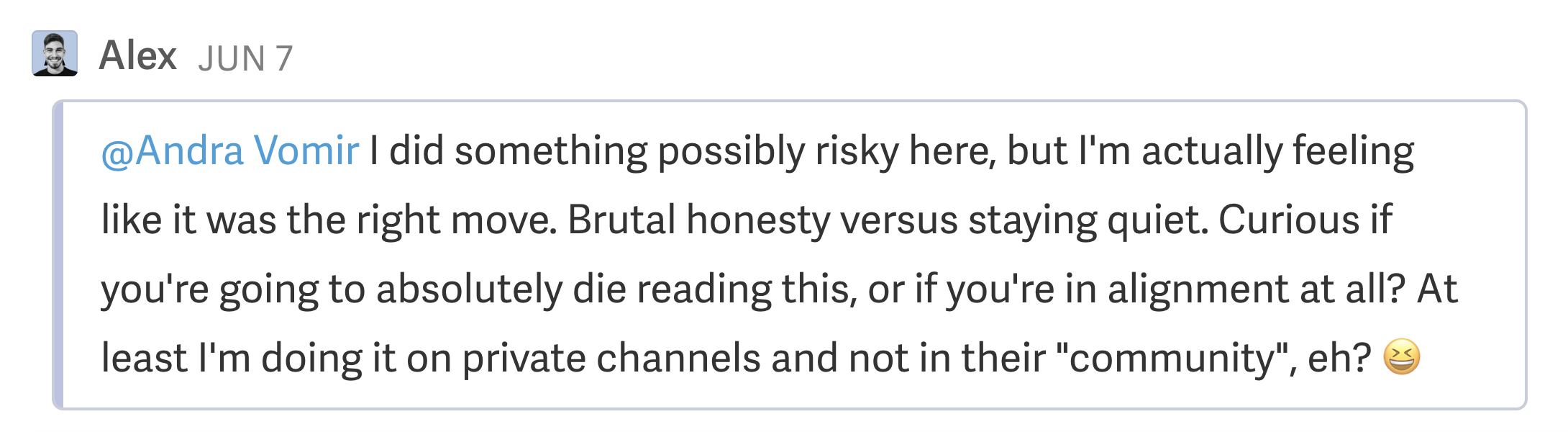
Real-life caption from our shared conversations 😂
The truth of the matter is that bringing each other into more conversations with bite size pieces has just added more enjoyment to email throughout the week.
Efficient App Exclusive
Efficient App ExclusiveTry Superhuman For 1 Month Free!
If you're even the slightest bit unsure of whether or not Superhuman will actually make your team more productive, now is the perfect time to find out. For a limited time, try Superhuman for free for 30 days!
And while you're at it, share the snippet before to get your team onboard to realize the full power of these new features.
Hey all, Superhuman just released team comments (watch video), found this link where we can all try it for 1 month for free. Let's give it a shot together?
Sign-up here: efficient.link/r/superhuman
[Your Name]