AI Prompts To Build Business Systems

Blog Post
Deals7

Building Your Business Systems

Building Your Business Systems

How I Create Business Systems as a Founder

How I Create Business Systems as a Founder

Using this step-by-step guide, you will be able to create systems in your business, without it feeling like a dreadful chore.

This guide includes:

  • Exact AI prompts developed by us to help you get clarity on your system
  • Step-by-step instructions to quickly create business systems

Let's get started.
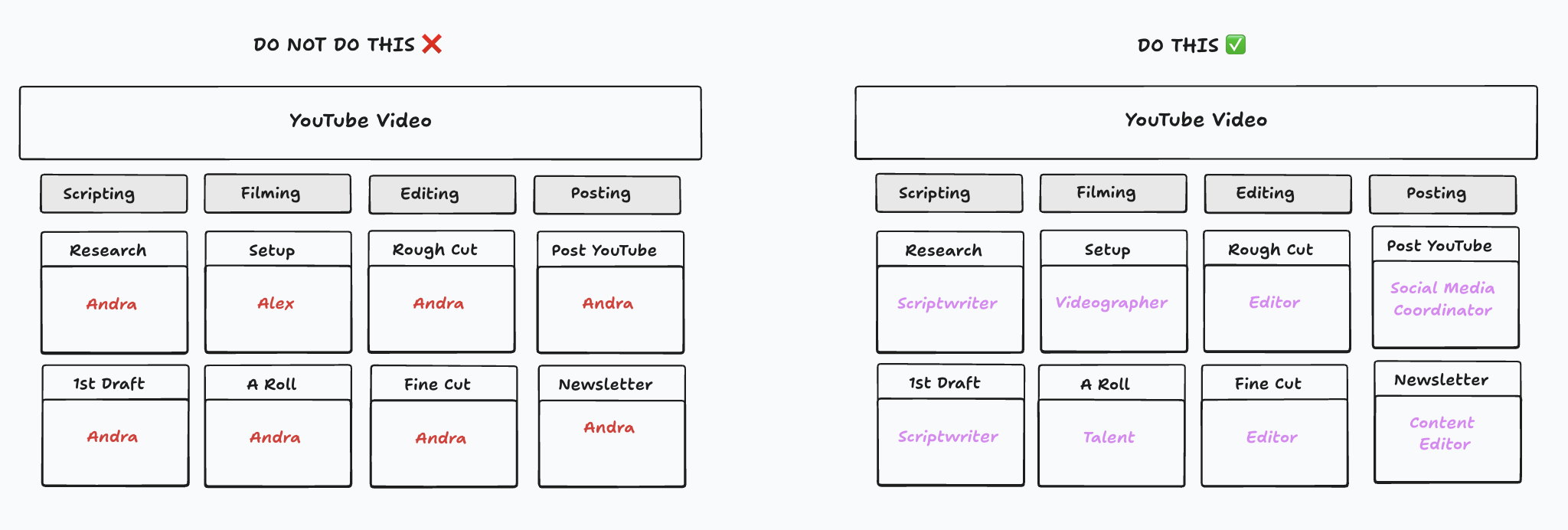
Process-systems-right-vs-wrong

Instructions

Instructions

Use your AI of choice for these prompts. We prefer ChatGPT or Claude, but either will get you a good outcome.

Step 1: Select Highest Impact Process

Step 1: Select Highest Impact Process

While it might feel tempting to pick something fast and visually appealing, that's not going to move the needle.

The most important part of your business to systemize are going to be one of these three things:

  • Revenue generating - it brings in money, like your sales process
  • Time intensive - it takes a lot of mental bandwidth, like onboarding a new customer
  • Improves Quality - It helps improve the quality of the product or service you deliver

These are the processes that, when you don't have systems for them, force you to be involved. Once these run without you, you're free.

First AI Prompt

First AI Prompt

Identify the most business-critical processes.

Fill in the context section below and copy and paste the rest of the prompt.

You are my Business Systems Copilot.

Ask me ONE question at a time. Do not dump a full plan. Keep answers short and structured. Wait for me to reply "approve" before moving to the next step. If you need assumptions, ask me first. Respond "got it".

Context: [fill in section below]
Industry:
Business type:
Website:
Primary revenue driver:
Team size:
Task:

List the top 5 highest-leverage, end-to-end business systems (not sub-steps) for a business like mine that fit into these categories:

Revenue Generating: directly produces revenue (eg: sales process)
Time Intensive: consumes significant owner or team bandwidth (eg. customer onboarding)
Improves Quality: improves service delivery and customer outcomes

Also write: Why it is critical and what breaks if it fails, then ask me: Which ONE process should we systemize first? Once, I answer, ask me to paste in the next prompt. Do not ask more questions.

Step 2: Identify Major Milestones

Step 2: Identify Major Milestones

Once you've selected a process (e.g. Sales), now you need to major milestones your business needs to hit in order to hit these milestones.

Process Step 1

Second AI Prompt

Second AI Prompt

Define Major Milestones For Process

Fill in the process you choose and copy and paste the rest of the prompt.

We are systemizing this process: [fill me in]

Propose the major milestones that the process must hit to be completed for a business like mine. Think of Milestones as Pipeline Stages.

For each milestone, provide: Milestone name

Then ask me to reply: "APPROVE" if the milestones look right, or tell you what to add/remove/rename

Then ask me to use voice mode to through each task that needs to be completed under each milestone in my business. Offer me the option to have suggested tasks, acknowledging they will need to be tweaked to my business needs.

Step 3: Tasks

Step 3: Tasks

We're not quite ready to delegate just yet, and this third step is gonna reveal the exact details that go into achieving each milestone in your process.

You want to identify the tasks required to complete each milestone.

This is where we get specific to your business. AI can suggest ideas, but the real value comes from you walking through what actually happens inside your company.

These tasks are often nuanced and unique, so open voice mode and talk through every step required to complete each milestone. Let AI capture, structure, and organize them for you.

Process Step 2

Third AI Prompt

Third AI Prompt
Define Tasks For Process

I will now dictate to you the major tasks that are needed to complete each milestone in our business. Take note of each task and organize them for me under each milestone name.

Turn on voice mode on AI and talk through each major task your team needs to complete in order hit each major milestone.

This is the level of detail you are aiming for at this step:

Process Step 3

Even if you've gotten up to just a step, you've made huge progress in making a business system that can run without you!!

Step 4: Detailed Task Instructions

Step 4: Detailed Task Instructions

By doing the next step I'm about to teach you, you can confidently delegate any task no matter how difficult to a team member, or in some cases AI.

Process Step 4

Take a look at each task, and you want to write out EXACTLY how to do each task.

Now this whole process can seem very daunting, here is how we do it in our company so that it doesn't feel like homework:

  1. Use an AI Notetaker, we use Granola.
  2. Granola is more stable than just using AI on voice mode for longer recordings. It's also better for searching notes, automatic formatting, and overall more reliable for something like this.
  3. Next time you need to do the task, turn on Granola and talk out loud through how you do each step. Talk about every little detail you're doing so it captures it in the transcription.
  4. End the recording and Granola will automatically format notes for you
Granola Notes

Bonus: You can record a video of yourself going through the process to share with your team. Our favorite tool to do this is Supercut.

Step 5: Roles

Step 5: Roles

Now at this point, you're really excited because you've got an entire process mapped out from start to finish, and a workflow that anyone on your team could hop in and carry out.

But there's a tiny mistake most teams make at this point, that's gonna make it a lot harder to scale later.

Process-systems-right-vs-wrong

What most teams do is assign tasks directly to people. If there are two people, the work usually just gets split roughly 50/50. The problem is that you are just piling more work onto each person, instead of clearly defining the roles being played and making it obvious where delegation or future hires are actually needed.

Instead, you want to assign ROLES to tasks, not people.

For example, in our YouTube process we define clear roles like Scriptwriter, Designer, Talent, Editor, and Project Manager. Each task belongs to a role first, and only then gets assigned to a person.

This immediately shows you how many roles you are actually playing and makes delegation obvious, because you can assign entire groups of tasks to a new hire on day 1.

Step 6: Team Adoption

Step 6: Team Adoption

Now that you have your process, making sure your team is actually using it is a whole other challenge. Most teams document their processes in tools like Notion and assume their team will reference them when needed.

But what actually ends up happening is they go unused, making all your hard work potentially useless.

If your team has to open a separate tool just to figure out what to do next, it creates friction.

The rule is simple: processes only work if they live where the work happens.

→ Using a project management tool for your process makes the most sense if you're an agency, or do creative or project based work. Our Project Management recommendations.

→ Now if your business is mainly sales-driven, you'll want to be able to keep track of your customers and exactly where they are in their customer journey, and using a CRM for this makes the most sense. Our CRM recommendations.

Review our video of what it looks like to place your systems where your team already works.

Business Systems Mapped

Business Systems Mapped

Congrats! Here's what you just did.

You took the processes that only existed in your head, the ones keeping you trapped, and you turned them into systems anyone can run.

Which means the next time someone asks "what do I do here?" the answer isn't in your head. It's in the system.

And remember that 7-day vacation we talked about at the beginning? Well you just made it possible. Your team now knows exactly what to do, in what order, without texting you once.